Build you Computer Vision Application – Part II: Data preperation and Annotation

This is the second post of the series were we build a road sign and pothole detection application. We will be using multiple methods through out this series which includes computer vision techniques using opencv, annotating images using labelImg, mastering Tensorflow object detection API, Training objection detection using transfer learning, Object detection on video etc. This series will be split across 8 posts.

1. Introduction to object detection

2. Data set preperation and annotation Using labelImg ( This Post )

3. Building your road pothole detector from scratch using Image pyramids and Sliding window

4. Building your road pothole detector using RCNN

5. Building your road pothole detector using YOLO

6. Building you road pothole detector using Tensorflow object detection API

7. Building your video analytics application for detecting potholes

8. Deploying your video analytics application for detection of potholes

In this post we will talk about the data annotation and data preperation stage of the process

Data Sets for Object Detection

In the last post we got introduced to Object detection tasks. We also briefly discovered some of the leading approaches for object detection. When discussing about model training approaches you would have identified that the data sets for object detection are not exactly like any data sets which you would have encountered in your normal machine learning lifecycle. Object detection data sets have two sets of labels, one is the class label for the objects and the second is the bounding boxes for each of the object. The bounding boxes contains the (x ,y )cordinates of the four corners where the object is present. There are different publicly available data sets for object detection tasks. The coco dataset being one of the most popular ones

For the specific task which we are dealing with i.e. Pothole detection, we might not have annotated data sets. Therefore we will have to create that dataset which includes the class labels and the bounding boxes.

This post will talk about downloading data for pothole detection, creating the class labels and bounding boxes for the data and then extracting the necessary information from the annotation task so that we can use it for training the data set. In this exercise we will use a tool called labelIMG which will be used for annotating the dataset.

Installing and Configuraing labelIMG

LabelImg is a free, open source tool for graphically labeling images. It’s written in Python and is an easy, free way to label images for your object detection projects.

Installation of labelImg is quite simple and it can be installed using pip command for python3 as shown below.

pip3 install labelImg

To know more about the installation and configuration you can refer the following link.

Lets now look at how we collect data and annotate them using labelImg

Raw Data Creation

The first task is to create the data set required for training the model and also annotation. The images which are used in this series are collected from google images.
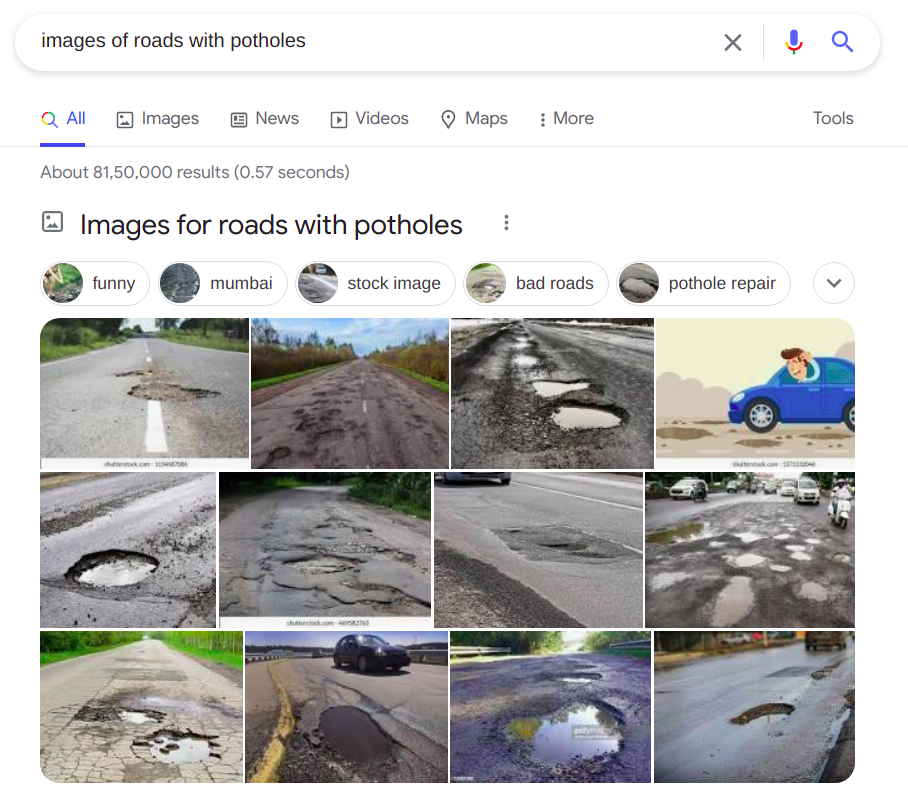
You can download as many images as you want for this task. Always remember to get some good variety of images with different type of objects which you are likely to see on roads.

Annotation of the images

The annotation of the images are done using labelImg application.

To activate the labelImg application, just invoke the labelImg command on the terminal as follows

Figure 1 : Activating labelIMG on terminal

Once this is activated a front end will be opened as follows

Figure 2 : Front end of labelIMg

We start with selecting the directory where the files are stored. We select the directory using the open Dir icon. Once we select the Open Dir icon we will get all the images in the direcotry listed in the application as follows

Figure 3 : Files list

We navigate one image at a time, and then draw the bounding boxes of the objects we want to annotate. Once the bounding boxes are drawn we can input the label we want to give to the image. Once the bounding boxes are selected and annotation are done, the image can be saved as an xml file.

Figure 4 : Annotating the images

Let us open one fo the xml files and look at the information contained in the xml file. The xml file contains the bounding boxes and the class information of the images as shown below.

Figure 5 : xml file information

We have now annotated all the files with the class names and bounding boxes. Let us now extract the information from the xml files into a csv files

Extracting the Information from annotation

In this section we will extract all the annotation information into a pandas data frame and later on to csv file. We will start with importing all the library files we require.

import os
import glob
import pandas as pd
import xml.etree.ElementTree as ET

Next let us list down all the ‘xml’files in the folder using glob() method. We have to give the path of the folder where all the xml files are stored.

# Define the path
path = 'data'
# Get the list of all files in the folder
allFiles = glob.glob(path + '/*.xml')
allFiles
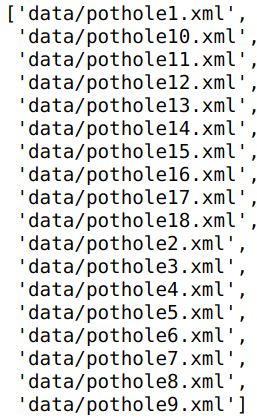
Figure 6 : List of all xml files

Next we need to parse through the 'xml'files and then extract the information from the file. We will use the 'ElementTree' method in the xml package to parse through the folder and then get the relevant information.

# Get one of the files
xml_file = allFiles[0]
# Parse xml file and get the root
tree = ET.parse(xml_file)
root = tree.getroot()
# For each element of the root print the tag and the attribute
for child in root:
    print(child.tag, child.attrib)
Figure 7 : Extracted elements from xml file

In line 13 -14 we get the 'tree' object and the get the 'root' of the xml file. The root contains all the elements as children. Lines 16-17 we go through each of the elements of the xml file and then extract the tags and the attribute of the element. We can see the major elements printed. If we look at the raw xml file we can see all these elements listed there.

As seen in the output, elements named as ‘object’ are the bounding boxes we annotated in the earlier step. These objects contains the bounding box information we need. Before we extract the bounding box information, let us look at some basic methods to extract any information from the root.

filename = root.find('filename').text
filename
Output : Name of the xml file

In line 18 we extract the filename of this xml file using the root.find() method. We need to specify which element we want to look into, which in our case is the text called ‘filename‘ as that is how it is represented in the xml file. To get the filename as a string we give the .text extension.

Let us now get the width and height of the image. We can see from the xml file that this is contained in the element, 'size'

# Extract width and height of the image
width = int(root.find('size').find('width').text)
height = int(root.find('size').find('height').text)
print(width,height)

In lines 21-22 use the find() method to extract width and height and then convert the text into integer.

Our next task is to extract the class names and the bounding box elements. These are contained in each of the 'object' elements under the name 'bndbox'. The class label of the image is contained inside this element under the element name 'name' and the bounding boxes are with the element names 'xmin','ymin','xmax','ymax'. Let us look at one of the sample object elements.

# Get all the 'object' elements
members = root.findall('object')
# Take the first one to extract the information as an example
member = members[0]
print(member.find('name').text)
print(member.find('bndbox').find('xmin').text)
Class label and x min coordinate of the object

From lines 28-29 we can see the class name and one of the bounding box values extracted using the find() method as seen before

Now that we have seen all the moving parts , let us encapsulate all these into a function and extract all the information into a pandas dataframe. This code is taken from this tutorial link for object detection.

def xml_to_pd(path):
    """Iterates through all .xml files (generated by labelImg) in a given directory and combines
    them in a single Pandas dataframe.

    Parameters:
    ----------
    path : str
        The path containing the .xml files
    Returns
    -------
    Pandas DataFrame
        The produced dataframe
    """

    xml_list = []
    # List down all the files within the path
    for xml_file in glob.glob(path + '/*.xml'):
        # Get the tree and the root of the xml files
        tree = ET.parse(xml_file)
        root = tree.getroot()
        # Get the filename, width and height from the respective elements
        filename = root.find('filename').text
        width = int(root.find('size').find('width').text)
        height = int(root.find('size').find('height').text)
        # Extract the class names and the bounding boxes of the classes
        for member in root.findall('object'):
            bndbox = member.find('bndbox')
            value = (filename,
                     width,
                     height,
                     member.find('name').text,
                     int(bndbox.find('xmin').text),
                     int(bndbox.find('ymin').text),
                     int(bndbox.find('xmax').text),
                     int(bndbox.find('ymax').text),
                     )
            xml_list.append(value)
    # Consolidate all the information into a data frame
    column_name = ['filename', 'width', 'height',
                   'class', 'xmin', 'ymin', 'xmax', 'ymax']
    xml_df = pd.DataFrame(xml_list, columns=column_name)
    return xml_df

Let us now extract the information of all the xml files and then convert it into a pandas data frame.

pothole_df = xml_to_pd(path)
pothole_df
Pandas dataframe containing the bounding box information

Finally let us save this label information in a csv file as we will use it later for training our object detection elements.

pothole_df.to_csv('pothole_df.csv',index=False)

Having prepared the data set, let us now look at the next process which is to prepare the train and test sets.

Preparing the Training and test sets

The process of building the train images, involves multiple processes. Let us look at each of them

Mixing positive and negative images

We just annotated the images with potholes along with its bounding boxes. We will be using those images for building the positive classes for the object detector. Along with the positive classes, we also need to get some negative examples. For negative examples we will take some examples of roads without potholes. We will keep both the positive and negative examples, in seperate folders and then use them for building the training data. We will also use some augmentation techniques to increase the training data. Let us dive deeper with the preperation of the training data set.

import os
import glob
import pandas as pd
import io
import cv2
from skimage import feature
import skimage
from sklearn.feature_extraction.image import extract_patches_2d
from sklearn.svm import SVC
import numpy as np
import argparse
import pickle
import matplotlib.pyplot as plt
from random import sample
%matplotlib inline

We will start by importing all the required packages. Next let us look at the positive examples, which are the images with potholes that were downloaded in the last post.

# Positive Images
path = 'data'
allFiles = glob.glob(path + '/*.jpeg')
print(len(allFiles))
allFiles

The above figure lists the images which were downloaded and annotated earlier. You are free to download any number of images. The more the better, as the classifier will perform well with more examples. Later on we will see how we augment these images with different augmentation techniques to increase the number of positive images. However whatever the type of augmentation techniques we use, it would still not be a substitute for variety of positive images.

Let us now look at the negative classes of images. For negative classes we will be using images of normal roads. Let us look at some of the examples of the negative images

# Negative images
path = 'data/Annotated'
roadFiles = glob.glob(path + '/*.jpeg')
for imgPath in roadFiles[:2]:
    img = cv2.imread(imgPath)
    plt.imshow(img)
    plt.show()

These negative images were downloaded in the same way the positive images were also downloaded i.e. from Google images. Again more the examples the better. However what needs to be noted is to maintain a fair balance between the positive and negative examples.

Extracting HOG features from the images

Once the positive and negative images are collected, its now the turn to extract features from the images. There a different methods to extract features from images. The method we will be using is the HOG features. HOG stands for ‘Histogram of Oriented Gradients’. Let us quickly take a quick tour of the HOG method.

Histogram of Oriented Gradients ( HOG )

HOG descriptors are used to represent the structure and appearence of the object in an image. This algorithm works on the principle that an object in an image can be modeled by the distribution of intensity gradients within regions where the object reside. The implementation of this method entails dividing an image into small cells and then for each cell computing the histogram of oriented gradients for pixels within each cell. The histograms accross multiple cells are accumulated to form the feature vector. The dimensionality of these feature vectors depend on the dimension of the image and the parameters of the HOG descriptor like pixels_per_cell, cells_per_block and orientations. You can refer to the following link to learn more about HOG descriptors

Let us now implement the methods for extracting the features and saving the data set on to disk. As a first step we will read the positive images which are the pothole images. We will read the data from the information in the csv file we created earlier. We will take the information and then extract only those patches which contain potholes. Let us first look at the csv file containing the data.

# Reading the csv file
pothole_df = pd.read_csv('pothole_df.csv')
pothole_df

As seen from the output, the data set extracted here contains only 65 rows which comprises of all the classes including vegetation, signs, potholes etc. From this csv file, we will extract only the pothole data. The number of images have been kept intentionally low, so that we can also explore some augmentation techniques so as to enhance the data set. When you embark on custom solutions where data sets are not available you will have to resort to different augmentation techniques to improve your results.

Let us now exlore the dimensions of the set of potholes images we have, and then look at the average width and height of the bounding boxes. This, as we will see later, is to define the width of the window for the pyramid and sliding window techniques. We will use pothole_df data frame to find the dimensions.

# Find the mean of the x dim and y dimensions of the pothole class
xdim = np.mean(pothole_df[pothole_df['class']=='pothole']['xmax'] - pothole_df[pothole_df['class']=='pothole']['xmin'])
ydim = np.mean(pothole_df[pothole_df['class']=='pothole']['ymax'] - pothole_df[pothole_df['class']=='pothole']['ymin'])
print(xdim,ydim)

We will round off the dimensions to [80,40] which we will adopt as the window dimensions for the pyramid and sliding window methods.

# We will take the windows dimension as these dimensions rounded off
winDim = [80,40]

Once the images are read from the excel sheet, its time to extract the patches of potholes which we require, from the images. There are two functions which we require to extract the features which we want. The first one is to extract the hog features from the image. Let us look at that function first.

# Defining the hog structure
def hogFeatures(image,orientations,pixelsPerCell,cellsPerBlock,normalize=True):
    # Extracting the hog features from the image
    feat = feature.hog(image, orientations=orientations, pixels_per_cell=pixelsPerCell,cells_per_block = cellsPerBlock, transform_sqrt = normalize, block_norm="L1")
    feat[feat < 0] = 0
    return feat

The inputs to this function are the images from which we want to extract the features, the orientations, pixels per cell, cells per block and the normalize flag.

In line 40, we extract the features using feature.hog() method from the image. We provide all our parameters to the method to get the features. Once we extract the features, we remove all the negative pixels by making them as 0 in line 41. The extracted features are then returned by the function in the last line.

The next method we will see is the one to augment our images. There are different types of augmentation techniques which are useful. We will be using techniques like flipping ( both horizontal and vertical flipping) and then rotating them to diffrent angles. Let us see the function to augment our images.

# Defining the function for image augmentation
def imgAug(roi,ht,wd,extensive=True):
    # Initialise the empty list to store images
    rois = []
    # resize the ROI to the desired size
    roi = cv2.resize(roi, (ht,wd), interpolation=cv2.INTER_AREA)
    # Append the different images
    rois.append(roi)
    # Augment the image by flipping both horizontally and vertically
    rois.append(cv2.flip(roi, 1))
    if extensive:        
        rois.append(cv2.flip(roi, 0))
        rois.append(cv2.rotate(roi, cv2.ROTATE_90_CLOCKWISE))
        rois.append(cv2.rotate(roi, cv2.ROTATE_90_COUNTERCLOCKWISE))
        # Rotate to other angles
        for rot in [15,45,60,75,85]:
            # Get the rotation matrix
            rotMatrix = cv2.getRotationMatrix2D((ht/2,wd/2),rot,1)
            # ROtate the matrix using the rotation matrix
            rois.append(cv2.warpAffine(roi,rotMatrix,(ht,wd)))         
    return rois

The inputs to the function are the patch of image we want to augment along with the dimensions we want to resize the image. We also define a parameter called extensive to check if we want to do all the methods or just a simple horizontal flipping.

We first initialise a list to store all the augmented images in line 46 and then we go ahead and resize the image in line 48. The resized image is then appended to the list in line 50.

The first augmentation technique is implemented in the line 52 where in we flip it horizontally. The parameter 1 stands for flipping along the y axis.

Now if we want to go for extensive augmentation, we proceed with other types of augmentation. The first of these methods are the vertical flip, clockwise rotation and anticlockwise rotations as shown in lines 54-56.

Then we do 5 different rotations based on the list of angles we have specified in line 58. You can try out with more angles of your choice. To do the rotation we first have to define a rotation matrix which is centred along the centre of the image as shown in line 60. We also provide the centre of the image the angle by which we have to rotate and the scaling function as input parameters . We have chosen a scale of 1. You can try different scaling parameters and then see its effect on the image.

Once the rotation matrix is defined, the image is rotated using the method cv2.warpAffine() in line 62. Here we give the patch of image, the rotation matrix and the dimensions of the image as inputs.

We finally append all the augmented images into the list and then return the rois.

The overall process to extract the features consists of two functions as given below.

# Functions to extract the bounding boxes and the hog features
def roiExtractor(row,path):
    img = cv2.imread(path + row['filename'])    
    # Get the bounding box elements
    bb = [int(row['xmin']),int(row['ymin']),int(row['xmax']),int(row['ymax'])]
    # Crop the image
    roi = img[bb[1]:bb[3], bb[0]:bb[2]]
    # Get the list of augmented images
    rois = imgAug(roi,80,40)
    return rois

def featExtractor(rois,data,labels,positive=True):
    for roi in rois:
        # Extract hog features
        feat = hogFeatures(roi,orientations,pixelsPerCell,cellsPerBlock,normalize=True)
        # Append data and labels
        data.append(feat)
        labels.append(int(1))        
    return data,labels

The first of these functions is to read an image based on the information from the csv file and then crop the image based on the bounding box coordinates as shown in lines 66-70. Finally in line 72, we do the augmetation of the cropped image.

The second function takes the augmented images derived using the first function and extract the HOG features from each of them. We append the features in the list data and the labels are appended to 1 as these are the positive examples.

Having seen all the functions let us now see the process of preparing the data sets.

# Extracting pothole patches from the data
path = 'data/'
# Parameters for extracting HOG features
orientations=12
pixelsPerCell=(4, 4)
cellsPerBlock=(2, 2)
# Empty lists to store data and labels
data = []
labels = []
# Looping through the excel sheet rows
for idx, row in pothole_df.iterrows():
    if row['class'] == 'pothole':
        rois = roiExtractor(row,path)
        data,labels = featExtractor(rois,data,labels)

The process is quite straighforward. In lines 86-88, we define the parameters for HOG feature extraction. Then we initialise two empty lists in lines 90-91 to store data and the labels. We then loop through each of the rows of the pothole data frame and the extract the rois and features if the class of the row is ‘pothole’.

That was the positive examples we saw. Its now the turn of extracting features for the negative examples. Let us first list all the negative examples

# Listing all the negative examples
path = 'data/Annotated'
roadFiles = glob.glob(path + '/*.jpeg')
roadFiles
# Looping through the files
for row in roadFiles:
    # Read the image
    img = cv2.imread(row)
    # Extract patches
    patches = extract_patches_2d(img,(80,40),max_patches=10)
    # For each patch do the augmentation
    for patch in patches:        
        # Get the list of augmented images
        rois = imgAug(patch,80,40,False)
        # Extract the features using HOG        
        for roi in rois:
            feat = hogFeatures(roi,orientations,pixelsPerCell,cellsPerBlock,normalize=True)
            data.append(feat)
            labels.append(int(-1))

In the process for extracting negative examples , we first iterate through the files and then read each file. Since we dont have to crop a specific area within the image, we will adopt a different strategy to augment images. We extract certain patches of a fixed window size from the image. This is implemented through a method extract_patches_2d() in Sklearn. The dimension of the window size is based on the dimensions we fixed earlier. We also specify the number of patches we want to extract in line 106. For each of the patch we extract, we do only horizontal flip as it wouldnt make sense to do any other augmentation steps for the images of roads. We then extract the HOG features in line 113 like what we did for the positive examples. The labels for these examples are -1 as this is the negative image.

Having extracted features and the labels, we will now write the data to disk using h5py format.

import h5py
import numpy as np
# Define the output path
outputPath = 'data/pothole_features_all.hdf5'
# Create the database and write method
db = h5py.File(outputPath, "w")
dataset = db.create_dataset('pothole_features_all', (len(data), len(data[0]) + 1), dtype="float")
dataset[0:len(data)] = np.c_[labels, data]
db.close()

In this implementation we first define the outputPath and then create the database using the ‘write’ method. To create the dataset we use the create_dataset() method giving the name and the dimensions of the dataset. We increase the second dimenstion with +1 as we will be storing the label also in the same dataset. We finally store the dataset as numpy array where the labels and data are concatenated using the np.c_ method of numpy. After this step the new data base will get created in the specified path.

We can read the database using the h5py.File() method. Let us look at the name of the data set we earlier gave by taking the keys() of the database

# Read the h5py file
db = h5py.File(outputPath)
list(db.keys())
# Shape of the data
db["pothole_features_all"].shape

You can see that the shape of the data set we created. We had 730 examples of both the positive and negative examples . We can also see that we have 8209 features, which is a combination of label + the hog features of 8208.

That takes us to the end of the data preperation stage for building our object detector. In the next post we will take this data and build our object detector from scratch.

What Next ?

In the next post, we will explore different techniques to build our custom object detector. We will be covering the following topics in the next post

  1. Building a classifier using the training data
  2. Introduce the concept of Image pyramids and sliding windows
  3. Using Image pyramids and sliding windows to extract bouding boxes for your images
  4. Use non maxima suppression to eliminate overlap of bounding boxes.

We will be covering lot of ground in the next post. The next post will be published next week. To be notified of the next post please subscribe to this blog post .You can also subscribe to our Youtube channel for all the videos related to this series.

You can also access the code base for this series from the following git hub link

Do you want to Climb the Machine Learning Knowledge Pyramid ?

Knowledge acquisition is such a liberating experience. The more you invest in your knowledge enhacement, the more empowered you become. The best way to acquire knowledge is by practical application or learn by doing. If you are inspired by the prospect of being empowerd by practical knowledge in Machine learning, subscribe to our Youtube channel

I would also recommend two books I have co-authored. The first one is specialised in deep learning with practical hands on exercises and interactive video and audio aids for learning

This book is accessible using the following links

The Deep Learning Workshop on Amazon

The Deep Learning Workshop on Packt

The second book equips you with practical machine learning skill sets. The pedagogy is through practical interactive exercises and activities.

The Data Science Workshop Book

This book can be accessed using the following links

The Data Science Workshop on Amazon

The Data Science Workshop on Packt

Enjoy your learning experience and be empowered !!!!

Building Self Learning Recommendation system – VIII : Evaluating deployment options

This is the eighth and last post of our series on building a self learning recommendation system using reinforcement learning. This series consists of 8 posts where in we progressively build a self learning recommendation system.

  1. Recommendation system and reinforcement learning primer
  2. Introduction to multi armed bandit problem
  3. Self learning recommendation system as a K-armed bandit
  4. Build the prototype of the self learning recommendation system : Part I
  5. Build the prototype of the self learning recommendation system : Part II
  6. Productionising the self learning recommendation system : Part I – Customer Segmentation
  7. Productionising self learning recommendation system: Part II : Implementing self learning recommendations
  8. Evaluating deployment options for the self learning recommendation systems. ( This post )

This post ties together all what we discussed in the previous two posts where in we explored all the classes and methods we built for the application. In this post we will implement the driver file which controls all the processes and then explore different options to deploy this application.

Implementing the driver file

Now that we have seen all the classes and methods of the application, let us now see the main driver file which will control the whole process.

Open a new file and name it rlRecoMain.py and copy the following code into the file

import argparse
import pandas as pd
from utils import Conf,helperFunctions
from Data import DataProcessor
from processes import rfmMaker,rlLearn,rlRecomend
import os.path
from pymongo import MongoClient

# Construct the argument parser and parse the arguments
ap = argparse.ArgumentParser()
ap.add_argument('-c','--conf',required=True,help='Path to the configuration file')
args = vars(ap.parse_args())

# Load the configuration file
conf = Conf(args['conf'])

print("[INFO] loading the raw files")
dl = DataProcessor(conf)

# Check if custDetails already exists. If not create it
if os.path.exists(conf["custDetails"]):
    print("[INFO] Loading customer details from pickle file")
    # Load the data from the pickle file
    custDetails = helperFunctions.load_files(conf["custDetails"])
else:
    print("[INFO] Creating customer details from csv file")
    # Let us load the customer Details
    custDetails = dl.gvCreator()
    # Starting the RFM segmentation process
    rfm = rfmMaker(custDetails,conf)
    custDetails = rfm.segmenter()
    # Save the custDetails file as a pickle file 
    helperFunctions.save_clean_data(custDetails,conf["custDetails"])

# Starting the self learning Recommendation system

# Check if the collections exist in Mongo DB
client = MongoClient(port=27017)
db = client.rlRecomendation

# Get all the collections from MongoDB
countCol = db["rlQuantdic"]
polCol = db["rlValuedic"]
rewCol = db["rlRewarddic"]
recoCountCol = db['rlRecotrack']

print(countCol.estimated_document_count())

# If Collections do not exist then create the collections in MongoDB
if countCol.estimated_document_count() == 0:
    print("[INFO] Main dictionaries empty")
    rll = rlLearn(custDetails, conf)
    # Consolidate all the products
    rll.prodConsolidator()
    print("[INFO] completed the product consolidation phase")
    # Get all the collections from MongoDB
    countCol = db["rlQuantdic"]
    polCol = db["rlValuedic"]
    rewCol = db["rlRewarddic"]

# start the recommendation phase
rlr = rlRecomend(custDetails,conf)
# Sample a state since the state is not available
stateId = rlr.stateSample()
print(stateId)

# Get the respective dictionaries from the collections

countDic = countCol.find_one({stateId: {'$exists': True}})
polDic = polCol.find_one({stateId: {'$exists': True}})
rewDic = rewCol.find_one({stateId: {'$exists': True}})

# The count dictionaries can exist but still recommendation dictionary can not exist. So we need to take this seperately

if recoCountCol.estimated_document_count() == 0:
    print("[INFO] Recommendation tracking dictionary empty")
    recoCountdic = {}
else:
    # Get the dictionary from the collection
    recoCountdic = recoCountCol.find_one({stateId: {'$exists': True}})


print('recommendation count dic', recoCountdic)


# Initialise the Collection checker method
rlr.collfinder(stateId,countDic,polDic,rewDic,recoCountdic)
# Get the list of recommended products
seg_products = rlr.rlRecommender()
print(seg_products)
# Initiate customer actions

click_list,buy_list = rlr.custAction(seg_products)
print('click_list',click_list)
print('buy_list',buy_list)

# Get the reward functions for the customer action
rlr.rewardUpdater(seg_products,buy_list ,click_list)

We import all the necessary libraries and classes in lines 1-7.

Lines 10-12, detail the argument parser process. We provide the path to our configuration file as the argument. We discussed in detail about the configuration file in post 6 of this series. Once the path of the configuration file is passed as the argument, we read the configuration file and the load the value in the variable conf in line 15.

The first of the processes is to initialise the dataProcessor class in line 18. As you know from post 6, this class has the methods for loading and processing data. After this step, lines 21-33 implements the raw data loading and processing steps.

In line 21 we check if the processed data frame custDetails is already present in the output directory. If it is present we load it from the folder in line 24. If we havent created the custDetails data frame before, we initiate that action in line 28 using the gvCreator method we have seen earlier. In lines 30-31, we create the segments for the data using the segmenter method in the rfmMaker class. Finally the custDetails data frame is saved as a pickle file in line 33.

Once the segmentation process is complete the next step is to start the recommendation process. We first establish the connection with our collection in lines 38-39. Then we collect the 4 collections from MongoDB in lines 42-45. If the collections do not exist it will return a ‘None’.

If the collections are none, we need to create the collections. This is done in lines 50-59. We instantiate the rlLearn class in line 52 and the execute the prodConsolidator() method in line 54. Once this method is run the collections would be created. Please refer to the prodConsolidator() method in post 7 for details. Once the collections are created, we get those collections in lines 57-59.

Next we instantiate the rlRecomend class in line 62 and then sample a stateID in line 64. Please note that the sampling of state ID is only a work around to simulate a state in the absence of real customer data. If we were to have a live application, then the state Id would be created each time a customer logs into the sytem to buy products. As you know the state Id is a combination of the customers segment, month and day in which the logging happens. So as there are no live customers we are simulating the stateId for our online recommendation process.

Once we have sampled the stateId, we need to extract the dictionaries corresponding to that stateId from the MongoDb collections. We do that in lines 69-71. We extract the dictionary corresponding to the recommendation as a seperate step in lines 75-80.

Once all the dictionaries are extracted, we do the initialisation of the dictionaries in line 87 using the collfinder method we explored in post 7 . Once the dictionaries are initialised we initiate the recommendation process in line 89 to get the list of recommended products.

Once we get the recommended products we simulate customer actions in line 93, and then finally update the rewards and values using rewardUpdater method in line 98.

This takes us to the end of the complete process to build the online recommendation process. Let us now see how this application can be run on the terminal

Figure 1 : Running the application on terminal

The application can be executed on the terminal with the below command

$ python rlRecoMain.py --conf config/custprof.json

The argument we give is the path to the configuration file. Please note that we need to change directory to the rlreco directory to run this code. The output from the implementation would be as below

The data can be seen in the MongoDB collections also. Let us look at ways to find the data in MongoDB collections.

To initialise Mongo db from terminal, use the following command

Figure 3 : Initialize Mongo

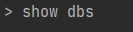
You should get the following output

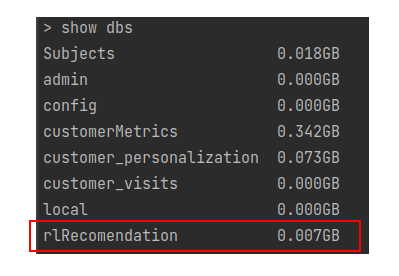
Now to find all the data bases in Mongo DB you can use the below command

You will be able to see all the databases which you have created. The one marked in red is the database we created. No to use that data base the command used is use rlRecomendation as shown below. We will get the command that the database has been switched to the desired data base.

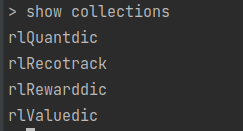
To see all the collections we have made in this database we can use the below command.

From the output we can see all the collections we have created. Now to see some specific record within the collections, we can use the following command.

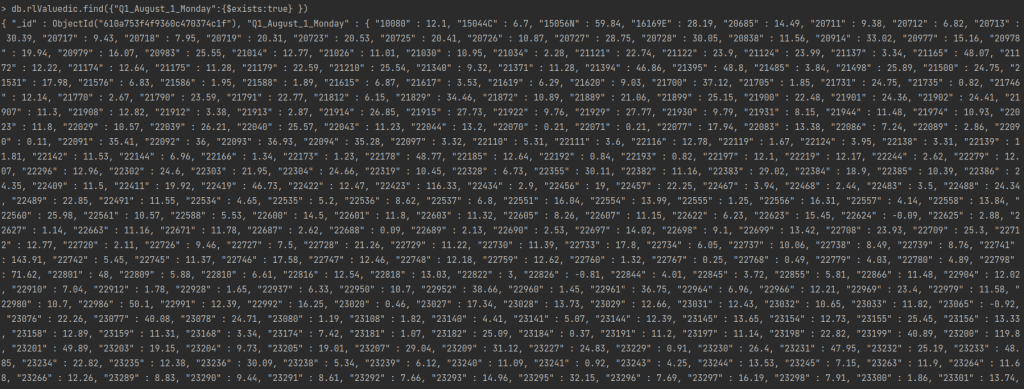
db.rlValuedic.find({"Q1_August_1_Monday":{$exists:true} })

In the above command we are trying to find all records in the collection rlValuedic for the stateID "Q1_August_1_Monday". Once we execute this command we get all the records in this collection for this specific stateID. You should get the below output.

The output displays all the proucts for that stateID and its value function.

What we have implemented in code is a simulation of the complete process. To run this continuously for multiple customers, we can create another scrip with a list of desired customers and then execute the code multiple times. I will leave that step as an exercise for you to implement. Now let us look at different options to deploy this application.

Deployment of application

The end product of any data science endeavour should be to build an application and sharing it with the world. There are different options to deploy python applications. Let us look at some of the options available. I would encourage you to explore more methods and share your results.

Flask application with Heroku

A great option to deploy your applications is to package it as a Flask application and then deploy it using Heroku. We have discussed this option in one of our earlier series, where we built a machine translation application. You can refer this link for details. In this section we will discuss the nuances of building the application in Flask and then deploying it on Heroku. I will leave the implementation of the steps for you as an exercise.

When deploying the self learning recommendation system we have built, the first thing which we need to design is what the front end will contain. From the perspective of the processes we have implemented, we need to have the following processes controlled using the front end.

  1. Training process : This is the process which takes the raw data, preprocesses the data and then initialises all the dictionaries. This includes all the processes till line 59 in the driver file rlRecoMain.py. We need to initialise the process of training from the front end of the flask application. In the background all the process till line 59 should run and the dictionaries needs to be updated.
  2. Recommendation simulation : The second process which needs to be controlled is the one where we get the recommendations. The start of this process is the simulation of the state from the front end. To do this we can provide a drop down of all the customer IDs on the flask front end and take the system time details to form the stateID. Once this stateID is generated, we start the recommendation process which includes all the process starting from line 62 till line 90 in the the driver file rlRecoMain.py. Please note that line 64 is the stateID simulating process which will be controlled from the front end. So that line need not be implemented. The final output, which is the list of all recommended products needs to be displayed on the front end. It will be good to add some visual images along with the product for visual impact.
  3. Customer action simulation : Once the recommended products are displayed on the front end, we can send feed back from the front end in terms of the products clicked and the products bought through some widgets created in the front end. These widgets will take the place of line 93, in our implementation. These feed back from the front end needs to be collected as lists, which will take the place of click_list and buy_list given in lines 94-95. Once the customer actions are generated, the back end process in line 98, will have to kick in to update the dictionaries. Once the cycle is completed we can build a refresh button on the screen to simulate the recommendation process again.

Once these processes are implemented using a Flask application, the application can be deployed on Heroku. This post will give you overall guide into deploying the application on Heroku.

These are broad guidelines for building the application and then deploying them. These need not be the most efficient and effective ones. I would challenge each one of you to implement much better processes for deployment. Request you to share your implementations in the comments section below.

Other options for deployment

So far we have seen one of the option to build the application using Flask and then deploy them using Heroku. There are other options too for deployment. Some of the noteable ones are the following

  • Flask application on Ubuntu server
  • Flask application on Docker

The attached link is a great resource to learn about such deployment. I would challenge all of you to deploy using any of these implementation steps and share the implementation for the community to benefit.

Wrapping up.

This is the last post of the series and we hope that this series was informative.

We will start a new series in the near future. The next series will be on a specific problem on computer vision specifically on Object detection. In the next series we will be building a ‘Road pothole detector using different object detection algorithms. This series will touch upon different methods in object detection like Image Pyramids, RCNN, Yolo, Tensorflow Object detection API etc. Watch out this space for the next series.

Please subscribe to this blog post to get notifications when the next post is published.

You can also subscribe to our Youtube channel for all the videos related to this series.

The complete code base for the series is in the Bayesian Quest Git hub repository

Do you want to Climb the Machine Learning Knowledge Pyramid ?

Knowledge acquisition is such a liberating experience. The more you invest in your knowledge enhacement, the more empowered you become. The best way to acquire knowledge is by practical application or learn by doing. If you are inspired by the prospect of being empowerd by practical knowledge in Machine learning, subscribe to our Youtube channel

I would also recommend two books I have co-authored. The first one is specialised in deep learning with practical hands on exercises and interactive video and audio aids for learning

This book is accessible using the following links

The Deep Learning Workshop on Amazon

The Deep Learning Workshop on Packt

The second book equips you with practical machine learning skill sets. The pedagogy is through practical interactive exercises and activities.

The Data Science Workshop Book

This book can be accessed using the following links

The Data Science Workshop on Amazon

The Data Science Workshop on Packt

Enjoy your learning experience and be empowered !!!!

Building Self Learning Recommendation system – VII : Productionizing the application : II

This is the seventh post of our series on building a self learning recommendation system using reinforcement learning. This series consists of 8 posts where in we progressively build a self learning recommendation system.

  1. Recommendation system and reinforcement learning primer
  2. Introduction to multi armed bandit problem
  3. Self learning recommendation system as a K-armed bandit
  4. Build the prototype of the self learning recommendation system : Part I
  5. Build the prototype of the self learning recommendation system : Part II
  6. Productionising the self learning recommendation system : Part I – Customer Segmentation
  7. Productionising the self learning recommendation system: Part II – Implementing self learning recommendation ( This Post )
  8. Evaluating different deployment options for the self learning recommendation systems.

This post builds on the previous post where we started off with productionizing the application using python scripts. In the last post we completed the customer segmentation part. In this post we continue from where we left off and then build the self learning system using python scripts. Let us get going.

Creation of States

Let us take a quick recap of the project structure and what we covered in the last post.

In the last post we were in the early part of our main driver file rlRecoMain.py. We explored rfmMaker class in file rfmProcess.py from the processes directory. We will now explore selfLearnProcess.py file in the same directory.

Open a new file and name it selfLearnProcess.py and insert the following code

import pandas as pd
from numpy.random import normal as GaussianDistribution
from collections import OrderedDict
from collections import Counter
import operator
from random import sample
import numpy as np
from pymongo import MongoClient
client = MongoClient(port=27017)
db = client.rlRecomendation


class rlLearn:
    def __init__(self,custDetails,conf):
        # Get the date  as a seperate column
        custDetails['Date'] = custDetails['Parse_date'].apply(lambda x: x.strftime("%d"))
        # Converting date to float for easy comparison
        custDetails['Date'] = custDetails['Date'].astype('float64')
        # Get the period of month column
        custDetails['monthPeriod'] = custDetails['Date'].apply(lambda x: int(x > conf['monthPer']))
        # Aggregate the custDetails to get a distribution of rewards
        rewardFull = custDetails.groupby(['Segment', 'Month', 'monthPeriod', 'Day', conf['product_id']])[conf['prod_qnty']].agg(
            'sum').reset_index()
        # Get these data frames for all methods
        self.custDetails = custDetails
        self.conf = conf
        self.rewardFull = rewardFull
        # Defining some dictionaries for storing the values
        self.countDic = {}  # Dictionary to store the count of products
        self.polDic = {}  # Dictionary to store the value distribution
        self.rewDic = {}  # Dictionary to store the reward distribution
        self.recoCountdic = {}  # Dictionary to store the recommendation counts

    # Method to find unique values of each of the variables
    def uniqeVars(self):
        # Finding unique value for each of the variables
        segments = list(self.rewardFull.Segment.unique())
        months = list(self.rewardFull.Month.unique())
        monthPeriod = list(self.rewardFull.monthPeriod.unique())
        days = list(self.rewardFull.Day.unique())
        return segments,months,monthPeriod,days

    # Method to consolidate all products
    def prodConsolidator(self):
        # Get all the unique values of the variables
        segments, months, monthPeriod, days = self.uniqeVars()
        # Creating the consolidated dictionary
        for seg in segments:
            for mon in months:
                for period in monthPeriod:
                    for day in days:
                        # Get the subset of the data
                        subset1 = self.rewardFull[(self.rewardFull['Segment'] == seg) & (self.rewardFull['Month'] == mon) & (
                                self.rewardFull['monthPeriod'] == period) & (self.rewardFull['Day'] == day)]
                        # INitializing a temporary dictionary to storing in mongodb
                        tempDic = {}
                        # Check if the subset is valid
                        if len(subset1) > 0:
                            # Iterate through each of the subset and get the products and its quantities
                            stateId = str(seg) + '_' + mon + '_' + str(period) + '_' + day
                            # Define a dictionary for the state ID
                            self.countDic[stateId] = {}
                            tempDic[stateId] = {}
                            for i in range(len(subset1.StockCode)):
                                # Store in the Count dictionary
                                self.countDic[stateId][subset1.iloc[i]['StockCode']] = int(subset1.iloc[i]['Quantity'])
                                tempDic[stateId][subset1.iloc[i]['StockCode']] = int(subset1.iloc[i]['Quantity'])
                            # Dumping each record into mongo db
                            db.rlQuantdic.insert(tempDic)

        # Consolidate the rewards and value functions based on the quantities
        for key in self.countDic.keys():
            # Creating two temporary dictionaries for loading in Mongodb
            tempDicpol = {}
            tempDicrew = {}
            # First get the dictionary of products for a state
            prodCounts = self.countDic[key]
            self.polDic[key] = {}
            self.rewDic[key] = {}
            # Initializing temporary dictionaries also
            tempDicpol[key] = {}
            tempDicrew[key] = {}
            # Update the policy values
            for pkey in prodCounts.keys():
                # Creating the value dictionary using a Gaussian process
                self.polDic[key][pkey] = GaussianDistribution(loc=prodCounts[pkey], scale=1, size=1)[0].round(2)
                tempDicpol[key][pkey] = self.polDic[key][pkey]
                # Creating a reward dictionary using a Gaussian process
                self.rewDic[key][pkey] = GaussianDistribution(loc=prodCounts[pkey], scale=1, size=1)[0].round(2)
                tempDicrew[key][pkey] = self.rewDic[key][pkey]
            # Dumping each of these in mongo db
            db.rlRewarddic.insert(tempDicrew)
            db.rlValuedic.insert(tempDicpol)
        print('[INFO] Dumped the quantity dictionary,policy and rewards in MongoDB')

As usual we start with import of the libraries we want from lines 1-7. In this implementation we make a small deviation from the prototype which we developed in the previous post. During the prototyping phase we predominantly relied on dictionaries to store data. However here we would be storing data in Mongo DB. Those of you who are not fully conversant with MongoDB can refer to some good tutorials on MongDB like the one here. I will also be explaining the key features as and when required. In line 8, we import the MongoClient which is required for connections with the data base. We then define the client using the default port number ( 27017 ) in line 9 and then name the data base where we will store the recommendation in line 10. The name of the database we have selected is rlRecomendation . You are free to choose any name of your choice.

Let us now explore the rlLearn class. The constructor of the class which starts from line 15, takes the custDetails data frame and the configuration file as inputs. You would already be familiar with lines 17-23 from our prototyping phase, where we extract information to create states and then consolidate the data frame to get the quantities of each state. In lines 30-33, we create dictionaries where we store the relevant information like count of products, value distribution, reward distribution and the number of times the products are recommended.

The main method within the rlLearn class is the prodConslidator() method in lines 45-95. We have seen the details of this method in the prototyping phase. Just to recap, in this method we iterate through each of the components of our states and then store the quantities of each product under the state in the dictionaries. However there is a subtle difference from what we did during the prototyping phase. Here we are inserting each state and its associated products in Mongodb data base we created, as shown in line 70, 93 and 94. We create a temporary dictionary in line 57 to dump each state into Mongodb. We also store the data in the dictionaries,as we did during the prototyping phase, so that we get the data for other methods in this class. The final outcome from this method, is the creation of the count dictionary, value dictionary and reward dictionary from our data and updation of this data in Mongodb.

This takes us to the end of the rlLearn class.

We now go back to the driver file rlRecoMain.py and the explore the next important class rlRecomend.

The rlRecomend class has the methods which are required for recommending products. This class has many methods and therefore we will go one by one through each of the methods. We have seen all these methods during the prototyping phase and therefore we will not get into detailed explanation of these methods here. For detailed explanation you can refer to the previous post.

Now on the selfLearnProcess.py start adding the code pertaining to the rlRecomend class.

class rlRecomend:
    def __init__(self, custDetails, conf):
        # Get the date  as a seperate column
        custDetails['Date'] = custDetails['Parse_date'].apply(lambda x: x.strftime("%d"))
        # Converting date to float for easy comparison
        custDetails['Date'] = custDetails['Date'].astype('float64')
        # Get the period of month column
        custDetails['monthPeriod'] = custDetails['Date'].apply(lambda x: int(x > conf['monthPer']))
        # Aggregate the custDetails to get a distribution of rewards
        rewardFull = custDetails.groupby(['Segment', 'Month', 'monthPeriod', 'Day', conf['product_id']])[
            conf['prod_qnty']].agg(
            'sum').reset_index()
        # Get these data frames for all methods
        self.custDetails = custDetails
        self.conf = conf
        self.rewardFull = rewardFull

The above code is for the constructor of the class ( lines 97 – 112 ), which is similar to the constructor of the rlLearn class. Here we consolidate the custDetails data frame and get the count of each products for the respective state.

Let us now look at the next two methods. Add the following code to the class we earlier created.

# Method to find unique values of each of the variables
    def uniqeVars(self):
        # Finding unique value for each of the variables
        segments = list(self.rewardFull.Segment.unique())
        months = list(self.rewardFull.Month.unique())
        monthPeriod = list(self.rewardFull.monthPeriod.unique())
        days = list(self.rewardFull.Day.unique())
        return segments, months, monthPeriod, days

    # Method to sample a state
    def stateSample(self):
        # Get the unique state elements
        segments, months, monthPeriod, days = self.uniqeVars()
        # Get the context of the customer. For the time being let us randomly select all the states
        seg = sample(segments, 1)[0]  # Sample the segment
        mon = sample(months, 1)[0]  # Sample the month
        monthPer = sample([0, 1], 1)[0]  # sample the month period
        day = sample(days, 1)[0]  # Sample the day
        # Get the state id by combining all these samples
        stateId = str(seg) + '_' + mon + '_' + str(monthPer) + '_' + day
        self.seg = seg
        return stateId

The first method , lines 115 – 121, is to get the unique values of segments, months, month-period and days. This information will be used in some of the methods we will see later on. The second method detailed in lines 124-135, is to sample a state id, through random sampling of the components of a state.

The next methods we will explore are to initialise dictionaries if a state id has not been seen earlier. The first method initialises dictionaries and the second method inserts a recommendation collection record in MongoDB if the state dosent exist. Let us see the code for these methods.

  # Method to initialize a dictionary in case a state Id is not available
    def collfinder(self,stateId,countDic,polDic,rewDic,recoCountdic):
        # Defining some dictionaries for storing the values
        self.countDic = countDic  # Dictionary to store the count of products
        self.polDic = polDic  # Dictionary to store the value distribution
        self.rewDic = rewDic  # Dictionary to store the reward distribution
        self.recoCountdic = recoCountdic  # Dictionary to store the recommendatio
        self.stateId = stateId
        print("[INFO] The current state is :", stateId)
        if self.countDic is None:
            print("[INFO] State ID do not exist")
            self.countDic = {}
            self.countDic[stateId] = {}
            self.polDic = {}
            self.polDic[stateId] = {}
            self.rewDic = {}
            self.rewDic[stateId] = {}
        if self.recoCountdic is None:
            self.recoCountdic = {}
            self.recoCountdic[stateId] = {}
        else:
            self.recoCountdic[stateId] = {}

# Method to update the recommendation dictionary
    def recoCollChecker(self):
        print("[INFO] Inside the recommendation collection")
        recoCol = db.rlRecotrack.find_one({self.stateId: {'$exists': True}})
        if recoCol is None:
            print("[INFO] Inserting the record in the recommendation collection")
            db.rlRecotrack.insert_one({self.stateId: {}})
        return recoCol

The inputs to the first method, as in line 138 are the state Id and all the other 4 dictionaries we extract from Mongo DB, which we will see later on in the main script rlRecoMain.py. If no record exists for a specific state Id, the dictionaries we extract from Mongo DB would be null and therefore we need to initialize these dictionaries for storing all the values of products, its values, rewards and the count of recommendations. The initialisation of these dictionaries are implemented in this method from lines 146-158.

The second initialisation method is to check for the recommendation count dictionary for a specific state Id. We first check for the state Id in the collection in line 163. If the record dosent exist then we insert a blank dictionary for that state in line 166.

Let us now look at the next two methods in the class

    # Create a function to get a list of products for a certain segment
    def segProduct(self,seg, nproducts):
        # Get the list of unique products for each segment
        seg_products = list(self.rewardFull[self.rewardFull['Segment'] == seg]['StockCode'].unique())
        seg_products = sample(seg_products, nproducts)
        return seg_products

    # This is the function to get the top n products based on value
    def sortlist(self,nproducts,seg):
        # Get the top products based on the values and sort them from product with largest value to least
        topProducts = sorted(self.polDic[self.stateId].keys(), key=lambda kv: self.polDic[self.stateId][kv])[-nproducts:][::-1]
        # If the topProducts is less than the required number of products nproducts, sample the delta
        while len(topProducts) < nproducts:
            print("[INFO] top products less than required number of products")
            segProducts = self.segProduct(seg, (nproducts - len(topProducts)))
            newList = topProducts + segProducts
            # Finding unique products
            topProducts = list(OrderedDict.fromkeys(newList))
        return topProducts

The method in lines 171-175 is to sample a list of products for a segment. This method is used incase the number of products in a particular state is less than the total number of products which we want to recommend. In such cases, we randomly sample some products from the list of all products bought by customers in that segment and then add it to the list of products we want to recommend. We will see this in action in sortlist method (lines 178-188).

The sortlist method, sorts the list of products based on the demand for that product and the returns the list of top products. The inputs to this method are the number of products we want to be recommended and the segment ( line 178 ). We then get the top ‘n‘ products by sorting the value dictionary based on the number of times a product is bought as in line 180. If the number of products is less than the required products, sampling of products is done using the segProduct method we saw earlier. The final list of top products is then returned by this method.

The next method which we are going to explore is the one which controls the exploration and exploitation process thereby generating a list of products to be recommended. Let us add the following code to the class.

# This is the function to create the number of products based on exploration and exploitation
    def sampProduct(self,seg, nproducts,epsilon):
        # Initialise an empty list for storing the recommended products
        seg_products = []
        # Get the list of unique products for each segment
        Segment_products = list(self.rewardFull[self.rewardFull['Segment'] == seg]['StockCode'].unique())
        # Get the list of top n products based on value
        topProducts = self.sortlist(nproducts,seg)
        # Start a loop to get the required number of products
        while len(seg_products) < nproducts:
            # First find a probability
            probability = np.random.rand()
            if probability >= epsilon:
                # print(topProducts)
                # The top product would be first product in the list
                prod = topProducts[0]
                # Append the selected product to the list
                seg_products.append(prod)
                # Remove the top product once appended
                topProducts.pop(0)
                # Ensure that seg_products is unique
                seg_products = list(OrderedDict.fromkeys(seg_products))
            else:
                # If the probability is less than epsilon value randomly sample one product
                prod = sample(Segment_products, 1)[0]
                seg_products.append(prod)
                # Ensure that seg_products is unique
                seg_products = list(OrderedDict.fromkeys(seg_products))
        return seg_products

The inputs to the method are the segment, number of products to be recommended and the epsilon value which determines exploration and exploitation as shown in line 191. In line 195, we get the list of the products for the segment. This list is from where products are sampled during the exploration phase. We also get the list of top products which needs to be recommended in line 197, using the sortlist method we defined earlier. In lines 199-218 we implement the exploitation and exploration processes we discussed during the prototyping phase and finally we return the list of top products for recommendation.

The next method which we will explore is the one to update dictionaries after the recommendation process.

# This is the method for updating the dictionaries after recommendation
    def dicUpdater(self,prodList, stateId):        
        for prod in prodList:
            # Check if the product is in the dictionary
            if prod in list(self.countDic[stateId].keys()):
                # Update the count by 1
                self.countDic[stateId][prod] += 1                
            else:
                self.countDic[stateId][prod] = 1                
            if prod in list(self.recoCountdic[stateId].keys()):
                # Update the recommended products with 1
                self.recoCountdic[stateId][prod] += 1                
            else:
                # Initialise the recommended products as 1
                self.recoCountdic[stateId][prod] = 1                
            if prod not in list(self.polDic[stateId].keys()):
                # Initialise the value as 0
                self.polDic[stateId][prod] = 0                
            if prod not in list(self.rewDic[stateId].keys()):
                # Initialise the reward dictionary as 0
                self.rewDic[stateId][prod] = GaussianDistribution(loc=0, scale=1, size=1)[0].round(2)                
        print("[INFO] Completed the initial dictionary updates")

The inputs to this method, as in line 221, are the list of products to be recommended and the state Id. From lines 222-234, we iterate through each of the recommended product and increament the count in the dictionary if the product exists in the dictionary or initialize the count to 1 if the product wasnt available. Later on in lines 235-240, we initialise the value dictionary and the reward dictionary if the products are not available in them.

The next method we will see is the one for initializing the dictionaries in case the context dosent exist.

    def dicAdder(self,prodList, stateId):        
        # Loop through the product list
        for prod in prodList:
            # Initialise the count as 1
            self.countDic[stateId][prod] = 1
            # Initialise the value as 0
            self.polDic[stateId][prod] = 0
            # Initialise the recommended products as 1
            self.recoCountdic[stateId][prod] = 1
            # Initialise the reward dictionary as 0
            self.rewDic[stateId][prod] = GaussianDistribution(loc=0, scale=1, size=1)[0].round(2)
        print("[INFO] Completed the dictionary initialization")
        # Next update the collections with the respective updates        
        # Updating the quantity collection
        db.rlQuantdic.insert_one({stateId: self.countDic[stateId]})
        # Updating the recommendation tracking collection
        db.rlRecotrack.insert_one({stateId: self.recoCount[stateId]})
        # Updating the value function collection for the products
        db.rlValuedic.insert_one({stateId: self.polDic[stateId]})
        # Updating the rewards collection
        db.rlRewarddic.insert_one({stateId: self.rewDic[stateId]})
        print('[INFO] Completed updating all the collections')

If the state Id dosent exist, the dictionaries are initialised as seen in lines 147-155. Once the dictionaries are initialised, MongoDb data bases are updated in lines 259-265.

The next method which we are going to explore is one of the main methods which integrates all the methods we have seen so far. This methods implements the recomendation process. Let us explore this method.

# Method to sample a stateID and then initialize the dictionaries
    def rlRecommender(self):
        # First sample a stateID
        stateId = self.stateId        
        # Start the recommendation process
        if len(self.polDic[stateId]) > 0:
            print("The context exists")
            # Implement the sampling of products based on exploration and exploitation
            seg_products = self.sampProduct(self.seg, self.conf["nProducts"],self.conf["epsilon"])
            # Check if the recommendation count collection exist
            recoCol = self.recoCollChecker()
            print('Recommendation collection existing :',recoCol)
            # Update the dictionaries of values and rewards
            self.dicUpdater(seg_products, stateId)
        else:
            print("The context dosent exist")
            # Get the list of relavant products
            seg_products = self.segProduct(self.seg, conf["nProducts"])
            # Add products to the value dictionary and rewards dictionary
            self.dicAdder(seg_products, stateId)
        print("[INFO] Completed the recommendation process")

        return seg_products

The first step in the process is to get the state Id ( line 271 ) based on which we have to do all the recommendations. Once we have the state Id, we check if it is an existing state id in line 273. If it is an existing state Id we get the list of ‘n’ products for recommendation using the sampProduct method we saw earlier, where we implement exploration and exploitation. Once we get the products we initialise the recommendation collection in line 278. Finally we update all dictionaries using the dicUpdater method in line 281.

From lines 282-287, we implement a similar process when the state Id dosent exist. The only difference in this case is in the initialisation of the dictionaries in line 287, where we use the dicAdder method.

Once we complete the recommendation process, we get into simulating the customer action.

# Function to initiate customer action
    def custAction(self,segproducts):
        print('[INFO] getting the customer action')
        # Sample a value to get how many products will be clicked
        click_number = np.random.choice(np.arange(0, 10),
                                        p=[0.50, 0.35, 0.10, 0.025, 0.015, 0.0055, 0.002, 0.00125, 0.00124, 0.00001])
        # Sample products which will be clicked based on click number
        click_list = sample(segproducts, click_number)

        # Sample for buy values
        buy_number = np.random.choice(np.arange(0, 10),
                                      p=[0.70, 0.15, 0.10, 0.025, 0.015, 0.0055, 0.002, 0.00125, 0.00124, 0.00001])
        # Sample products which will be bought based on buy number
        buy_list = sample(segproducts, buy_number)

        return click_list, buy_list

Lines 296-305 implements the processes for simulating the list of products which are bought and browsed by the customer based on the recommendation we made. The method returns the list of products which were browsed through and also the one which were bought. For detailed explanations on these methods please refer the previous post

The next methods we will explore are the ones related to the value updation of the recommendation system.

    def getReward(self,loc):
        rew = GaussianDistribution(loc=loc, scale=1, size=1)[0].round(2)
        return rew

    def saPolicy(self,rew, prod):
        # This function gets the relavant algorithm for the policy update
        # Get the current value of the state        
        vcur = self.polDic[self.stateId][prod]        
        # Get the counts of the current product
        n = self.recoCountdic[self.stateId][prod]        
        # Calculate the new value
        Incvcur = (1 / n) * (rew - vcur)       
        return Incvcur

The getReward method on line 309 is to generate a reward from a gaussian distribution centred around the reward value. We will see the use of this method in subsequent methods.

The saPolicy method in lines 313-321 updates the value of the state based on the simple averaging method in line 320. We have already seen these methods in our prototyping phase in the previous post.

Next we will see the method which uses both the above methods.

    def valueUpdater(self,seg_products, loc, custList, remove=True):
        for prod in custList:
            # Get the reward for the bought product. The reward will be centered around the defined reward for each action
            rew = self.getReward(loc)            
            # Update the reward in the reward dictionary
            self.rewDic[self.stateId][prod] += rew            
            # Update the policy based on the reward
            Incvcur = self.saPolicy(rew, prod)            
            self.polDic[self.stateId][prod] += Incvcur           
            # Remove the bought product from the product list
            if remove:
                seg_products.remove(prod)
        return seg_products

The inputs to this method are the recommended list of products, the mean reward ( click, buy or ignore), the corresponding list ( click list or buy list) and a flag to indicate if the product has to be removed from the recommendation list or not.

We interate through all the products in the customer action list in line 324 and then gets the reward in line 326. Once the reward is incremented in the reward dictionary in line 328, we get the incremental value in line 330 and this is updated in the value dictionary in line 331. If the flag is True, we remove the product from the recommended list and the finally returns the remaining recommendation list.

The next method is the last of the methods and ties the above three methods with the customer action.

# Function to update the reward dictionary and the value dictionary based on customer action
    def rewardUpdater(self, seg_products,custBuy=[], custClick=[]):
        # Check if there are any customer purchases
        if len(custBuy) > 0:
            seg_products = self.valueUpdater(seg_products, self.conf['buyReward'], custBuy)
            # Repeat the same process for customer click
        if len(custClick) > 0:
            seg_products = self.valueUpdater(seg_products, self.conf['clickReward'], custClick)
            # For those products not clicked or bought, give a penalty
        if len(seg_products) > 0:
            custList = seg_products.copy()
            seg_products = self.valueUpdater(seg_products, -2, custList,False)
        # Next update the collections with the respective updates
        print('[INFO] Updating all the collections')
        # Updating the quantity collection
        db.rlQuantdic.replace_one({self.stateId: {'$exists': True}}, {self.stateId: self.countDic[self.stateId]})
        # Updating the recommendation tracking collection
        db.rlRecotrack.replace_one({self.stateId: {'$exists': True}}, {self.stateId: self.recoCountdic[self.stateId]})
        # Updating the value function collection for the products
        db.rlValuedic.replace_one({self.stateId: {'$exists': True}}, {self.stateId: self.polDic[self.stateId]})
        # Updating the rewards collection
        db.rlRewarddic.replace_one({self.stateId: {'$exists': True}}, {self.stateId: self.rewDic[self.stateId]})
        print('[INFO] Completed updating all the collections')

In lines 340-348, we update the value based on the number of products bought, clicked and ignored. Once the value dictionaries are updated, the respective MongoDb dictionaries are updated in lines 352-358.

With this we have covered all the methods which are required for implementing the self learning recommendation system. Let us summarise our learning so far in this post.

  • Created the states and updated MongoDB with the states data. We used the historic data for initialisation of values.
  • Implemented the recommendation process by getting a list of products to be recommended to the customer
  • Explored customer response simulation wherein the customer response to the recommended products were implemented.
  • Updated the value functions and reward functions after customer response
  • Updated Mongo DB collections after the completion of the process for a customer.

What next ?

We are coming to the fag end of our series. The next post is where we tie all these methods together in the main driver file and see how these processes are implmented. We will also run the script on the terminal and observe the results. Once the application implementation is done, we will also explore avenues to deploy the application. Watch this space for the last post of the series.

Please subscribe to this blog post to get notifications when the next post is published.

You can also subscribe to our Youtube channel for all the videos related to this series.

The complete code base for the series is in the Bayesian Quest Git hub repository

Do you want to Climb the Machine Learning Knowledge Pyramid ?

Knowledge acquisition is such a liberating experience. The more you invest in your knowledge enhacement, the more empowered you become. The best way to acquire knowledge is by practical application or learn by doing. If you are inspired by the prospect of being empowerd by practical knowledge in Machine learning, subscribe to our Youtube channel

I would also recommend two books I have co-authored. The first one is specialised in deep learning with practical hands on exercises and interactive video and audio aids for learning

This book is accessible using the following links

The Deep Learning Workshop on Amazon

The Deep Learning Workshop on Packt

The second book equips you with practical machine learning skill sets. The pedagogy is through practical interactive exercises and activities.

The Data Science Workshop Book

This book can be accessed using the following links

The Data Science Workshop on Amazon

The Data Science Workshop on Packt

Enjoy your learning experience and be empowered !!!!

VII Build and deploy data science products: Machine translation application – From Prototype to Production for Inference process

Image source : macadamian.com

“To contrive is nothing! To consruct is something ! To produce is everything !”

Edward Rickenbacker

This is the seventh part of the series in which we continue our endeavour in building the inference process for our machine translation application. This series comprises of 8 posts.

  1. Understand the landscape of solutions available for machine translation
  2. Explore sequence to sequence model architecture for machine translation.
  3. Deep dive into the LSTM model with worked out numerical example.
  4. Understand the back propagation algorithm for a LSTM model worked out with a numerical example.
  5. Build a prototype of the machine translation model using a Google colab / Jupyter notebook.
  6. Build the production grade code for the training module using Python scripts.
  7. Building the Machine Translation application -From Prototype to Production : Inference process ( This post)
  8. Build the machine translation application using Flask and understand the process to deploy the application on Heroku

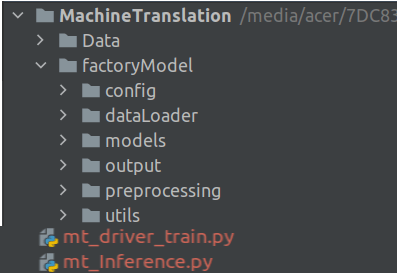
In the last post of the series we covered the training process. We built the model and then saved all the variables as pickle files. We will be using the model we developed during the training phase for the inference process. Let us dive in and look at the project structure, which would be similar to the one we saw in the last post.

Project Structure

Let us first look at the helper function file. We will be adding new functions and configuration variables to the file we introduced in the last post.

Let us first look at the configuration file.

Configuration File

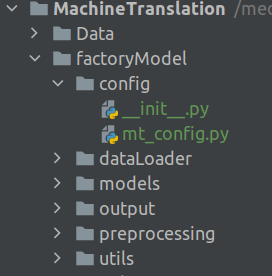
Open the configuration file mt_config.py , we used in the last post and add the following lines.

# Define the path where the model is saved
MODEL_PATH = path.sep.join([BASE_PATH,'factoryModel/output/model.h5'])
# Defin the path to the tokenizer
ENG_TOK_PATH = path.sep.join([BASE_PATH,'factoryModel/output/eng_tokenizer.pkl'])
GER_TOK_PATH = path.sep.join([BASE_PATH,'factoryModel/output/deu_tokenizer.pkl'])
# Path to Standard lengths of German and English sentences
GER_STDLEN = path.sep.join([BASE_PATH,'factoryModel/output/ger_length.pkl'])
ENG_STDLEN = path.sep.join([BASE_PATH,'factoryModel/output/eng_length.pkl'])
# Path to the test sets
TEST_X = path.sep.join([BASE_PATH,'factoryModel/output/testX.pkl'])
TEST_Y = path.sep.join([BASE_PATH,'factoryModel/output/testY.pkl'])

Lines 14-23 we add the paths for many of the files and variables we created during the training process.

Line 14 is the path to the model file which was created after the training. We will be using this model for the inference process

Lines 16-17 are the paths to the English and German tokenizers

Lines 19-20 are the variables for the standard lengths of the German and English sequences

Lines 21-23 are the test sets which we will use to predict and evaluate our model.

Utils Folder : Helper functions

Having seen the configuration file, let us now review all the helper functions for the application. In the training phase we created a helper function file called helperFunctions.py. Let us go ahead and revisit that file and add more functions required for the application.

'''
This script lists down all the helper functions which are required for processing raw data
'''

from pickle import load
from numpy import argmax
from pickle import dump
from tensorflow.keras.preprocessing.sequence import pad_sequences
from numpy import array
from unicodedata import normalize
import string

# Function to Save data to pickle form
def save_clean_data(data,filename):
    dump(data,open(filename,'wb'))
    print('Saved: %s' % filename)

# Function to load pickle data from disk
def load_files(filename):
    return load(open(filename,'rb'))

Lines 5-11 as usual are the library packages which are required for the application.

Line 14 is the function to save data as a pickle file. We saw this function in the last post.

Lines 19-20 is a utility function to load a pickle file from disk. The parameter to this function is the path of the file.

In the last post we saw a detailed function for cleaning raw data to finally generate the training and test sets. For the inference process we need an abridged version of that function.

# Function to clean the input data
def cleanInput(lines):
    cleanSent = []
    cleanDocs = list()
    for docs in lines[0].split():
        line = normalize('NFD', docs).encode('ascii', 'ignore')
        line = line.decode('UTF-8')
        line = [line.translate(str.maketrans('', '', string.punctuation))]
        line = line[0].lower()
        cleanDocs.append(line)
    cleanSent.append(' '.join(cleanDocs))
    return array(cleanSent)

Line 23 initializes the cleaning function for the input sentences. In this function we assume that the input sentence would be a string and therefore in line 26 we split the string into individual words and iterate through each of the words. Lines 27-28 we normalize the input words to the ascii format. We remove all punctuations in line 29 and then convert the words to lower case in line 30. Finally we join inividual words to a string in line 32 and return the cleaned sentence.

The next function we will insert is the sequence encoder we saw in the last post. Add the following lines to the script

# Function to convert sentences to sequences of integers
def encode_sequences(tokenizer,length,lines):
    # Sequences as integers
    X = tokenizer.texts_to_sequences(lines)
    # Padding the sentences with 0
    X = pad_sequences(X,maxlen=length,padding='post')
    return X

As seen earlier the parameters are the tokenizer, the standard length and the source data as seen in Line 36.

The sentence is converted into integer sequences using the tokenizer as shown in line 38. The encoded integer sequences are made to standard length in line 40 using the padding function.

We will now look at the utility function to convert integer sequences to words.

# Generate target sentence given source sequence
def Convertsequence(tokenizer,source):
    target = list()
    reverse_eng = tokenizer.index_word
    for i in source:
        if i == 0:
            continue
        target.append(reverse_eng[int(i)])
    return ' '.join(target)

We initialize the function in line 44. The parameters to the function are the tokenizer and the source, a list of integers, which needs to be converted into the corresponding words.

In line 46 we define a reverse dictionary from the tokenizer. The reverse dictionary gives you the word in the vocabulary if you give the corresponding index.

In line 47 we iterate through each of the integers in the list . In line 48-49, we ignore the word if the index is 0 as this could be a padded integer. In line 50 we get the word corresponding to the index integer using the reverse dictionary and then append it to the placeholder list created earlier in line 45. All the words which are appended into the placeholder list are then joined together to a string in line 51 and then returned

Next we will review one of the most important functions, a function for generating predictions and the converting the predictions into text form. As seen from the post where we built the prototype, the predict function generates an array which has the same length as the number of maximum sequences and depth equal to the size of the vocabulary of the target language. The depth axis gives you the probability of words accross all the words of the vocabulary. The final predictions have to be transformed from this array format into a text format so that we can easily evaluate our predictions.

# Function to generate predictions from source data
def generatePredictions(model,tokenizer,data):
    prediction = model.predict(data,verbose=0)    
    AllPreds = []
    for i in range(len(prediction)):
        predIndex = [argmax(prediction[i, :, :], axis=-1)][0]
        target = Convertsequence(tokenizer,predIndex)
        AllPreds.append(target)
    return AllPreds

We initialize the function in line 54. The parameters to the function are the trained model, English tokenizer and the data we want to translate. The data to translate has to be in an array form of dimensions ( num of examples, sequence length).

We generate the prediction in line 55 using the model.predict() method. The predicted output object ( prediction) is an array of dimensions ( num_examples, sequence length, size of english vocabulary)

We initialize a list to store all the predictions on line 56.

Lines 57-58,we iterate through all the examples and then generate the index which has the maximum probability in the last axis of the prediction array. The last axis of the predictions array will be a probability distribution over the words of the target vocabulary. We need to get the index of the word which has the maximum probability. This is what we use the argmax function.

This image has an empty alt attribute; its file name is image-23.png

As shown in the representative figure above by taking the argmax of the last axis ( axis = -1) we obtain the index position where the probability of words accross all the words of the vocabulary is the greatest. The output we get from line 58 is a list of the indexes of the vocabulary where the probability is highest as shown in the list below

[ 5, 123, 4, 3052, 0]

In line 59 we convert the above list of integers to a string using the Convertsequence() function we saw earlier. All the predicted strings are then appended to a placeholder list and returned in lines 60-61

Inference Process

Having seen the helper functions, let us now explore the inference process. Let us open a new file and name it mt_Inference.py and enter the following code.

'''
This is the driver file for the inference process
'''

from tensorflow.keras.models import load_model
from factoryModel.config import mt_config as confFile
from factoryModel.utils.helperFunctions import *

## Define the file path to the model
modelPath = confFile.MODEL_PATH

# Load the model from the file path
model = load_model(modelPath)

We import all the required functions in lines 5-7. In line 7 we import all the helper functions we created above. We then initiate the path to the model from the configuration file in line 10.

Once the path to the model is initialized then it is the turn to load the model we saved during the training phase. In line 13 we load the saved model from the path using the Keras function load_model().

Next we load the required pickle files we saved after the training process.

# Get the paths for all the files and variables stored as pickle files
Eng_tokPath = confFile.ENG_TOK_PATH
Ger_tokPath = confFile.GER_TOK_PATH
testxPath = confFile.TEST_X
testyPath = confFile.TEST_Y
Ger_length = confFile.GER_STDLEN
# Load the tokenizer from the pickle file
Eng_tokenizer = load_files(Eng_tokPath)
Ger_tokenizer = load_files(Ger_tokPath)
# Load the standard lengths
Ger_stdlen = load_files(Ger_length)
# Load the test sets
testX = load_files(testxPath)
testY = load_files(testyPath)

On lines 16-20 we intialize the paths to all the files and variables we saved as pickle files during the training phase. These paths are defined in the configuration file. Once the paths are initialized the required files and variables are loaded from the respecive pickle files in lines 22-28. We use the load_files() function we defined in the helper function script for loading the pickle files.

The next step is to generate the predictions for the test set. We already defined the function for generating predictions as part of the helper functions script. We will be calling that function to generate the predictions.

# Generate predictions
predSent = generatePredictions(model,Eng_tokenizer,testX[0:20,:])

for i in range(len(testY[0:20])):
    targetY = Convertsequence(Eng_tokenizer,testY[i:i+1][0])
    print("Original sentence : {} :: Prediction : {}".format([targetY],[predSent[i]]))

On line 31 we generate the predictions on the test set using the generatePredictions() function. We provide the model , the English tokenizer and the first 20 sequences of the test set for generating the predictions.

Once the predictions are generated let us look at how good our predictions are by comparing it against the original sentence. In line 33-34 we loop through the first 20 target English integer sequences and convert them into the respective English sentences using the Convertsequence() function defined earlier. We then print out our predictions and the original sentence on line 35.

The output will be similar to the one we got during the prototype phase as we havent changed the model parameters during the training phase.

Predicting on our own sentences

When we predict on our own input sentences we have to preprocess the input sentence by cleaning it and then converting it into a sequence of integers. We have already made the required functions for doing that in our helper functions file. The next thing we want is a place to enter the input sentence. Let us provide our input sentence in our configuration file itself.

Let us open the configuration file mt_config.py and add the following at the end of the file.

######## German Sentence for Translation ###############

GER_SENTENCE = 'heute ist ein guter Tag'

In line 27 we define a configuration variable GER_SENTENCE to store the sentences we want to input. We have provided a string 'heute ist ein guter Tag' which means ‘Today is a good day’ as the input string. You are free to input any German sentence you want at this location. Please note that the sentence have to be inside quotes ' '.

Let us now look at how our input sentences can be translated using the inference process. Open the mt_inference.py file and add the following code below the existing code.

############# Prediction of your Own sentences ##################

# Get the input sentence from the config file
inputSentence = [confFile.GER_SENTENCE]

# Clean the input sentence
cleanText = cleanInput(inputSentence)

# Encode the inputsentence as sequence of integers
seq1 = encode_sequences(Ger_tokenizer,int(Ger_stdlen),cleanText)

print("[INFO] .... Predicting on own sentences...")

# Generate the prediction
predSent = generatePredictions(model,Eng_tokenizer,seq1)
print("Original sentence : {} :: Prediction : {}".format([cleanText[0]],predSent))

In line 40 we access the input sentence from the configuration file. We wrap the input string in a list [ ].

In line 43 we do a basic cleaning for the input sentence. We do it using the cleanInput() function we created in the helper function file. Next we encode the cleaned text as integer sequences in line 46. Finally we generate our prediction on line 51 and print out the results in line 52.

Wrapping up

Hurrah!!!! we have come to the end of the inference process. In this post you learned how to generate predictions on the test set. We also predicted our own sentences. We have come a long way and we are ready to make the final lap. Next we will make machine translation application using flask.

Go to article 8 of this series : Building the machine translation application using Flask and deploying on Heroku

You can download the notebook for the inference process using the following link

https://github.com/BayesianQuest/MachineTranslation/tree/master/Production

Do you want to Climb the Machine Learning Knowledge Pyramid ?

Knowledge acquisition is such a liberating experience. The more you invest in your knowledge enhacement, the more empowered you become. The best way to acquire knowledge is by practical application or learn by doing. If you are inspired by the prospect of being empowerd by practical knowledge in Machine learning, I would recommend two books I have co-authored. The first one is specialised in deep learning with practical hands on exercises and interactive video and audio aids for learning

This book is accessible using the following links

The Deep Learning Workshop on Amazon

The Deep Learning Workshop on Packt

The second book equips you with practical machine learning skill sets. The pedagogy is through practical interactive exercises and activities.

This book can be accessed using the following links

The Data Science Workshop on Amazon

The Data Science Workshop on Packt

Enjoy your learning experience and be empowered !!!!

V : Build and deploy data science products: Machine translation application-Develop the prototype

Source:boagworld.com

”Prototyping is the conversation you have with your ideas”

Tom Wujec

This is the fifth part of the series where we see our theoretical foundation on machine translation come to fruition. This series comprises of 8 posts.

  1. Understand the landscape of solutions available for machine translation
  2. Explore sequence to sequence model architecture for machine translation.
  3. Deep dive into the LSTM model with worked out numerical example.
  4. Understand the back propagation algorithm for a LSTM model worked out with a numerical example.
  5. Build a prototype of the machine translation model using a Google colab / Jupyter notebook.( This post)
  6. Build the production grade code for the training module using Python scripts.
  7. Building the Machine Translation application -From Prototype to Production : Inference process
  8. Build the machine translation application using Flask and understand the process to deploy the application on Heroku

In the previous 4 posts we understood the solution landscape for machine translation ,explored different architecture choices for sequence to sequence models and did a deep dive into the forward pass and back propagation algorithm for LSTMs. Having set a theoretical foundation on the application, it is time to build a prototype of the machine translation application. We will be building the prototype using a Google Colab / Jupyter notebook.

Building the prototype

The prototype building phase will consist of the following steps.

  1. Loading the raw data
  2. Preprocessing the raw data for machine translation
  3. Preparing the train and test sets
  4. Building the encoder – decoder architecture
  5. Training the model
  6. Getting the predictions

Let us get started in building the prototype of the application on a notebook

Downloading the raw text

Let us first grab the raw data for this application. The data can be downloaded from the link below.

http://www.manythings.org/anki/deu-eng.zip

This is also available in the github repository. The raw text consists of English sentences paired with the corresponding German sentence. Once the data text file is downloaded let us upload the data in our Google drive. If you do not want to do the prototype in Colab, you can download it in your local drive and then use a Jupyter notebook also for the purpose.

Preprocessing the text

Before starting the processes, let us import all the packages we will be using for the process

import string
import re
from numpy import array, argmax, random, take
from numpy.random import shuffle
import pandas as pd
from tensorflow.keras.models import Sequential
from tensorflow.keras.layers import Dense, LSTM, Embedding, RepeatVector
from tensorflow.keras.preprocessing.text import Tokenizer
from tensorflow.keras.callbacks import ModelCheckpoint
from tensorflow.keras.preprocessing.sequence import pad_sequences
from tensorflow.keras.models import load_model
from tensorflow.keras import optimizers
import matplotlib.pyplot as plt
% matplotlib inline
pd.set_option('display.max_colwidth', 200)
from pickle import dump
from unicodedata import normalize
from tensorflow.keras.models import load_model

The raw text which we have downloaded needs to be opened and progressively preprocessed through series of processing steps to ultimately get the train and test set which we require for building our models. Let us first define the path for the text, so as to take it from the google drive. This path has to be changed by you based on the path in which you load the data

# Define the path to the raw data set 
fileurl = '/content/drive/My Drive/Bayesian Quest/deu.txt'

Once the path is defined, let us read the text data.

# open the file 
file = open(fileurl, mode='rt', encoding='utf-8') 
# read all text 
text = file.read()

The text which is read from the text file would be in the format shown below

text[0:200]
Output of first 200 characters of text

From the output we can see that each record is seperated by a line (\n) and within each record the data we want is seperated by tabs (\t).So we can first split each record on new lines (\n) and after that each line we split on the tabs (\t) to get the data in the format we want

# Split the text into individual lines
lines = text.strip().split('\n')
# Splitting each line based on tab spaces and creating a list
lines = [line.split('\t') for line in lines]
# Visualizing first 5 lines
lines[0:5]

We can see that the processed records are stored as lists with each list containing an enlish word, its German translation and some metadata about the data. Let us store these lists as an array for convenience and then display the shape of the array.

# Storing the lines into an array
mtData = array(lines)
# Displaying the shape of the array
print(mtData.shape)
Shape of array

All the above steps we can represent as a function. Let us construct the function which will be used to load the data and do basic preprocessing of the data.

# function to read raw text file
def read_text(filename):
    # open the file
    file = open(filename, mode='rt', encoding='utf-8')
    # read all text
    text = file.read()
    
    # Split the text into individual lines
    lines = text.strip().split('\n')
    # Splitting each line based on tab spaces and creating a list
    lines = [line.split('\t') for line in lines]

    file.close()
    return array(lines)

We can call the function to load the data and convert it into an array of English and German sentences. We can also see that the raw data has more than 200,000 rows and three columns. We dont require the third column and therefore we can eliminate them. In addition processing all rows would also be computationally expensive. Let us take the first 50000 rows. However this decision is left to you on how many rows you want based on the capacity of your machine.

# Reading the data using the function
mtData = read_text(fileurl)
# Taking only 50000 rows of data
mtData = mtData[:50000,:2]
print(mtData.shape)
mtData[0:10]

With the array format, the data is in a neat format with the first column being English and the second one the corresponding German sentence. However if you notice the text, there are lot of punctuations and other characters which are unwanted. We also need to standardize the text to lower case. Let us now crank up our cleaning process. The following are the processes which we will follow

  1. Normalize all unicode characters,which are special characters found in a language, to its corresponding ascii format. We will be using a library called ‘unicodedata’ for this normalization.
  2. Tokenize the string to individual words
  3. Convert all the characters to lower case
  4. Remove all punctuations from the text
  5. Remove all non alphabets from text

Since there are multiple processes involved we will be wrapping all these processes in a function. Let us look at the code which implements this.

# Cleaning the document for all unwanted characters

def cleanDocs(lines):
  cleanArray = list()
  for docs in lines:
    cleanDocs = list()
    for line in docs:
      # Normalising unicode characters
      line = normalize('NFD', line).encode('ascii', 'ignore')
      line = line.decode('UTF-8')
      # Tokenize on white space
      line = line.split()
      # Removing punctuations from each token
      line = [word.translate(str.maketrans('', '', string.punctuation)) for word in line]
      # convert to lower case
      line = [word.lower() for word in line]
      # Remove tokens with numbers in them
      line = [word for word in line if word.isalpha()]
      # Store as string
      cleanDocs.append(' '.join(line))
    cleanArray.append(cleanDocs)
  return array(cleanArray)

The input to the function is the array which we created in the earlier step. We first initialize some empty lists to store the processed text in Line 3.

Lines 5 – 7, we loop through each row ( docs) and then through each column (line) of the row. The first process is to normalize the special characters . This is done through the normalize function available in the ‘unicodedata’ package. We use a normalization method called ‘NFD’ which maintains the same form of the characters in lines 9-10. The next process is to tokenize the string to individual words by applying the split() function in line 12. We then proceed to remove all unwanted punctuations using the translate() function in line 14 . After this process we convert the text to lower case and then retain only the charachters which are alphabets using the isalpha() function in lines 16-18. We join the individual columns within a row using the join() function and then store the processed row in the ‘cleanArray’ list in lines 20-21. The final output after the whole process looks quite clean and is ready for further processing.

# Cleaning the sentences
cleanMtDocs = cleanDocs(mtData)
cleanMtDocs[0:10]

Nueral Translation Data Set Preperation

Now that we have completed the initial preprocessing, its now time to get closer to the core process. Let us first prepare the data sets in the required format we want for modelling. The various steps which we will follow for preparation of data set are

  1. Tokenizing the text and creating vocabulary dictionaries for English and German sentences
  2. Define the sequence length for both English and German text
  3. Encode the text sequences as integer sequences
  4. Split the data set into train and test sets

Let us see each of these processes

Tokenization and vocabulary creation

Tokenization is the process of splitting the string to individual unique words or tokens. So if the string is

"Hi I am enjoying this learning and I look forward for more"

The unique tokens vocabulary would look like the following

{'i': 1, 'hi': 2, 'am': 3, , 'enjoying': 4 , 'this': 5 , 'learning': 6 'and': 7, , 'look': 8 , 'forward': 9, 'for': 10, 'more': 11}

Note that only unique words are taken and each token is given an index which will come in handy when we encode the tokens in later steps. So let us go ahead and prepare the tokens. Please note that we will be creating seperate vocabulary for English words and German words.

# Instantiating the tokenizer class
tokenizer = Tokenizer()

The function which does tokenization is the Tokenizer() class which could be imported from tensorflow.keras as shown above. The first step is to instantiate the Tokenizer() class. Next we will see how to fit text to the tokenizer object we created.

# Fit the tokenizer on the text
tokenizer.fit_on_texts(string)

Fitting the text is done using the fit_on_texts() method. This method splits the strings and then creates the vocabulary we saw earlier. Since these steps have to be repeated multiple times, let us package them as a function

# Function for creating tokenizers
def createTokenizer(lines):
    tokenizer = Tokenizer()
    tokenizer.fit_on_texts(lines)
    return tokenizer

Let us use the above function to create the tokenizer for English words and look at the total length of words in English

# Create English Tokenizer
eng_tokenizer = createTokenizer(cleanMtDocs[:,0])
eng_vocab_size = len(eng_tokenizer.word_index) + 1
print(eng_vocab_size)

We can see that the length of the English vocabulary is 6255. This is after we incremented the actual vocabulary size with 1 to account for any words which is not part of the vocabulary. Let us list down the first 10 words of the English vocabulary.

# Listing the first 10 items of the English tokenizer
list(eng_tokenizer.word_index.items())[0:10]

From the output we can see how the words are assigned an index value. Similary we will create the German vocabulary also

# Create German tokenizer
ger_tokenizer = createTokenizer(cleanMtDocs[:,1])
# Defining German Vocabulary
ger_vocab_size = len(ger_tokenizer.word_index) + 1

Now that we have tokenized the German and English sentences, the next task is to define a standard sequence length for these languges

Define Sequence lengths for German and English sentences

From our earlier introduction on sequence models, we know that we need data in sequences. A prerequisite in building sequence models is the sequences to be of standard lenght. However if we look at our corpus of both English and German sentences the lengths of each sentence will vary. We need to adopt a strategy for standardizing this length. One common strategy would be to adopt the maximum length of all the sentences as the standard sequence. Sentences which will have length lesser than the maximum length will have its indexes filled with zeros.However one pitfall of this strategy is, processing will be expensive. Let us say the length of the biggest sentence is 50 and most of the other sentences are of length ranging from 8 to 12. We have a situation wherein for just one sentence we unnecessarily increase the length of all other sentences by filling dummy values. When data sets become large, having all sentences standardized to the longest sentence will make the computation expensive.

To get over such issues we will adopt a strategy of finding a length under which majority of the sentences fall. This can be done by taking a high quantile value under which majority of the sentence lengths fall.

Let us implement this strategy. To start off we will have to count the lengths of all the sentences in the corpus

# Create an empty list to store all english sentence lenghts
len_english = []
# Getting the length of all the English sentences
[len_english.append(len(line.split())) for line in cleanMtDocs[:,0]]
len_english[0:10]

In line 2 we first created an empty list 'len_english'. Next we iterated through all the sentences in the corpus and found the length of each of the sentences and then appended each sentence lengths to the list we created, line 4.

Similarly we will create the list of all German sentence lenghts.

len_German = []
# Getting the length of all the English sentences
[len_German.append(len(line.split())) for line in cleanMtDocs[:,1]]
len_German[0:10]

After getting a distribution of all the lengths of English sentences, let us find the quantile value at 97.5% under which majority of the sentences fall.

# Find the quantile length
engLength = np.quantile(len_english, .975)
engLength

From the quantile value we can see that a sequence length of 5.0 would be a good value to adopt as majority of the sentences would fall within this length. Similarly let us calculate for the German sentences also.

# Find the quantile length
gerLength = np.quantile(len_German, .975)
gerLength

We will be using the sequence lengths we have calculated in the next process where we encode the word tokens as sequences of integers.

Encode the sequences as integers

Earlier we tokenized all the unique words and created vocabulary dictionaries. In those dictionaries we have a mapping of the word and an integer value for the word. For example let us display the first 5 tokens of the english vocabulary

# First 5 tokens and its integers of English tokenizer
list(eng_tokenizer.word_index.items())[0:5]

We can see that each tokens are associated with an integer value . In our sequence model we will be using the integer values instead of the tokens themselves. This process of converting the tokens to its corresponding integer values is called the encoding. We have a method called ‘texts_to_sequences’ in the tokenizer() to convert the tokens to integer sequences.

The standard length of the sequence which we calculated in the previous section will be the length of each of these integer encoding. However what happens if a sentence string has length more than the the standard length ? Well in that case the sentence string will be curtailed to the standard length. In the case of a sentence having length less than the standard length, the additional lengths will be filled with zeros. This process is called padding.

The above two processes will be implemented in a function for convenience. Let us look at the code implementation.

# Function for encoding and padding sequences

def encode_sequences(tokenizer,length, lines):
    # Sequences as integers
    X = tokenizer.texts_to_sequences(lines)
    # Padding the sentences with 0
    X = pad_sequences(X,maxlen=length,padding='post')
    return X

The above function takes three variables

tokenizer : Which is the language tokenizer we created earlier

length : The standard length

lines : Which is our data

In line 5 each line is converted to sequenc of integers using the 'texts_to_sequences' method and then padded using pad_sequences method, line 7. The parameter value of padding = 'post' means that the zeros are added after the corresponding length of the sentence till the standard length is reached.

Let us now use this function to prepare the integer sequence data for both English and German sentences. We will split the data set into train and test sets first and then encode the sequences. Please remember that German sequences are our X variable and English sentences are our Y variable as we are translating from German to English.

# Preparing the train and test splits
from sklearn.model_selection import train_test_split
# split data into train and test set
train, test = train_test_split(cleanMtDocs, test_size=0.1, random_state = 123)
print(train.shape)
print(test.shape)
# Creating the X variable for both train and test sets
trainX = encode_sequences(ger_tokenizer,int(gerLength),train[:,1])
testX = encode_sequences(ger_tokenizer,int(gerLength),test[:,1])
print(trainX.shape)
print(testX.shape)

Let us display first few rows of the training set

# Displaying first 5 rows of the traininig set
trainX[0:5]

From the visualization of the training set we can see the integer encoding of the sequences and also padding of the sequences . Similarly let us repeat the process for English sentences also.

# Creating the Y variable both train and test
trainY = encode_sequences(eng_tokenizer,int(engLength),train[:,0])
testY = encode_sequences(eng_tokenizer,int(engLength),test[:,0])
print(trainY.shape)
print(testY.shape)

We have come to the end of the preprocessing steps. Let us now get to the heart of the process which is defining the model and then training the model with the preprocessed training data.

Nueral Translation Model Building

In this section we will look into the building blocks of the model. We will define the model structure in a function as shown below. Let us dive into details of the model

def defineModel(src_vocab,tar_vocab,src_timesteps,tar_timesteps,n_units):
    model = Sequential()
    model.add(Embedding(src_vocab,n_units,input_length=src_timesteps,mask_zero=True))
    model.add(LSTM(n_units))
    model.add(RepeatVector(tar_timesteps))
    model.add(LSTM(n_units,return_sequences=True))
    model.add(TimeDistributed(Dense(tar_vocab,activation='softmax')))
    # Compiling the model
    model.compile(optimizer = 'adam',loss='sparse_categorical_crossentropy')
    # Summarising the model
    model.summary()
    
    return model

In the second article of this series we were introduced to the encoder-decoder architecture. We will be manifesting the encoder architecture within this code block. From the above code uptill line 5 is the encoder part and the remaining is the decoder part.

Let us now walk through each layer in this architecture.

Line 2 : Sequential Class

As you know neural networks, work on the basis of various layers stacked one after the other. In Keras, representation of the model as a stack of layers is initialized using a class called Sequential(). The sequential class is usable for most of the cases except in cases where one has to share multiple layers or have multiple inputs and outputs. For the latter case the functional API in keras is used. Since the model we have defined is quite straight forward, using sequential class will suffice.

Line 3 : Embedding Layer

A basic requirement for a neural network model is the input to be in numerical format. In our case our inputs are text format. So we have to convert this text into some numerical features. Word embedding is a very effective way of representing the sequence of texts in the form of numbers ensuring that the syntactic relationship between words in the sequence is also maintained.

Embedding layer in Keras can be explained in simple terms as a look up dictionary between the unique words in the vocabulary and the corresponding vector of that word. The vector for each word which is the representation of the semantic similarity is learned during the training process. The Embedding function within Keras requires the following parameters vocab_size, embedding_size and sequence_length

Vocab_size : The vocab size is required to initialize the matrix of unique words and its corresponding vectors. The unique indexes of each word is initialized based on the vocab size. Let us look at an example to illustrate this.

Suppose there are two sentences with the following words

Embedding gets the semantic relationship between words

‘Semantic relationships manifests the context

For demonstration purpose let us assume that the initial vector representation of these words are as shown in the table below.

IndexWordVector
0Embedding[0.02 , 0.01 , 0.12]
1gets[0.21 , 0.41 , 0.52]
2the[0.22 , 0.61 , 0.02]
3semantic[0.71 , 0.01 , 0.32]
4Relationship[0.85 ,-0.23 , -0.52]
5between[0.21 , -0.45 , 0.62]
6words[-0.29 , 0.91 , 0.052]
7manifests[0.121 , 0.401 , 0.352]
8context[0.721 , 0.531 , -0.592]

Let us understand each of the parameters of the embedding layer based on the above table. In our model the vocab size for the encoder part is the German vocabulary size. This is represented as src_vocab, which stands for source vocabulary. For the toy example we considered, our vocab size is 9 as there are 9 unique words in the above table.

embedding size : The second parameter which needs to be supplied is the embedding size. This represents the size of the vector for each word in the matrix. In the example matrix shown above the vector size is 3. The size of the embedding vector is a parameter which can be altered to get the right semantic relationship between the sequences of words in the sentence

sequence length : The sequence length represents the number of words which are required in each input sentence. As seen earlier during preprocessing, a pre-requisite for the LSTM layer was for the length of sequences to be standardized. If a particular sequence has less number of words than the sequence length, it was padded with dummy vectors so that the length was standard. For illustration purpose let us assume that the sequence length = 10. The representation of these two sentence sequences in the vector form will be as follows

[Embedding, gets, the ,semantic, relationship, between, words] => [[0.02 , 0.01 , 0.12], [0.21 , 0.41 , 0.52], [0.22 , 0.61 , 0.02], [0.71 , 0.01 , 0.32], [0.85 ,-0.23 , -0.52], [0.21 , -0.45 , 0.62], [-0.29 , 0.91 , 0.052], [0.00 , 0.00, 0.00], [0.00 , 0.00, 0.00]]

[Semantic, relationships, manifests ,the, context] => [[0.71 , 0.01 , 0.32], [0.85 ,-0.23 , -0.52], [0.121 , 0.401 , 0.352] ,[0.22 , 0.61 , 0.02], [0.721 , 0.531 , -0.592], [0.00 , 0.00, 0.00], [0.00 , 0.00, 0.00], [0.00 , 0.00, 0.00], [0.00 , 0.00, 0.00], [0.00 , 0.00, 0.00]]

The last parameter mask_zero = True is to inform the Model that some part of the data is padding data.

The final output from the embedding layer after providing all the above inputs will be a three dimensional matrix of the following shape (No. of samples ,sequence length , embedding size). Let us view this pictorially

As seen from the above figure, let each rectangular block represent the vector representation of a word in the sequence. The depth of the block will be the embedding size dimensions. Multiple words along the ‘X’ axis will form a sequence and multiple such sequences along the ‘Y’ axis will represent the number of examples we have in the corpora.

Line 4 : Sequence to sequence Layer (LSTM)

The next layer in the model is the sequence to sequence layer which in our case is a LSTM. We discussed in detail the dynamics of the LSTM layer in the third and fourth articles of the series. The number of hidden units is defined as a parameter when defining the LSTM unit.

Line 5 : Repeat Vector

In our machine translation application, we need to produce output which is equal in length with the standard sequence length of the target language ( English) . However our input at the encoder phase is equal in length to the source sequence ( German ). We therefore need a mechanism to map the output from the encoder phase to the number of sequences of the decoder phase. A ‘Repeat Vector’ is that operation which maps the input sequences (German sequence) to that of the output sequences ( English sequence). The below figure gives a pictorial representation of the operation.

As seen in the figure above we have to match the output from the encoder and the decoder. The sequence length of the encoder will be equal to the source sequence length ( German) and the length of the decoder will have to be the length of the target sequence ( English). Repeat vector can be described as a trick to match them. The output vector of the encoder where the information of the complete sequence is encoded is repeated in this operation. It is important to note that there are no weights and parameters in this operation.

Line 6 : LSTM Layer ( with return sequence is true)

The next layer is another LSTM unit. The dynamics within this unit is the same as the previous LSTM unit. The only difference in the output. In the previous LSTM unit we never had any output from each of the sequences. The output sequences is controlled by the parameter return_sequences. By default it is ‘False’. However in this case we have specified the return_sequences = True . This means that we need to have an output from each of the sequences. When we keep the return_sequences = False only the last sequence will have an output.

Line 7 : Time Distributed – Dense Layer with Softmax activation

This is the final layer of the network. This layer receives the output from the pervious LSTM layer which has outputs equal to the target sequence. Each of these sequences are then connected to a dense layer or a fully connected layer. Dense layer in Keras is synonymous to the dot product of the output and weight matrix along with addition of the bias term.

Dense = dot(Wy , Y) + by

Wy = Weight matrix of the Dense layer

Y = Output from each of the LSTM sequence

by = bias term for each sequence

After the dense operation, the resultant vector is taken through a softmax layer which converts the output to a probability distribution around the vocabulary of the target language. Another term to note is the command Time distributed. This implies that each sequence output which we get out of the LSTM layer has to be applied to a separate dense operation and a subsequent Softmax layer. So at the end of all the operation we will get a probability distribution around the target vocabulary from each of the output

Time Distributed Dense Layer

Line 9 Optimizer

In this layer the optimizer function and the loss functions are defined. The loss function we have defined is sparse_cross entropy, which is beneficial from a training perspective. If we use categorical_cross entropy we would require one hot encoding of the output matrix which can be very expensive to train given the huge size of the target vocabulary. Sparse_cross entropy gives us a great alternate.

Line 11 Summary

The last line is the summary of the model. Let us try to unravel each of the parameters of the summary level based on our understanding of the LSTM

The summary displays the model layer by layer the way we built it. The first layer is the embedding layer where the output shape is (None,6,256). None stands for the number of examples we have. The other two are the length of the source sequence ( src_timesteps = gerLength) and the embedding size ( 256 ).

Next we applied a LSTM layer with 256 hidden units which is represented as (None , 256 ). Please note that we will only have one output from this LSTM layer as we have not specified return_sequences = True.

After the single LSTM layer we have the repeat vector operations which copies the single output of the LSTM to a length equal to the target language length (engLength = 5).

We have another LSTM layer after the repeat vector operation. However in this LSTM layer we have defined the output as return_sequences=True . Therefore we have outputs of 256 units each for each of the sequence resulting in the output dimension of ( None, 5 , 256).

Finally we have the time distributed dense layer. We earlier saw that the time distributed dense layer will be a dense operation on each of the time sequence. Each sequence will be of the form Dense = dot(Wy , Y) + by. The weight matrix Wy will have a dimension of (256,6225 ) where 6225 is the dimension of the target vocabulary ( eng_vocab_size = 6225). Y is the output from each of the LSTM layer from the previous layer which has a dimension ( 1, 256 ). So the dot product of both these matrices will be

[ 1, 256 ] x [256,6225] = >> [1, 6225]

The above is for one time step. When there are 5 time steps for the target language we will get a dimension of ( None , 5 , 6225)

Model fitting

Having defined the model and the optimization function its time to fit the model on the data.

# Fitting the model
checkpoint = ModelCheckpoint('model1.h5',monitor='val_loss',verbose=1,save_best_only=True,mode='min')
model.fit(trainX,trainY,epochs=50,batch_size=64,validation_data=(testX,testY),callbacks=[checkpoint],verbose=2)

The initiation of both the forward and backward propagation is through the model.fit function. In this function we provide the inputs (trainX and trainY), the number of epochs , the batch size for each pass of the optimizing function and also the validation set. We also define the checkpointing to save our models based on the validation score. The model fitting process or training process is a time consuming step. During the train phase the forward pass, error identification and the back propogation processes will kick in.

With this we come to the end of the training process. Let us look back and summarize the model architecture to get a big picture of the process.

Model Big picture

Having seen the model components, let us now get a big picture as to the whole process and how the forward and back propagation work together to learn the required parameters from the data.

The start of the process is the creation of the features for the model namely the embedding layer. The inputs for the input layer are the source vocabulary size, embedding size and the length of the sequences. The output we get out of this is a three dimensional matrix with number of examples, sequence length and the embedding size as the three dimensions.

The embedding layer is then supplied to the first LSTM layer as input with each time step receiving an embedding layer . There will not be any output for each time step of the sequence. The only output will be from the last time step which is then given as input to the next LSTM layer. The number of time steps of the second LSTM unit will be the equal to length of the target language sequence. To ensure that the LSTM has inputs equal to the target sequences, the repeat vector function is used to copy the output from the previous LSTM layer to all the time steps of the second LSTM layer.

The second LSTM layer will given intermediate outputs for each of the time steps. Each of these outputs are then fed into a dense layer. The output of the dense layer will be a vector equal to the vocabulary length of the target language. This vector is then passed on to the softmax layer to convert it into a probability distribution around the target vocabulary. The output from the softmax layer, which is the prediction is compared with the actual label and the difference would be the error.

Once the error is generated, it has to be back propagated to all the parts of the network to get the gradients of each of the parameters. The error will start propagating first from the dense layer and then would propagate to each of the sequence of the second LSTM unit. Within the LSTM unit the error will start propogating from the last sequence and then will progressively move towards the first sequence. During the movement of the error from the last sequence to the first, the respective errors from each of the sequences are added to the propagated error so as to get the gradients. The final weight gradient would be sum of the gradients obtained from each of the sequence of the LSTM as seen from the numerical example on back propagation. The gradient with respect to each of the inputs will also be calculated by summing across all the time step. The sum total of the gradients of the inputs from the second LSTM layer will be propagated back to the first LSTM layer.

In the first LSTM layer, the gradient received from the top layer will be propagated from the last time sequence. The error propagates progressively through each time step. In this LSTM there will not be any error to be added at each sequence as there were no output for each of the sequence except for the last layer. Along with all the weight gradients , the gradient vector for the embedding vector is also calculated. All these operations are carried out for all the epochs and finally the model weights are learned, which help in the final prediction.

Once the training is over, we get the most optimised parameters inside the model object. This model object is then used to predict on the test data set. Let us now look at the prediction or inference phase of the process.

Inference Process

The proof of the pudding of the model we created is the predictions we get from a test set. Let us first look at how the predictions would be from the model which we just created

# Generating the predictions
prediction = model.predict(testX,verbose=0)
prediction.shape

We get the prediction from the model using model.predict() method with the test data as its input. The prediction we get would be of shape ( num_examples, target_sequence_length,target_vocabulary_size). Each example will be a sequence of probability distribution around the target vocabulary. For each sequence the predicted word would be the index of the vocabulary where the probability is the greatest. Let us demonstrate this with a figure.

Let us assume that the vocabulary has only three words [ I , Learning , Am] with indexes as [1,2,3] respectively. On predicting with the model we will get a probability distribution on each sequence as shown in the figure above. For the first sequence the probability for the first index word is 0.6 and the other two are 0.2 and 0.2 resepectively. So from the probability distribution the word in the first index has the largest probability and that will be the predicted word for that sequence. So based on the index with the maximum probability for the entire sequence we get the predictions as [1,3,2] which translates to [I , Am, Learning] as per the vocabulary.

To get the index of each of the sequences, we use a function called argmax(). This is how the code to get the indexes of the predictions will look

# Getting the prediction index along the last axis ( Vocabulary size axis)
predIndex = [argmax(vector,axis = -1) for vector in prediction]
predIndex[0:3]

In the above code axis = -1 means that the argmax has to be taken on the last dimension of the prediction which is along the vocabulary dimension. The prediction we get will be in the form of sequences of integers having the same sequence length as the target vocabulary.

If we look at the first 3 predictions we can see that the predictions are integers which have to be converted to the corresponding words. This can be done using the tokenizer dictionary we created earlier. Let us look at how this is done

# Creating the reverse dictionary
reverse_eng = eng_tokenizer.index_word

The index_word, method of the tokenizer class generates the word for an input index. In the above step we have created a dictionary called reverse_eng which outputs a word when given an index. For a sequence of predictions we have to loop through all the indexes of the predictions and then generate the predicted words as shown below.

# Converting the tokens to a sentence
preds = []
for pred in predIndex[0]:
  if pred == 0:
        continue 
  preds.append(reverse_eng[pred])  
print(' '.join(preds))

In the above code block in line 2 we first initialized an empty list preds . We then iterated through each of the indexes in lines 3-6 and generated the corresponding word for the index using the reverse_eng dictionary. The generated words are finally appended to the preds list. We joined all the words in the list together get our predicted sentence.

Let us now package all the inference code we have seen so far into two functions.

# Creating a function for converting sequences
def Convertsequence(tokenizer,source):
    target = list()
    reverse_eng = tokenizer.index_word
    for i in source:
        if i == 0:
            continue
        target.append(reverse_eng[int(i)])
    return ' '.join(target)

The first function is to convert the sequence of predictions to a sentence.

# Function to generate predictions from source data
def generatePredictions(model,tokenizer,data):
    prediction = model.predict(data,verbose=0)
    AllPreds = []
    for i in range(len(prediction)):
        predIndex = [argmax(prediction[i, :, :], axis=-1)][0]
        target = Convertsequence(tokenizer,predIndex)
        AllPreds.append(target)
    return AllPreds

The second function is to generate predictions from the test set and then generate the predicted sentence. The first function we defined is used inside the generatePredictions function.

Now that we have understood how the predictions can be generated let us go ahead and generate predictions for the first 20 examples of the test set and evaluate the results.

# Generate predictions
predSent = generatePredictions(model,eng_tokenizer,testX[0:20,:])
for i in range(len(testY[0:20])):
    targetY = Convertsequence(eng_tokenizer,testY[i:i+1][0])
    print("Original sentence : {} :: Prediction : {}".format([targetY],[predSent[i]]))

From the output we can see that the predictions are pretty close in a lot of the examples. We can also see that there are some instances where the context is understood and predicted with different words like the examples below

There are also predictions which are way off the target

However considering the fact that the model we used was simple and the data set we used were relatively small, the model does a reasonably okay job.

Inference on your own sentences

Till now we predicted on the test set. Let us see how we can generate predictions from an input sentence we provide.

To generate predictions from our own input sentences, we have to first clean the input sentences and then tokenize them to transform it to the format the model understands. Let us look at the functions which does these tasks.

def cleanInput(lines):
    cleanSent = []
    cleanDocs = list()
    for docs in lines.split():
        line = normalize('NFD', docs).encode('ascii', 'ignore')
        line = line.decode('UTF-8')
        line = [line.translate(str.maketrans('', '', string.punctuation))]
        line = line[0].lower()
        cleanDocs.append(line)
    cleanSent.append(' '.join(cleanDocs))
    return array(cleanSent)

The first function is the cleaning function. This is an abridged version of the cleaning function we used for our original data set. The second function we will use is the encode_sequences function we used earlier. Using these functions let us go ahead and generate our predictions.

# Trying different input sentences
inputSentence = 'Es ist ein großartiger Tag' # It is a great day ?

The first sentence we will try is the German equivalent of 'It is a great day ?'.

Let us clean the input text first using the function we developed

# Clean the input sentence
cleanText = cleanInput(inputSentence)

Next we will encode this sentence into sequence of integers

# Encode the inputsentence as sequence of integers
seq1 = encode_sequences(ger_tokenizer,int(gerLength),cleanText)

Let us get our predictions and print them out

# Generate the prediction
predSent = generatePredictions(model,eng_tokenizer,seq1)

print("Original sentence : {} :: Prediction : {}".format([cleanText[0]],predSent))

Its not a great prediction isnt it ?? Let us try couple more sentences

inputSentence1 ='Heute wird es regnen' #  it's going to rain Today
inputSentence2 ='Ich habe im Radio gesprochen' # I spoke on the radio

for sentence in [inputSentence1,inputSentence2]:
  cleanText = cleanInput(sentence)
  seq1 = encode_sequences(ger_tokenizer,int(gerLength),cleanText)
  # Generate the prediction
  predSent = generatePredictions(model,eng_tokenizer,seq1)

  print("Original sentence : {} :: Prediction : {}".format([cleanText[0]],predSent))

We can see that the predictions on our own sentences are not promising .

Why is it that the test set gave us reasonable predictions and our own sentences are not giving good predicitons ? Well one obvious reason is that the distribution of words we used could be different from the distribution which was used for training. Besides,the model we used was a simple one and the data set also relatively small. All these could be the reasons for bad predictions on our own sentences. So how do we improve the quality of predictions ? There are different ways to do that. Let us see some of them.

  1. Use bigger data set for training and train for longer epochs.
  2. Change the model architecture. Experiment with different number of units and number of layers. Try variations like bidirectional LSTM
  3. Try out different regularization methods like drop out.
  4. Use attention mechanisms

There are different avenues for improvement. I would urge you to try out different choices and let me know how your fared.

Next Steps

Congratulations, we have successfully built a prototype for machine translation system. The next step in our journey is to convert this prototype into an application. We will address that in the next post.

Go to article 6 of this series : From prototype to production

You can download the notebook for the prototype using the following link

https://github.com/BayesianQuest/MachineTranslation/tree/master/Prototype

Do you want to Climb the Machine Learning Knowledge Pyramid ?

Knowledge acquisition is such a liberating experience. The more you invest in your knowledge enhacement, the more empowered you become. The best way to acquire knowledge is by practical application or learn by doing. If you are inspired by the prospect of being empowerd by practical knowledge in Machine learning, I would recommend two books I have co-authored. The first one is specialised in deep learning with practical hands on exercises and interactive video and audio aids for learning

This book is accessible using the following links

The Deep Learning Workshop on Amazon

The Deep Learning Workshop on Packt

The second book equips you with practical machine learning skill sets. The pedagogy is through practical interactive exercises and activities.

This book can be accessed using the following links

The Data Science Workshop on Amazon

The Data Science Workshop on Packt

Enjoy your learning experience and be empowered !!!!
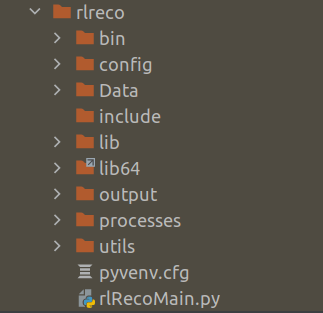
III : Build and Deploy Data Science Products : Looking under the hood of Machine translation model – LSTM Forward Propagation

Source : How stuff works

“Look deep into nature and you will understand everything better”

Albert Einsteen

This is the third part of our series on building a machine translation application. In the last two posts we understood the solution landscape for machine translation and also explored different architecture choices for sequence to sequence models. In this post we take a deep dive into the dynamics of the model we use for machine translation, LSTM model. This series consists of 8 posts.

  1. Understand the landscape of solutions available for machine translation
  2. Explore sequence to sequence model architecture for machine translation.
  3. Deep dive into the LSTM model with worked out numerical example.( This post)
  4. Understand the back propagation algorithm for a LSTM model worked out with a numerical example.
  5. Build a prototype of the machine translation model using a Google colab / Jupyter notebook.
  6. Build the production grade code for the training module using Python scripts.
  7. Building the Machine Translation application -From Prototype to Production : Inference process
  8. Build the machine translation application using Flask and understand the process to deploy the application on Heroku

Dissecting the LSTM network

I was recently reading the book ” The Agony and the Ecstacy’ written by Irving Stone. This book was about the Reniassence genius, master sculptor and artist Michelangelo. When sculptuing human forms, in his quest for perfection , Miehelangelo used to spent months dissecting dead bodies to understand the anotomy of human beings. His thought process was that unless he understood in detail how each fibre of human muscle work, it would be difficult to bring his work to life. I think his experience in dissecting and understanding the anatomy of the human body has had a profound impact on his masterpieces like Moses, Pieta,David and his paintings in the Sistine Chapel.

Michaelangelo’s Moses,Pieta, David & Sistine chapel frescos

I too believe in that philosophy of getting a handle on the inner working of algorithms to really appreciate how they can be used for getting the right business outcomes. In this post we will understand the LSTM network in depth and explore its therotical underpinnings. We will see a worked out example of the forward pass for a LSTM network.

Forward pass of the LSTM

Let us learn the dynamics of the forward pass of LSTM with a simple network. Our network has two time steps as represented in the below figure. The first time step is represented as 't-1' and the subsequent one as time step 't'

Let us try to understand each of the terms in the above network. A LSTM unit receives as its input the following

  1. c<t-2> : The cell state of the previous time step
  2. a<t-2> : The output from the previous time step
  3. x<t-1> : The input of the present time step

The cell state is the unit which is responsible for trasmitting the context accross different time steps. At each time step certain add and forget operations happens to the context transmitted from the previous time steps. These Operations are controlled through multiple gates. Let us understand each of the gates.

Forget Gate

The forget gate determines what part of the input have to be introduced into cell state and what needs to be forgotten. The forget gate operation can be represented as follows

Ґf = sigmoid(Wf*[ xt ] + Uf * [ at-1 ] + bf)

There are two weight parameters ( Wf and Uf ) which transforms the input ( xt ) and the output from the previous time step ( at-1) . This equation can be simplified by concatenating both the weight parameters and the corresponding xt & at vectors to a form given below.

Ґf = sigmoid(Wf *[xt , at-1] + bf)

Ґf is the forget gate

Wf is the new weight matrix got by concatenating [ Wf , Uf]

[xt , at-1]is the concatenation of the current time step input and the previous time step output from the

bf is the bias term.

The purpose of the sigmoid function is to quash the values within the bracket to act as a gate with values between 0 & 1 . These gates are used to control the flow of information. A value of 0 means no information can flow and 1 means all information needs to pass through. We will see more of those steps in a short while.

Update Gate

Update gate equation is similar to that of the forget gate . The only difference is the use of a different weight for this operation.

Ґu = sigmoid(Wu *[xt , at-1] + bu)

Wu is the weight matrix

Bu is the bias term for the update gate operation

All other operations and terms are similar to that in the forget gate

Input activation

In this operation the input layer is activated using a tanh non linear activation.

C~ = tanh(Wc *[x , a] + bc)

C~ is the input activation

Wc is the weight matrix

bc is the bias term which is added.

operation converts the terms within the bracket to values between -1 & 1 . Let us take a pause and analyse why a sigmoid is used for the gate operations and tanh used for the input activation layers.

The property of sigmoid is to give an output between 0 and 1. So in effect after the sigmoid gate, we either add to the available information or do not add any thing at all. However for the input activation we also might need to forget some items. Forgetting is done by having negative values as output. tanh layer ranges from -1 to 1 which you can see have negative values. This will ensure that we will be able to forget some elments and remember others when using the tanh operation.

Internal Cell State

Now that we have seen some of the building block operations, let us see how all of them come together. The first operation where all these individual terms come together is to define the internal cell state.

We already know that the forget and update gates which have values ranging between 0 to 1, act as controllers of information. The forget gate is applied on the previous time step cell state and then decides which of the information within the previous cell state has to be retained and what has to be eliminated.

Ґf * C<t-1>

The update gate is applied on the input activation information and determines which of these information needs to be retained and what needs to be eliminated .

Ґu * C~

These two informations block i.e the balance of the previous cell state and the selected information of the input activation are combined together to form the current cell state. This is represented in the equation as below.

C<t> = Ґu * C~ + Ґf * C<t-1>

Output Gate

Now that the cell state is defined it is time to work on the output from the current cell. As always, before we define the output candidates we first define the decision gate. The operations in the output gate is similar to the forget gate and the update gate .

Ґo = sigmoid(Wo *[x , a] + bo)

Wo is the weight matrix

Bo is the bias term for the update gate operation

Output

The final operation within the LSTM cell is to define the output layer. The output candidates are determined by carrying out a tanh() operation on the internal cell state. The output decision gate is then applied on this candidate to derive the output from the network. The equation for the output is as follows

a<t> = tanh(C<t>) * Ґo

In this operation using the tanh operation on the cell state we arrive at some candidates to be forgotten ( -ve values) and some to be remembered or added to the context. The decision on which of these have to be there in the output is decided by the final gate, output gate.

This sums up the mathematical operations within LSTM. Let us see these operations in action using a numerical example.

Dynamics of the Forward Pass

Now that we have seen the individual components of a LSTM let us understand the real dynamics using a toy numerical examples.

The basic building block of LSTM like any neural network is its hidden layer, which comprises of a set of neurons. The number of neurons within its hidden unit is a hyperparameter when initializing a LSTM. The dimensions of all the other components of a LSTM depends on the dimension of the hidden unit. Let us now define the dimensions of all the components of the LSTM.

ComponentDescriptionDimension of the component
LSTM hidden unitSize of the LSTM unit ( No of nuerons of the hidden unit)(n_a)
mNumber of examples(m)
n_xSize of inputs(n_x)
C<t-1>Dimension of previous cell state(n_a , m)
a<t-1>Dimensions of previous output(n_a , m)
x<t>Current state input(n_x , m)
[ x<t> , a<t-1> ]Concatenation of output of previous time step and current time step input(n_x + n_a, m)
Wf, Wu, Wc, WoWeights for all the gates(n_a , n_x + n_a)
bf bu bc b0Bias term for all operations(n_a ,1)
WyWeight for the output(n_y , n_a)
byBias term for the output(n_y ,1)

Let us now look at how the dimensions of the different outputs evolve after different operations within the LSTM .

Please note that when we do matrix multiplications with two matrices of size ( a,b) * (b,c) we get an output of size (a,c)
ComponentOperationDimensions
Ґf : Forget gatesigmoid(Wf * [x , a] + bf)(n_a, n_x + n_a) * (n_x + n_a ,m) + (n_a,1) = > (n_a , m).
Sigmoid is applied element wise and therefore dimension doesn’t change.
* : denotes matrix multiplication
Ґu: Update gatesigmoid(Wu *[x , a] + bu)(n_a, n_x+n_a ) * (n_x+n_a,m) + (n_a,1) = > (n_a , m)
C~: Input activationtanh(Wc *[x , a] + bc)(n_a, n_x + n_a) * (n_x + n_a , m) + (n_a, 1) = > (n_a, m).
Ґo : Output gate(Wo *[x , a] + bo)(n_a, n_x+n_a ) * (n_x + n_a ,m) + (n_a,1) = > (n_a,m)
C<t> : Current stateҐu x C~ + Ґf x C<t-1>(n_a, m) x (n_a, m) + (n_a, m) x (n_a, m) = > (n_a, m)
x: denotes element wise multiplication
a<t> : Output at current time steptanh(C<t>) x Ґo(n_a, m) x (n_a, m) => (n_a, m).

Let us do a toy example with a two time step network with random inputs and observe the dynamics of LSTM.

The network is as defined below with the following inputs for each time steps. We also define the actual outputs for each time step. As you might be aware the actual output will not be relevant during the forward pass, however it will be relevant during the back propogation phase.

Toy example with LSTM

Our toy example will have two time steps with its inputs (Xt) having two features as shown in the figure above. For time step 1 the input is Xt-1 = [0.4,0.3] and for time step 2 the input is Xt = [0.2,0.6]. As there are two features, the size of the input unit is n_x = 2. Let us tabulate these values

VariableDescriptionValuesDimension
X t-1Input for the first time step[0.4, 0.3](n_x , m)
= > (2 ,1)
XtInput for the second time step[0.2, 0.6](n_x , m)
= > (2 ,1)

For simplicity the hidden layer of the LSTM has only one unit which means that n_a = 1. For the first time step we can assume initial values for the cell state Ct-2 and output from previous layers at-2 as ‘0’.

VariableDescriptionValuesDimension
Ct-2Initial cell state[0](n_a , m) = > (1 ,1)
at-2Initial output from previous cell[0](n_a , m) = > (1 ,1)

Next we have to define the values for the weights and biases for all the gates. Let us randomly initialize values for the weights. As far as the weights are concerned, what needs to be carefully defined are the dimensions of the weights. In the earlier table where we defined the dimensions of all the components we defined the dimension of the weights as (n_a , n_x + n_a). But why do the weights be with these dimensions ? Let us dig deeper.

From our earlier discussions we know that the weights are used to get the sigmoid gates which are multiplied element wise on the cell states. For example

Ct = Ґu * C~ + Ґf * Ct-1

or

at = tanh(Ct) * Ґo.

From these equations we see that the gates are multiplied element wise to the cell states. To do an element wise multiplication, the gates have to be of the same dimensions as the cell state, i.e. (n_a, m). However, to derive the gates, we need to do a dot product of the initialised weights with the concatenation of previous cell state and the input vector [n_x+n_a]. Therefore to get an output dimension of (n_a, m) we need to have the weights with dimensions of (n_a , n_x + n_a) so that the equation of the gate ,Ґf = sigmoid(Wf *[x , a] + bf), generates an output of dimension of (n_a ,m ). In terms of matrix multiplication dynamics this equation can be represented as below

Having seen how the dimensions are derived, let us tabulate the values of weights and its biases .Please note that the values for all the weight matrices and its biases are randomly initialized.

WeightDescriptionValuesDimension
Wf,Forget gate Weight[-2.3 , 0.6 , -0.13 ]
[n_a , n_x + n_a] => (1,3)
bfForget gate bias[0.51][n_a] => 1
WuUpdate gate weight[1.51 ,-0.61 , 1.31][n_a , n_x + n_a] => (1,3)
buUpdate gate bias[1.30][n_a] => 1
Wc,Input activation weight[0.82,-0.57,-0.13][n_a , n_x + n_a] => (1,3)
bcInternal state bias[-0.57][n_a] => 1
WoOutput gate weight[-0.75 ,-0.95 , -0.34][n_a , n_x + n_a] => (1,3)
b0Output gate bias[-0.46][n_a] => 1

Having defined the initial values and the dimensions let us now traverse through each of the time steps and unravel the numerical example for forward propagation.

Time Step 1 :

Inputs : X t-1 = [0.4, 0.3]

Initial values of the previous state

at-2= [0] ,

Ct-2 = [0]

Forget gate => Ґf = sigmoid(Wf *[x , a] + bf) =>

= sigmoid( [-2.3 , 0.6 , -0.13 ] * [0.4, 0.3, 0] + [0.51] )

= sigmoid(((-2.3 * 0.4) + (0.6 * 0.3) + (-0.13 * 0 )) + 0.51)

= sigmoid(-0.23) = 0.443

Please note  sigmoid (-0.23) = 1/(1 + e(-(-0.23))

Update gate => Ґu = sigmoid(Wu *[x , a] + bu) =>

= sigmoid( [1.51 ,-0.61 , 1.31] * [0.4, 0.3, 0] + [1.30] )

= sigmoid((1.51 * 0.4) + (-0.61 * 0.3) + (1.31 * 0 ) + 1.30)

= sigmoid(1.721) = 0.848

Input activation => C~ = tanh(Wc *[x , a] + bc)

= tanh( [0.82,-0.57,-0.13] * [0.4, 0.3, 0] + [-0.57] )

= tanh (((0.82 * 0.4) + (-0.57 * 0.3) + (-0.13 * 0 )) + -0.57)

= tanh(-0.413) = -0.39

Please note tanh = ex – e-x / ( ex + e-x) where x = -0.413
= e-0.413 – e-(-0.413) / ( e-0.413 + e-(-0.413)) = -0.39

Output Gate => Ґo = sigmoid(Wo *[x , a] + bo)

= sigmoid( [-0.75 ,-0.95 , -0.34] * [0.4, 0.3, 0] + [-0.46] )

= sigmoid(((-0.75 * 0.4) + (-0.95 * 0.3) + (-0.34 * 0 )) + -0.46)

= sigmoid(-1.045)= 0.26

We now have all the components required to calculate the internal state and the outputs

Internal state => Ct-1 = Ґu * C~ + Ґf * Ct-2

= 0.848 * -0.39 + 0.443 * 0

= -0.33

Output => at-1 = tanh(Ct-1) * Ґo

= tanh(-0.33) * 0.26 = -0.083

Let us now represent all the numerical values for the first time step on the network.

With the calculated values of time step 1 let us proceed to calculating the values of time step 2

Time Step 2:

Inputs : Xt = [0.2, 0.6]

Values of the previous state output and cell states

at-1 = [-0.083]

Ct-1 = [-0.33]

Forget gate => Ґf = sigmoid(Wf *[xt , at-1] + bf) =>

= sigmoid( [-2.3 , 0.6 , -0.13 ] * [0.2, 0.6, -0.083] + [0.51] )

= sigmoid(((-2.3 * 0.2) + (0.6 * 0.6) + (-0.13 * -0.083 )) + 0.51)

= sigmoid(0.421) = 0.60

Update gate => Ґu = sigmoid(Wu *[xt , at-1] + bu) =>

= sigmoid( [1.51 ,-0.61 , 1.31] * [0.2, 0.6, -0.083] + [1.30] )

= sigmoid(((1.51 * 0.2) + (-0.61 * 0.6) + (1.31 * -0.083 )) + 1.30)

= sigmoid(1.13) = 0.755

Input activation => C~ = tanh(Wc *[xt , at-1] + bc)

= tanh( [0.82,-0.57,-0.13] * [0.2, 0.6, -0.083] + [-0.57] )

= tanh(((0.82 * 0.2) + (-0.57 * 0.6) + (-0.13 * -0.083 )) + -0.57)

= tanh(-0.737) = -0.63

Output Gate => Ґo = sigmoid(Wo *[x , a] + bo)

= sigmoid( [[-0.75 ,-0.95 , -0.34] * [0.2, 0.6, -0.083] + [-0.46] )

= sigmoid(((-0.75 * 0.2) + (-0.95 * 0.6) + (-0.34 * -0.083 )) + -0.46)

= sigmoid(-1.15178)= 0.24

Internal state => Ct = Ґu * C~ + Ґf * Ct-1

= 0.755 * -0.63 + 0.60 * -0.33

= -0.674

Output => at = tanh(Ct) * Ґo

= tanh(-0.674) * 0.24 = -0.1410252

Let us now represent the second time step within the LSTM unit

Second Time step

Let us also look at both the time steps together with all its numerical values

This sums a single forward pass for the LSTM. Once the forward pass is calculated the next step is to determine the error term and the backpropagating the error to determine the adjusted weights and bias terms. We will see those steps in the back propagation steps, which will be covered in the next post.

Go to article 4 of this series : Back propagation of the LSTM unit

Do you want to Climb the Machine Learning Knowledge Pyramid ?

Knowledge acquisition is such a liberating experience. The more you invest in your knowledge enhacement, the more empowered you become. The best way to acquire knowledge is by practical application or learn by doing. If you are inspired by the prospect of being empowerd by practical knowledge in Machine learning, I would recommend two books I have co-authored. The first one is specialised in deep learning with practical hands on exercises and interactive video and audio aids for learning

Deep Learning Workshop

This book is accessible using the following links

The Deep Learning Workshop on Amazon

The Deep Learning Workshop on Packt

The second book equips you with practical machine learning skill sets. The pedagogy is through practical interactive exercises and activities.

The Data Science Workshop Book

This book can be accessed using the following links

The Data Science Workshop on Amazon

The Data Science Workshop on Packt

Enjoy your learning experience and be empowered !!!!

II : Build and Deploy Data Science Products : Exploring Sequence to Sequence architecture for Machine Translation.

Source:curiodissey.org

“A sequence works in a way a collection never can”

George Murray

This is the second part of our series on building a machine translation application. In this post we explore sequence to sequence model architecture in greater depth. This series consists of the following eight posts.

  1. Understand the landscape of solutions available for machine translation
  2. Explore different sequence to sequence model architecture for machine translation.( This post)
  3. Deep dive into the LSTM model with worked out numerical example.
  4. Understand the back propagation algorithm for a LSTM model worked out with a numerical example.
  5. Build a prototype of the machine translation model using a Google colab / Jupyter notebook.
  6. Build the production grade code for the training module using Python scripts.
  7. Building the Machine Translation application -From Prototype to Production : Inference process
  8. Build the machine translation application using Flask and understand the process to deploy the application on Heroku

In the first part of this series we surveyed the solution landscape of machine translation applications and understood why sequence to sequence models are best suited for machine translation. In this post we will go little deeper and expore architectur choices for sequence to sequence models. We will specifically look at the encoder – decoder architecture which will be the specific architecture we will use for machine translation. We will also get a glimpse of the LSTM model which is the building block for the machine translation application we would be building.

We already know that the problem of machine translation entails deciphering sequence of words in a source language to predict a sequence of target language. For example if you look at the following input German sequence

Ich freue mich darauf, etwas über maschinelle Übersetzung zu lernen.
Which can be translated to 

I look forward to learning about machine translation

From these sequences we can observe the following.

  1. The length of input sequence and the length of the target sequence are different
  2. There is no one to one mapping between words from the input language to the target language
  3. There is dependence on the context which needs to be learned from the input language to get the best translation for the target language.

The inherent complexities like these in machine translation made models like multi layer perceptron ineffective for machine translation. The need of the hour was a model architecuture which was capable of looking accross sequences of words and understand the context of the source language to effectively translate to the target language. This is where Recurrent Neural Networks (RNNs) became popular for solving machine translation problems. Let us now take a deeper look at RNNs.

Recurrent Neural Networks ( RNNs)

RNN models which fall under the category of Sequence to sequence models are designed to learn the context of any input language. But why is learning the context important ? Let us understand this with a simple example.

Suppose we are predicting the next character in a sequence for the string “Happy B….”. We need to predict the next character after the letter ‘B’. For the time being let us assume that we are ignoring the word “Happy” falling before the letter B. In such a scenario the best bet would be to look for all the words which start with “B” and choose the word which is most frequent. Let us say the most frequent word starting with “B” is the word “Baby”. So the next character which will be predicted would be the letter “a”. Now let us imagine that we started looking at all the characters which preceeds B. Given the information about the preceeding charachters “H”,”A”,”P”,”P”,”Y” “B”, then the probability of predicting ‘i’ would be the highest since the word “Birthday” is the most likely word given the context “Happy B” . This is where the concept of context becomes very significant. Language translation depends a lot on the context and therefore there was the need to adopt an architecture where context was learned. Sequence to sequence models like RNNs became an obvious choice.

The dynamics of RNN can be represented as above. The circular nodes represents each time step in the sequence. Each of the time steps receives an input represetend as the arrow pointing upwards. In this context each letter in the string becomes the input at each time step. With each character input the output or the prediction is represented at the top. So given the letter ‘H’ the prediction is the letter ‘A’. Once the letter ‘A’ is predicted it becomes the next input and we need to predict the next letter given the context that we had the letter ‘H’ at the previous time step. At each time step we can also see that there is an arrow which points to the right. This is the information or context each time step passes on to the subsequent time step enabling it to predict contextually.

Unlike vanilla neural networks where each layer has a set of parameters, RNNs shares the same parameters accross all the time steps. Because the parameters are shared accross all time steps, the implementation of back propogation is a little different for the case of RNNs. The type of back propogation implemented in RNN is called Back propogation through time(BPTT). We will be covering the dynamics of BPTT with a toy example in the fourth blog of this series.

Earlier we saw that the RNN keeps the context of the previous time steps in memory and applies it when predicting for the time step in consideration. However in practice vanilla RNNs fails when it encounters large sequences. The parameters blow up or shrink to very small values in such cases. These scenarios are called exploding gradients and vanishing gradients respectively. So in practice a RNN can only leaverage few time steps to extract the context. To over come these shortcomings different variations sequence to sequence models are used. One such variation is the LSTM Long Short Term Memory network. We will be using the LSTM network in our application for machine translation. Let us first look at what an LSTM looks like.

Long Short Term Memory Network ( LSTM)

LSTMs, like vanialla RNNs, have the recurrent connections which entails that the context from the previous time steps are passed on to the current time step when generating an output. However we discussed in the previous section on RNN that they suffer from a major problem of exploding or vanishing gradients when encountered with long sequences. This shortcoming was overcome by building a memory block in LSTMs.

LSTM Network

The LSTM has three information sources,two from previous time steps and one from the current time step. The first one is the cell state denoted by ‘Ct’ . The cell state transmits the information about the context from the previous cell states. The second information which passes from the previous layer is its output denoted by ‘ht’. The third is the input for the present time step. In our context of predicting characters, the input from the time step t1 is the letter ‘H’. All these inputs get processed within the LSTM layer enabling it to have memory for longer sequences. We will be having a very detailed worked out example on the dynamics of LSTM in the next post.

An important part of building applications using sequence to sequence models is the selection of right architecture for the use case. Let us now look at different architecture choices for different use cases.

Network Architecture for Sequence to Sequence Models

There are different architecture choices for sequence to sequence models which varies according to the use case. Some of the prominent ones are

  • Many to one architecture

This is architecture is ideal for use cases like sentiment analysis where seeing a sequences of words in a string, predict a single output which in this case is the sentiment.

  • One to many architecture

This architecture is well suited for use cases like image translation. In such use cases, an image is provided as the input and a sequence of words describing the image is predicted as output. In this case there is one input and multiple outputs.

One to many architecture
  • Many to many architecture

This is the architecuture which is ideal for a use case like Machine translation. In this architecture, a sequence of words is given as input and the output is also another sequence of words. The below figure is a representation of German to English translation using the many to many architecture.

This architecture is also called Encoder-Decoder architecture. We will see the encoder-decoder architecture in greater depth during our prototype building phase.

Wrapping up

Its now time to wrap up our discussion on sequence to sequence. In this post we had an introduction on RNNs and in specific LSTM which we will be using for the machine translation application. We also looked at different types of architecture choices and identified the encoder-decoder architecture which will be more suited for our use case.

Having seen the conceptual level introduction of sequence to sequence models its time to look under the hood of the LSTM model. In the next post we will work out a toy numerical example and understand in greater depth how LSTM works.

Go to article 3 of the series : Deep dive into the LSTM model with worked out numerical example.

Do you want to Climb the Machine Learning Knowledge Pyramid ?

Knowledge acquisition is such a liberating experience. The more you invest in your knowledge enhacement, the more empowered you become. The best way to acquire knowledge is by practical application or learn by doing. If you are inspired by the prospect of being empowerd by practical knowledge in Machine learning, I would recommend two books I have co-authored. The first one is specialised in deep learning with practical hands on exercises and interactive video and audio aids for learning

Deep Learning Workshop

This book is accessible using the following links

The Deep Learning Workshop on Amazon

The Deep Learning Workshop on Packt

The second book equips you with practical machine learning skill sets. The pedagogy is through practical interactive exercises and activities.

The Data Science Workshop Book

This book can be accessed using the following links

The Data Science Workshop on Amazon

The Data Science Workshop on Packt

Enjoy your learning experience and be empowered !!!!
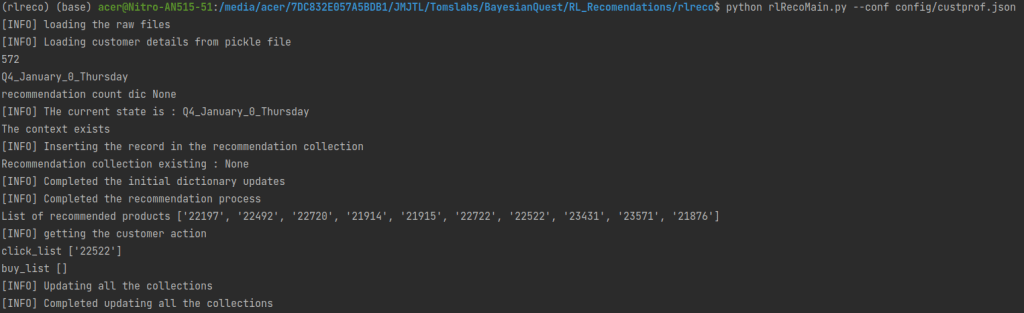
I : Build and Deploy Data Science Products : A Practical Guide to Building a Machine Translation Application.

Source : pintrest.com

“Investment in Knowledge pays the best dividend”

Benjamin Franklin

I was searching for a good quote to start this blog and that’s when I came across the above quote by Benjamin Franklin. I think the above quote best sums up what we are going to achieve in this series. We are going to invest our time in gaining an end to end perspective of a use case. We would be embarking on an exciting journey where we will get to experience a machine learning use case in its full glory, right from its theoretical base to building an application and deploying it. Our learning objectives are summed up in the below figure.

This journey is going to be a 8 post series. In this series we will take a use case, understand the solution landscape and its evolution, explore different architecture choices, look under the hood of the architecture to understand the nuts and bolts, build a prototype, convert the prototype into production ready code, build an application from the production ready code and finally understand the process for deploying the application .The use case we will be dealing with will be Machine Translation. By the end of the series you would have working knowledge on how to build and deploy a Machine translation application, which translates, German sentences into English. This series will comprise of the following posts.

  1. Understand the landscape of solutions available for machine translation ( This post)
  2. Explore sequence to sequence model architecture for machine translation.
  3. Deep dive into the LSTM model with worked out numerical example.
  4. Understand the back propagation algorithm for a LSTM model worked out with a numerical example.
  5. Build a prototype of the machine translation model using a Google colab / Jupyter notebook.
  6. Build the production grade code for the training module using Python scripts.
  7. Building the Machine Translation application -From Prototype to Production : Inference process
  8. Build the machine translation application using Flask and understand the process to deploy the application on Heroku

The first four posts lays the theoretical base and in the subsequent 4 posts we will see how the theory can be put to action. You can also watch videos of this series on Youtube.

Let us get started on this journey with an introduction to machine translation.

Introduction to Machine Translation

Language translation has always been a tough nut to crack. What makes it tough is the variations in structure and lexicon when one traverses from one language to the other. For this reason the problem of automated language translation or Machine translation has fascinated and inspired the best minds. Over the past decade some trailblazing advances have happened within this field. We have now reached a stage where machine translation has become quite ubiquitous. These technologies are now embedded in all our devices, mobiles, watches, desktops, tablets etc and have become an integral part of our every day life. A common example is the Google Translate service which has the capability to identify our input languge and subsequently translate it to multitudes of languages.

Machine translation technologies have transcended different approaches before reaching the state we are in at present. Let us take a quick look at the evolution of the solution landscape of machine translation.

Evolution of Solution landscape for Machine Translation

The journey to the current state of the art translation technologies tells a fascinating tale of the strides in machine learning.

The evolution of machine translation can be demarcated to three distinct phase. Let us look at each one of them and understand its distinct characteristics.

Classical Machine Translation

Classical machine translation methods relies heavily on linguisitc rules and deep domain knowledge to translate from a source language to a target language. There are three approaches under this method.

Direct Translation

“Direct translation is based on a large bilingual dictionary;each entry in the dictionary can be viewed as a small program whose job is to translate one word”

Source : Speech and Language processing : Daniel Jurafsky, James H Martin: 2nd Edition.

As the name suggests this method adopts a word-to-word translation of the source language to the target language. After the word to word translation a re-ordering of the translated words are required based on linguistic rules formulated between the source language and target language.

Let us look at an example

Example Source : Speech and Language processing : Daniel Jurafsky, James H Martin: 2nd Edition.

In the above example, the first two boxes represent the source English sentence and the final translated Spanish sentences respectively. The last box is a word to word mapping of the translated Spanish sentence to its English conuterpart. We can see how the word to word translation has been transformed by re-ordering to form a coherent sentence in the target language. These transformations are aided by comprehensive linguistic rules and deep domain knowledge.

Transfer Method

In the example we saw on direct translation method, we saw how the mapping of the English words for the translated Spanish sentence had a complete different ordering from the source English sentence. Every language has such structural charachteristics inherent in them. Transfer methods looks at tapping the structural differences between different language pairs.

Unlike the direct method where there is word to word tranlation followed by re-ordering, transfer methods relies on codification of the contrastive knowledge i.e difference between languages, for translation from the source to the target language. Similar to the direct method, this method also relies on deep domain knowledge and codification of complex rules governing language construction.

Interlingua Method

Image source : in.pinterest.com

The intelingua method works on a completely different approach to the word to word and contrastive translations methods we have already seen.

“The interlingua intuition is to treat translation as a process of extracting meaning of the input and then expressing the meaning in the target language.”

SOURCE : Speech and Language processing : Daniel Jurafsky, James H Martin: 2nd Edition.

The intelingua method resonates very closely to the process by which human translators work. When translating , a human translator understands the meaning of the source sentence and translate it to the target language so that the essence of the conversation is not lost. There might not be a word to word mapping of the source sentence and translated sentence. However the meaning would remain intact. This is the principle adopted in the intelingua methods. Like the other two methods in the classical approach, intelingua method also depends on the rich codification of rules and dictionaries

The classical machine translation methods were effective for a large set of use cases. However the classical methods relied on comprehensive set of rules and large dictionaries. Building such knowledge base was a mammoth task requiring specialised skills and expertise. The complexity increased many fold when designing systems able to handle translation of multiple languages. There was a need for an approach different from the domain intensive classical techniques. This led to the rise in popularity of the statistical methods in machine translation.

Statistical Machine Translation

When we explored the classical methods we understood the over dependence on domain knowledge in creating linguistic rules and dictionaries. However it was also a fact that no amount of domain knowledge was enough to handle the intricate nuances of languages. What if phrases, idioms and specialised usages in a language do not have any parallels in another language ? In such circumstances what a linguist would do is to go for the closest match given the source language.

This idea of selecting the most probable sentence in the target languge given a sentence in source language is what is leaveraged in statistical machine translation.

“This provides us with a hint to do Machine Translation. We can model the goal of translation as the production of an output that maximizes some value function that represents the importance of both faithfulness and fluency.”

SOURCE : SPEECH AND LANGUAGE PROCESSING : DANIEL JURAFSKY, JAMES H MARTIN: 2ND EDITION

Statistical methods builds probabilistic models that aims at maximizing the probability of the target sentence which best captures the essence of the source sentence. In probability terms we can represent this as

argmaxT P(T|S)

where T and S are the target and source languages respectively. The above form is the representation of a posterior probability as per Bayes Theorm. This is proportional to

= argmaxT P(S|T) * P(T)

The first term ( P(S|T) ) is called the translation model and can be interpreted as the likelihood of finding the source sentence given the target sentence. The second term P(T) is called the language model which represents the conditional probability of a word in the languge given some preceeding words.

The statistical model aims at finding the conditional probabilities of words within a corpora and using these probabilities find the best possible translation. Statistical machine translation models make use of large corpora or text available on the source and target languages. Eventhough statistical methods were effective, they also had some weaknesses. This method was predominantly focussed on phrases being translated thereby compromising the broder context of the target language. This method struggled when required to translate to a target language which was different in context from the source context. These shortcomings paved the way to advances in other methods which were more robust to retaining the context between the source and target languages.

Neural Machine Translation

Neural Machine Translation

Neural machine translation is a different approach where artifical neural networks are used for machine translation. In the statistical machine translation approaches we saw that it uses multiple components like the translation model and language model to do the translations.In NMT models the entire sentence is a single integrated model. In term of approach there isnt drastic deviations from the statistical approaches. However NMTs uses vector representations of words and sentences, which helps in retaining the context of the source and target sentences.

There are different approaches for machine translation using artificial neural networks. One of the earlier approach was to use a multi layer perceptron or a fully connected network for machine translation. However these models werent effective for large sequences of sentences.

Many shortfalls of the earlier approaches were addressed by the adoption of Recurrent Neural network models (RNNs) for machine translation. RNNs are those class of neural networks suited for sequence data. Languages as you know are manifestations of sequence of words with interdependencies between the words within the sequence. RNNs are capable of handling such interdependencies which made such class of models more suited for machine translation. There are different variations of Sequence models which are used for machine translation like encoder-decoder, encoder-decoder with attention etc. We will be using the encoder-decoder models for building our application and will be dealt with in greater depth in the next post.

The state of the art models for machine translation currently are the Transformer models. Transformer models make use of the concept of attention and then builds on it.

Wrapping up the discussions

In this post we introduced the landscape of machine translation approaches. We got introduced to different generations of machine translations solutions starting from the classical approaches,statistical machine translation and neural machine translation approaches.

In the next post we will dive deep into different types of sequence to sequence models and will understand different architecture choices for implementing sequence to sequence models.

We will continue our discussion in the second part of the series which is on sequence to sequence models. See you there.

Go to article 2 of the series : Explore sequence to sequence model architecture for machine translation.

Do you want to Climb the Machine Learning Knowledge Pyramid ?

Knowledge acquisition is such a liberating experience. The more you invest in your knowledge enhacement, the more empowered you become. The best way to acquire knowledge is by practical application or learn by doing. If you are inspired by the prospect of being empowerd by practical knowledge in Machine learning, I would recommend two books I have co-authored. The first one is specialised in deep learning with practical hands on exercises and interactive video and audio aids for learning

Deep Learning Workshop

This book is accessible using the following links

The Deep Learning Workshop on Amazon

The Deep Learning Workshop on Packt

The second book equips you with practical machine learning skill sets. The pedagogy is through practical interactive exercises and activities.

The Data Science Workshop Book

This book can be accessed using the following links

The Data Science Workshop on Amazon

The Data Science Workshop on Packt

Enjoy your learning experience and be empowered !!!!

Data Science Strategy Safari : Aligning Data Science Strategy to Org Strategy

Strategy_Safari_edited

Back from the days when I was a management student a classic work on strategy,which inspired me was “Strategy Safari” by Henry Mintzberg, Bruce Ahlstrand, and Joseph Lampel.  Strategic Safari, describes different perspectives on strategy as summarised in the attached matrix.

Mintzberg

Figure 1 : Facets of Strategy Formulation

These multiple facets of strategy did play a significant part in defining my perspectives on strategy.There is no doubt that works of other greats in the field like Peter Drucker and Michael Porter  did shape my thinking process and my perspectives on strategic management. However what made this book on top of my favourite list is the different angles through which the field of strategic management was looked at by the authors. The title of this post is derived by drawing inspiration from Mintzberg’s seminal work. In this post, I am attempting to take you on a safari through the data science strategy formulation process.

Data science strategy formulation : The big question

When formulating a data science strategy, a pertinent question one can ask is this. With tremendous strides data science is making in influencing business outcomes, should data science strategy lead organisation strategy or like any other functional strategy, should it be aligned to Organisational strategies ? Well, in my opinion, like any other functional strategy, data science strategy should also be aligned to organisational strategy. Data science domain would have no meaning if it is not used to support the organisation in meeting its overall objectives. And for this very reason I strongly believe that data science strategy has to be derived out of organisation strategy. So the next question is how do we define a data science strategy which is aligned to organisation strategy ? To answer that question let us decipher the strategic alignment framework.

Data science strategy safari : Alignment is the game

Strategic alignment is the process by which an organisation’s competencies,resources and actions are aligned to the planned organisational objectives. Data science has become a very critical competency an organisation have to build, to have an edge in this digitally connected era. However it is equally important that the output from a data science engagement i.e predictions,recommendations, inferential studies et al fits well into the overall scheme of strategic objectives an organisation wishes to pursue. This can be achieved by traversing the processes of the alignment framework. Figure 2 is the depiction of data science strategic alignment framework.

DS_strategic_alliance

Figure 2 : Data Science Strategic Alignment Framework

The strategic alignment framework can be summarised into the following steps

  1. Analyse the critical functions within the business value chain.
  2. Within each function, identify critical performance indicators.
  3. From each of the performance indicators derive predictive or inferential use cases which will help in realisation of those performance indicators. Create a web of such use cases which are aligned to each of those performance indicators.
  4. For each of the use case, identify business factors which influence that particular use case.
  5. For each of the factor identify related data points
  6. Identify the systems and subsystems which generate these data points and figure out ways to connect them to implement the use case.

These steps can be demarcated based on its value as “Strategic alignment” steps and “Operational alignment” steps. The first four belong to the first category and the remaining two to the latter.

Let us see the manifestation of the strategic alignment framework for the case of an insurance company. Let us take the case of  a single function within the value chain i.e ‘Customer Management’.

Insurance_safari

Figure 3 : Alignment process for an Insurace company

The trail for analysis for the customer management function is as depicted in figure 3 above. To ensure that data science strategy is aligned to organisational goals, the first step of the process is to identify Key Performance Indicators ( KPI’s )  for each function within the value chain. For the function ‘customer management’ which we are analysing, one critical KPI which has substantial impact on the top line and bottom line is “Improving customer retention rate”.

Having identified a critical performance indicator, alignment to it would entail deriving data science use cases which will help in achievement of this performance indicator . For customer management function a  use case which will help in improving customer retention rate would be to predict probability of premium renewal. The output from this use case can be used for targeted campaigns towards customers who have low probability of renewing premiums, there by enabling achievement of the KPI.  In addition to use cases which are directly related to the KPI we should also derive related use cases which will enable the process of achieving that KPI. For example having known which customer to be targeted, it would also be valuable to know specifics of how to target them,like predicting right time and channel to reach out to target customers or predicting right price point for giving them specific offers.

In a similar fashion, we have to look across all the functions,critical metrics within each function and derive all primary and related predictive use cases. These use cases can be formed into an interconnected web called Strategic Alignment Map ( SAM). Figure 4 below  is a representative SAM depicting the business value chain,its critical functions, interconnected web of use cases and its corresponding category ( Natural Language Processing, Inferential , Machine Learning/Deep Learning, Other AI etc). A comprehensive SAM would form the blue print for aligning data science projects to organisational strategy and also in indicating inter dependencies between different use cases / models. In addition, it will also be an aid to get a view on various data science competencies which are required to add value to an organisation

Strateg_algn_insurance

Figure 4 : Strategic Alignment Map

Now that we have seen the process of creating the SAM, let us dive deeper and decipher the operational aspects of data science strategy.

Once we have an interconnected web of use cases critical for the organisation, the next task would be in getting data acquisition and integration strategies aligned to the overall strategy. To align data acquisition strategies to overall strategy we first have to know what kind of data points are required for implementing the use cases depicted in the SAM and also the characteristics of the data points like formats, velocity, frequency, data systems which generate them etc. A good approach to derive those details is to look at each use case, identify business factors influencing  each of them and then working our way downwards.

For our specific use case i.e predicting renewal rate,  some factors which have a bearing on the renewal rate are

(a) competition (b) pricing (c) customer experience & expectations & (d) channel effectiveness etc

A comprehensive list of  factors like the above have to be identified through close discussions with business/domain teams. Having identified various factors affecting each use case the next task is to identify data points related to each factor. Some of the major data points related to factors influencing renewal rate is depicted in figure 5 below.

Factors

Figure 5 : Data points related to factors

The requirement for data points related to each factor governs data sourcing and integration strategies. From the various data points depicted above we can see that data requirements can be from within the organisation and also from external sources. For example, data points related to competition in all probability will have to be acquired from external sources. Other data points predominantly can be acquired from various systems within the organisation.

In addition, the factor analysis will also help in determining the data types related to each use case. Some of the data types related to the identified data points are as follows

  • Traditional RDBMS data (eg. demographics, customer records, policy transactions etc.)
  • Text data ( customer reviews)
  • Voice ( Call centre data)
  • Log files( channel usage metrics,channel cookies etc.)

To have a comprehensive view of data requirements one will have to look at each factor through different facets. Various facets through which one have to look at each factor is as listed below

  • What are the data points ?
  • How varied are the data types ?
  • What are the sources of data ?
  • Whether external or internal ?
  • What frequency are these generated and captured ?
  • How do we connect them together for implementing the use cases ?

These comprehensive views derived on the data requirements will help in aligning different components of data engineering strategies like data acquisition, data integration, data pre-processing and cleansing, data storage etc to overall organisational strategy.

Wrapping Up

Having seen the data science strategic alignment framework in action one can not help but wonder if we can draw parallels from the framework to some of the perspectives of Mintzberg’s “Strategy Safari”. The process steps encapsulated within this framework have elements of the Learning, Cognitive and Planning Schools of strategy formulation. However at the end of the day this framework, like any other framework, is aimed at structuring one’s though process towards achievement of certain objectives. The objective it aims to accomplish is to ensure that your data science efforts are aligned to overall Organisational goals and strategies.


Applied Data Science Series : Solving a Predictive Maintenance Business Problem – Part III

battery2

In the previous post of the series we discussed the exploratory analysis phase and saw how the combination of domain knowledge and single variable exploration unravels intuitions from the data. In this post we will expand our analysis to multiple variables and then see how intuitions we develop during the exploration phase, can lead to generating new features for modelling.

In the example we were discussing, we were limited to analysis of a single variable i.e conductance. However to get more meaningful insights we have to connect other variables layer by layer to the initial variable which we have analysed to get more insights on the problem. As far as battery is concerned some of the critical variables other than conductance are voltage and discharge. Let us connect these two variables along with the conductance profile to gain more intuitions from the data.

Multivariable_plot

The above figure is a plot which depicts three variables across the same time span. The idea of plotting multiple variables together across a common time span is to unearth any discernible trends we can see together. A cursory look at this plot will reveal some obvious observations.

  1. The fall in current and voltage in conjunction with drop in conductance.
  2. The cyclic nature of the voltage profile.
  3. A gradual drop in the troughs of the voltage profile.

Having made some observations,we now need to ascertain whether these observations can be codified to some definitive trends. This can be verified only by observing plots for many samples of similar variables. By sampling data pertaining to many batteries if we can get similar observations, then we can be sure that we have unearthed some trends explaining behaviors of different variables. However just unearthing some trends will not suffice. We have to get some intuitions from such trends which will help in transforming the raw variables to some form which will help in the modelling task. This is achieved by feature engineering the raw variables.

Feature Engineering

Many a times the given set of raw variables will not suffice for extracting the required predictive power from the model. We will have to transform the raw variables to generate new variables giving us the extra thrust towards better predictive metrics. What transformation has to be done, will be based on the intuitions we build during the exploratory analysis phase and also by combining domain knowledge. For the case of batteries let us revisit some of the intuitions we build during the exploratory analysis phase and see how these intuitions we build can be used for feature engineering.

In the previous post , we found out that precipitous fall in conductance is an indicator of failing health of a battery. So a probable feature we can extract from the conductance variable is the slope of the data points over a fixed time span.The rationale for such a feature is this, if precipitous fall in conductance over time is an indicator of failing health of a battery  then the slope of data points for a battery which is failing will be more steeper than the battery which is healthy. It was observed that through such transformation there was a positive influence on predictive metrics. The dynamics of such transformation is as follows, if we have conductance data for the battery for three years, we can take consecutive three month window of conductance data and take the slope of all the data points and make it as a feature.  By doing this, the number of rows of data for the variable also gets consolidated to much fewer numbers.

Let us also look at another example of feature engineering which we can introduce to the variable, discharge voltage. As seen from the above figure, the discharge voltage follows a wave like profile. It turns out that when a battery discharges the voltage first drops and then it rises. This behavior is called the “Coupe De Fouet” (CDF) effect. Now our thought should be, how do we combine the observed wave like pattern and the knowledge about CDF into a feature ? Again we have to dig into domain knowledge. As per theory on the state of health of batteries there are standards for the CDF profile of a healthy battery and that of a failing battery. These are prescribed by the manufacturer of the battery. For example the manufacturing standards prescribe certain depth to which the voltage will fall during discharge and certain height to which it will go up during a typical CDF effect. The deviance between the observed CDF and the manufacture prescribed standard can be taken as another feature. Similarly we can also think of other features related to voltage, like depth of discharge ( DOD), number of cycles etc. Our focus should be in using the available domain knowledge to transform raw variables into features.

As seen from the above two examples the essence of feature engineering is all about translating the domain knowledge and the trends seen in the data to more meaningful features. The veracity of the models which are built depends a lot on the strength of  the features built. Now that we have seen the feature engineering phase let us now look at modelling strategy for this use case.

Modelling Phase

In the first part of this use case we discussed about labeling strategy for training the model. Since the use case is to predict which battery would fail and at what period of time, we have to look back in time from the failure point label for creating different classes related to periods of failure. In this specific case, the different features were created by consolidating 3 months of data into a single row. So one period before failure would denote 3 months before failure. So if the requirement is to predict failure 6 months prior to when it is likely to happen, then we will have 4 different classes i.e  failure point,one period before failure(3 months prior to failure point) ,two periods before failure and (6 months prior to failure point) & normal state. All periods prior to 6 months can be labelled as normal state.

With respect to modelling, we can spot check with different classification algorithms ( logistic regression, Naive bayes, SVM, Random Forest, XGboost .. etc). The choice of final model will be based on the accuracy metrics ( sensitivity , specificity etc) of the spot checked models. Another aspect which might be useful to note is also that, data set could be highly unbalanced i.e the number of normal battery classes is likely to outnumber the failure classes disproportionately. It will be a good idea to try out class balancing methods on the data set before modelling.

Wrapping up

This post brings down curtains to the three part series on predictive analytics for industrial batteries. Any use case within the manufacturing sector can be quite challenging as the variables involved are very technical and would require lot of interventions from related domain teams. Constant engagement of domain specialist as part of the data science team is very important for the success of such projects.

I have tried my best to write the nuances of such a difficult use case. I have tried to cover the critical elements in the process. In case of any clarifications on the use case and details of its implementation you can connect with me through the following email id bayesianquest@gmail.com. Looking forward to hearing from you.  Till then let me sign off.

Watch this space for more such use cases.