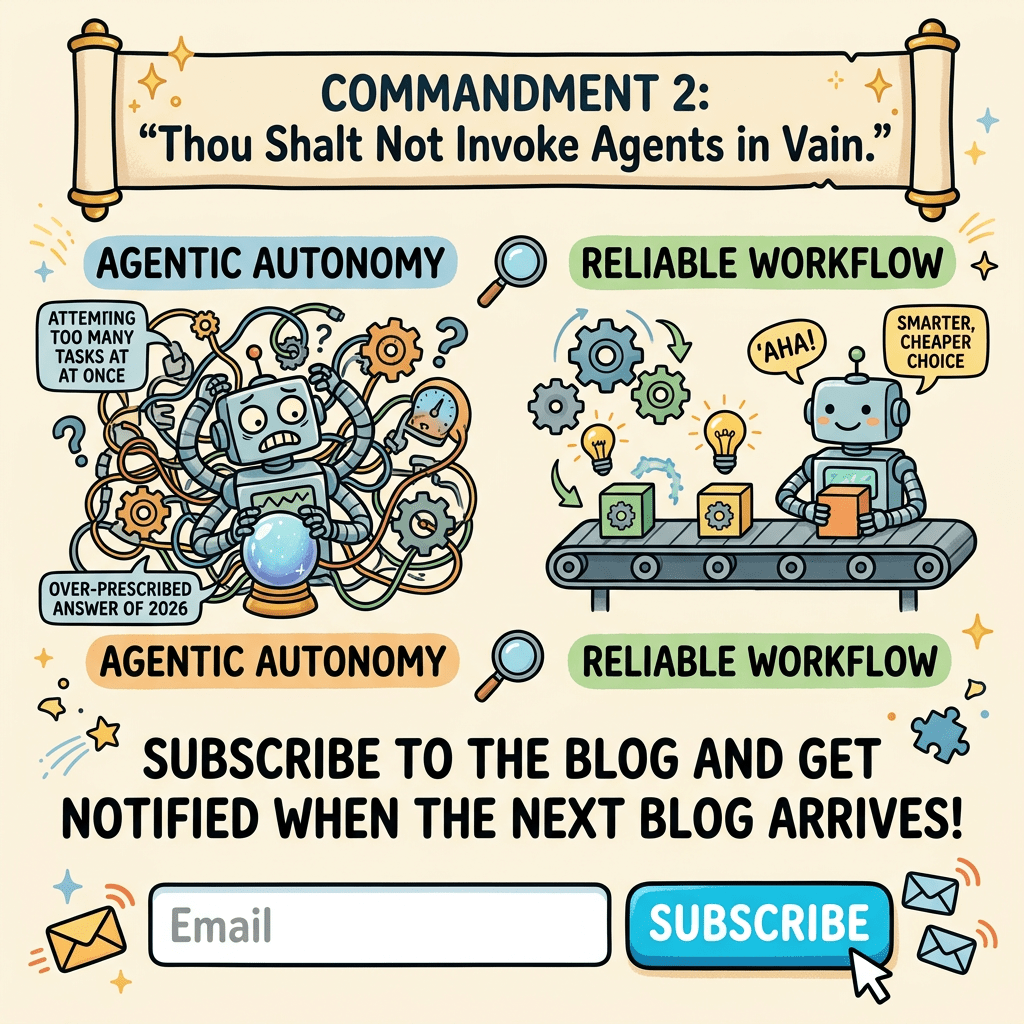
Part 4 of the series The 10 Commandments of AI in Business: Choosing the right intelligence for the right problem.
1.0 Where we left off
Commandment 2 spent a lot of words and one experiment telling you what not to build. We proved that for a known, repeatable process, an agent costs up to 7.4× more, forever, for identical output. We ended on a promise,
“You don’t have an agent problem. You have a workflow which, conveniently, is the subject of the next commandment.”
So here we are. If most business processes are known roads that don’t need an agent behind the wheel, the obvious question is: what should we be driving instead?
The answer is deeply unglamorous, and that’s exactly why it gets overlooked. It’s the single well crafted prompt and the fixed chain of prompts ,the boring, cheap, reliable workhorse that quietly solves the majority of real GenAI problems in business. This commandment is a defence of the humble. Because in the rush to look cuttingedge, teams skip straight past the tool that would have worked.
1.1. The two humble workhorses
Recall the decision lens and hierarchy ladder from Commandment 2. The current commandment lives entirely on the bottom two rungs, the ones everyone is embarrassed to build or state publicly, because they don’t sound impressive in a stand-up.
Rung
What it is ?
When it wins ?
Multi agent
Commandment 2
Rarely
Single agent
Commandment 2
Only when the path is genuinely unknown
Fixed chain
A pre-defined sequence of prompts, wired together by you
A multi step task where you know the steps in advance
Single prompt
One LLM call: instruction in, result out
A single self contained task
The critical distinction from an agent is that, in a workflow, the developer owns the path. You decide step 1 >> step 2 >> step 3. The LLM never asks “what should I do next?”. It only fills in the blank you hand it. No reasoning loop, no growing context, no runaway tokens, no unpredictability. Just a dependable pipeline.
The mindset shift for leaders: stop asking “how do we make this AI impressive?” and start asking “what’s the simplest thing that reliably works?” The measure of a good AI implementation is not its sophistication. It’s the ratio of business value to complexity and the humble workflow wins that ratio far more often than anyone admits.
1.2. The six highest-ROI, lowest-risk patterns
Here’s the good news that the hype obscures. A huge share of everyday business processes collapses into just six patterns, and every one of them is a single prompt or short chain job. Learn to recognise these, and you’ll spot the “why don’t we build an agent?” over reach immediately.
Pattern
What it does
Typical business task
Why it’s low-risk
Summarisation
Long >> short
Condense a contract, a call transcript, a report
Output is checkable against the source
Extraction
Unstructured >> structured
Pull order ID, dates, amounts from an email
Output can be validated against a schema
Classification
Input >> a label
Route a ticket to billing/technical/sales
Finite, testable set of answers
Drafting
Brief >> first draft
Reply, job description, product blurb
A human edits before it ships
Translation
Language A >> language B
Localise copy, translate a query
Mature, well-benchmarked capability
Reformatting
Format A >> format B
Notes >> structured minutes; prose >> table
Deterministic and easy to verify
Notice the common thread in the final column. In all six cases, verifying the output is both cheap and fast. That low verification cost is precisely what minimizes risk. While AI evangelists in your company might rush to “agentise” these patterns, using an agent here is almost always overkill. You aren’t asking the model to make high stakes, autonomous decisions. You’re simply asking it to transform text that a human or automated validator can instantly double check. That makes these tasks the natural domain of simple, humble workflows, which already account for a massive chunk of real business operations.
2.0. Three business processes, and where the humble workflow fits
Let’s honour the recurring principle of this series i.e. Look at the actual process, step by step, and place the tool where the nature of the work belongs.
Example A : Contract summarisation (a single prompt, then a small chain)
The process:
Receive contract >> Read & understand >> Identify key terms >> Summarise obligations & risks >> Flag anything unusual >> Route to the right reviewer
The naive instinct is “build a contract analysis agent.” But look at the path, it never changes. Every contract goes through the same steps in the same order. You can draw the flowchart. So it’s a fixed chain, not an agent:
2. Classify each clause’s risk (standard / review / red-flag)
Classification
One prompt per clause type
3. Summarise obligations in plain English
Summarisation
One prompt
4. Route red-flags to legal
Automation
A rule on the classifier output
Three fixed prompts and a routing rule. No agent. Cheaper, faster, predictable and every step’s output is verifiable against the source contract. The human lawyer stays the accountable reviewer (a nod back to Commandment 1‘s HR-grievance lesson: keep judgement human).
Example B : Ticket triage (you’ve already seen this one win)
This is the exact task we benchmarked in Commandment 2 and it’s the poster child for the humble workflow:
Classify >> look up >> draft >> route.
We proved a fixed 3-call chain did it at 1/7th the cost of the multi-agent version, for identical output. I won’t re-litigate it. I’ll just point at it as Exhibit A. When a process is this predictable, the humble chain isn’t the compromise. It’s the correct answer.
Example C : Meeting-note extraction (a single prompt does most of it)
The process:
Record meeting >> Transcribe >> Extract decisions & action items >> Assign owners & due dates >> Format as minutes >> Distribute
Step
Pattern
Implementation
Transcribe
Speech-to-text. Not an LLM job
A transcription service
Extract decisions, actions, owners, dates
Extraction
One structured prompt
Format as minutes
Reformatting
Same prompt or a template
Distribute
Automation
A rule / integration
The entire “intelligent” part is one well designed extraction prompt. No chain, no agent. This is the kind of task where a team spends three weeks architecting an “agentic meeting assistant” when a single prompt with a good schema would have shipped on day one and worked more reliably.
2.1. The catch: “simple” is not the same as “reliable”
Here’s the honest part, and the reason this commandment isn’t just “use fewer tokens.” A humble workflow is only valuable if it’s trustworthy in production, and a lasily written prompt is not. The gap between a demo prompt and a production workflow is exactly where most simple GenAI projects quietly fail.
The difference comes down to three engineering disciplines. None of them are glamorous, and all of them matter more than the model choice:
1. Structured outputs. Don’t let the model reply in free prose and then try to parse it with fragile string matching. Force it to return a defined schema (JSON with named fields), using the model’s structured-output / function-calling feature. Now the output is machine-usable and “validatable” by design.
2. Templates. Don’t hand-write a fresh prompt each time. Build a prompt template with slots for the variable parts (the contract, the email, the transcript) and a fixed, tested instruction around them. This is what makes the workflow repeatable the same instruction runs on every input.
3. Validation (and retry). After the model responds, check it before trusting it: did it return valid JSON? Are all required fields present? Are dates real dates, amounts real numbers? If validation fails, retry once with the error fed back. This one cheap loop turns a flaky prompt into a dependable component.
The principle: an agent gets its reliability from the model reasoning its way out of trouble (expensively, unpredictably). A humble workflow gets its reliability from you engineering the trouble out in advance, cheaply, and deterministically. That’s not a downgrade. It’s often the more professional choice.
3.0. A small experiment on reliability, not cost
In Commandment 2 we measured cost. It would be lasy to run the same experiment again. But there’s a different axis worth measuring here and it directly answers the “is simple actually trustworthy?”.
The setup:
An extraction task (pull order_id, account_email, and issue_type from support messages), run many times, two ways:
Design A : Naive prompt:“Extract the order id, email and issue from this message.” This is a Free-text reply.
Design B : Engineered workflow: the same task, but with a forced JSON schema + validation + one retry on failure.
We measure not dollars, but parse success rate (did we get valid, complete, machine-usable output?) and consistency(same input >> same output across runs).
Batch of 4 messages × 5 run(s) each.
Metric
A. Naive prompt
B. Engineered workflow
Valid, complete output
8%
100%
Consistent across runs
12%
100%
Downstream integration
Fragile string parsing
Clean, typed fields
Cost per call
same
same
The full runnable script is available on request; I’d encourage running it on your own data, as the naive failure rate depends heavily on your inputs.
The lesson is the mirror-image of Commandment 2. There, the agent’s unpredictability (the ± spread) was the villain. Here, the villain is a lasily-built simple prompt and the hero is a well-engineered one. The humble workflow is not automatically reliable; it becomes reliable when you add structure and validation. And crucially that reliability costs you nothing extra in tokens. It’s pure engineering discipline, not more compute.
This reframes the whole commandment: the choice isn’t “cheap-but-flaky simple workflow” vs. “expensive-but-smart agent.” Done right, it’s “cheap and reliable workflow” vs. “expensive, unpredictable agent.”
For the six patterns above, the humble option wins on both axes.
4.0. Guardrails and lightweight evaluations
One more discipline separates a workflow you can trust from one you merely hope works. Leaders should insist on it before any GenAI goes into a real process:
A small “eval set.”: Take 20-30 real examples with known-correct answers. Every time you change the prompt or the model, run it against this set and measure accuracy. This is the single cheapest insurance policy in AI, and astonishingly few teams do it.
Example : Support ticket classification
A SaaS company routes inbound tickets into five categories: Billing, Bug, Feature Request, Account Access, Other. They, pull 80 historical tickets that a senior support lead has already labelled correctly. This becomes the frozen eval set. Each entry is simply:
Ticket text
Correct label
“My card was charged twice this month”
Billing
“The export button does nothing on Safari”
Bug
“Can you add dark mode?”
Feature Request
When someone tweaks the classification prompt, they run all 80 and get a number: “91% match, up from 87%.” That’s a decision they can defend one which is validated by a proper eval set
Guardrails on the output. Simple checks the workflow enforces automatically: is the classification one of the allowed labels? Is the summary within length? Does the extraction contain no invented fields? Reject and retry if not.
Example: Allowed-label check (classification)
allowed = {"Billing", "Bug", "Feature Request", "Account Access", "Other"}

if model_output not in allowed:

    retry()          # e.g. the model returned "Payment Issue"
The model occasionally invents a label like “Refund”. The guardrail rejects anything outside the five permitted values and forces a retry, so a rogue category can never reach the routing system.
A human checkpoint sized to the stakes. Low-stakes, easily-reversed output (e.g. spot check a draft email). High-stakes or irreversible (e.g. human sign-off, always for a contract clause sent to a client) . This scales the human-in-the-loop idea from Commandment 1.
None of this requires a data-science team or a fancy platform. It requires the discipline to treat a “simple” workflow as a real production component because it is one.
5.0. The decision lens: is this a humble workflow job?
When a GenAI proposal lands on your desk, run it through this before approving anything more complex:
Ask this
If YES
If NO
Is the task one of the six patterns (summarise / extract / classify / draft / translate / reformat)?
Single prompt or chain
Look harder before escalating
Can I check whether the output is correct, cheaply?
Rule of thumb:Before anyone builds an agent, prove that a single prompt and a fixed chain can’t do it. In the majority of business tasks, they can and they’ll be cheaper, faster, and more reliable.
5.1. The business leader’s checklist
The next time a team pitches a GenAI build, ask:
☐ “Which of the six patterns is this really?” : Most business tasks are one of them.
☐ “Can we do this with a single prompt or a fixed chain first?” : Make the simpler option the default, and the complex one justify itself.
☐ “Is the output structured and validated or are we parsing free text and hoping?” : Desired for production reliability.
☐ “Where’s the eval set?” : If they can’t show you 30 examples with known answers, it isn’t production-ready.
☐ “What happens when it’s wrong, and who checks?” : Making human judgement a supreme gate.
☐ “What does this cost per transaction versus the fancier alternative?” : Tie it back to Commandment 2. Simple usually wins on cost and reliability.
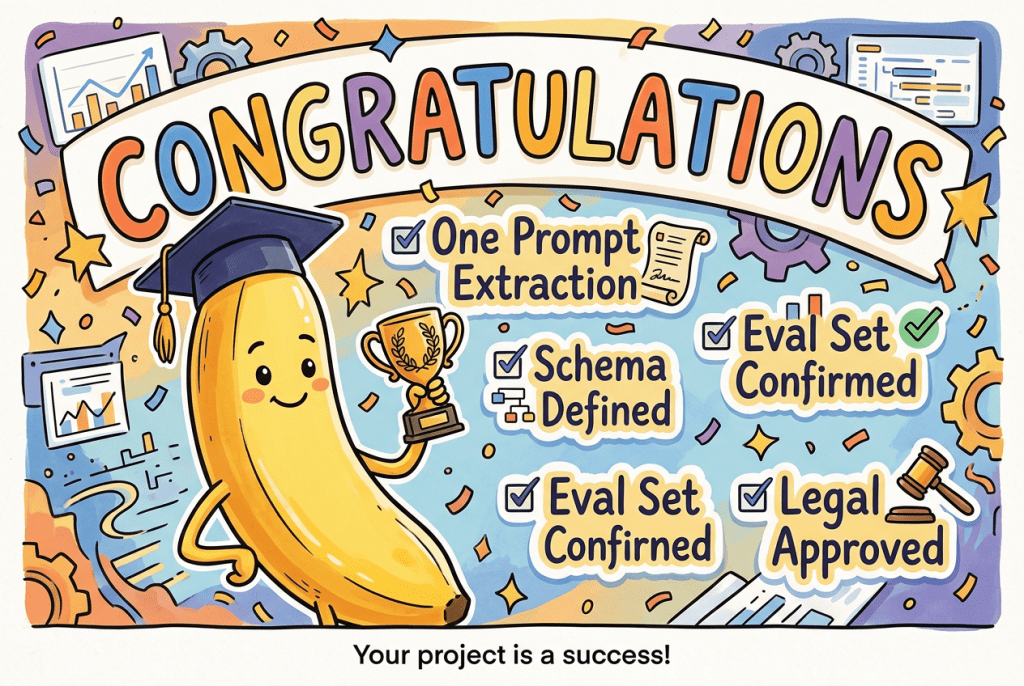
If the honest answers are “it’s an extraction task, one prompt with a schema does it, here’s our eval set, and legal signs off on red-flags” :
Congratulations!!!
You have a humble workflow. Ship it, and put the engineering effort into reliability, not sophistication.
6.0 Conclusion
There is a quiet bias in every organisation right now. Complexity is mistaken for competence. Building an agent feels like real AI work. Writing one excellent, structured, validated prompt feels like… not much. So teams routinely over-build and end up with something more expensive, slower, and less reliable than the humble alternative would have been.
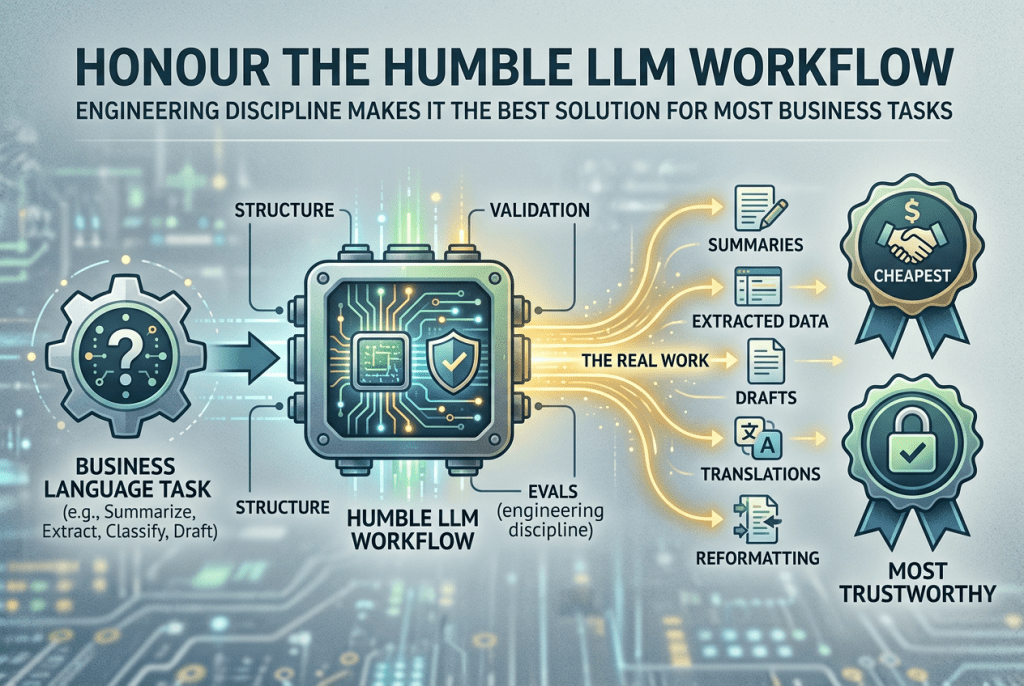
This commandment is a plea to resist that bias. The single prompt and the fixed chain are not the consolation prize you settle for when you can’t afford an agent. For the vast majority of business language tasks, summarising, extracting, classifying, drafting, translating, reformatting: they are the right answer, and done with a little engineering discipline (structure, validation, evals), they are both the cheapest and the most trustworthy thing you can put into production.
Honour the humble LLM workflow. It does more of the real work than anything with a fancier name.
We’ve now defended the simple generative workflow. But there’s an even more overlooked truth. A great many problems people throw generative AI at aren’t language problems at all. They’re prediction problems, or plain automation. In the next post we rehabilitate the unfashionable elders : machine learning, forecasting, and old-fashioned rules and show how to spot a “predictive problem wearing a generative costume.”
In Commandment 1, we established that the process is sovereign . You start with the process, find the constraint, and let the nature of the work at the constraint choose the tool. We had a six-row decision lens, and we noticed that AI Agents were just one row in it reserved for the specific job of coordinating multiple systems.This post zooms into that one row, because it is the single most abused word in business AI today.
Somewhere in your organisation, right now, someone is proposing to solve a problem with “an agent.” Maybe a “multi-agent system.” It sounds sophisticated. It sounds like the future. And in perhaps one case out of five, it’s the right call.
This commandment is about identifying that one case from the other four
2.0 The scene (you’ve lived this one too)
A process is running slowly. Someone has read that agentic systems are the frontier of AI. They propose:
“Let’s build an agent for it. Actually a multi-agent system. One agent to read the request, one to look up the data, one to draft the reply, one to check it.”
It sounds like a well-organised team of digital workers. What it actually is, in most cases, is a slow, expensive, unpredictable way to do something a fifty-line script could have done reliably for a fraction of the cost.
To understand why, we first have to be honest about what an agent actually is because the word is doing a lot of marketing work that the technology doesn’t always earn.
3.0 The same brain, with a different packaging
Here is the most important thing a business leader can understand about agents, and almost nobody says it plainly:
An agent is not a smarter AI. It is the same LLM — the same “brain” — wrapped in scaffolding that lets it act on its own.
The large language model at the centre of an agent (Claude, GPT, Gemini) is exactly the same model you use when you type a single question into a chat window. It is not more intelligent because you called it an “agent.” It has the same knowledge, the same reasoning ability, and the same tendency to make mistakes.
What changes is the harness built around it. An agent is an LLM plus:
Tools — the ability to call external functions (search a database, send an email, query an API).
A loop — permission to run itself repeatedly until it decides the job is done.
State & memory — a scratchpad of what it has done so far and what it has learned.
Autonomy over the path — and this is the crucial one.
That last point is the whole distinction. Let me make it concrete.
In a simple prompt or a workflow, you decide the steps. You write: “First classify the email -> then extract the fields -> then draft a reply.” The LLM fills in each blank, but the path is fixed, predictable, and controlled by you.
In an agent, the LLM decides the steps. You give it a goal, “resolve this customer’s issue” and a set of tools, and it decides what to do first, what to do next, when to use a tool, and when it’s finished. You have handed the steering wheel to the model.
That is the trade at the heart of this commandment:
Workflow
Agent
Who controls the path?
You (fixed)
TheLLM (dynamic)
Predictable?
Yes
No
Cheap & fast?
Yes
No
Good when the steps are…
Known in advance
Unknown in advance
You hand over the steering wheel only when you genuinely don’t know the road in advance. Most business processes are known roads. That is why most business processes do not need an agent.
4.0. The Anatomy of an agent — how it actually works ?
Before we look at applications of an agent or even cost an agent out, we need to demolish the biggest myth about it: that the agent magically knows how to look things up, send emails, or issue refunds. It doesn’t. Every one of those abilities is a tool that a developer built, described, and handed to the LLM in advance. And the “memory” that lets it string steps together isn’t memory at all, it’s scaffolding re-reading a transcript to a model that forgets everything between calls. Let’s take these one at a time.
4.1 What exactly is a “tool”?
A tool is simply a capability you give the LLM so it can act on the outside world instead of just talking about it. On its own, an LLM can only produce text.It cannot look up your billing records or send an email. A tool is the bridge. In practice, a tool is almost always one of these:
A function you write — a small piece of code that calculates a shipping cost or formats a date.
A database query — “fetch this customer’s last 10 transactions.”
An API call to another system — your payment gateway, your CRM, a weather service, a Slack message.
A search — over the web, or over your internal documents.
The critical point to note here is that none of these appear by magic. Someone in the team has to build each one, connect it securely to the underlying system, and maintain it. Ten tools means ten integrations to build, test, secure, and keep working when the underlying systems change. That is real, recurring engineering cost — and it’s part of the price tag of “just building an agent.”
4.2 How a tool is defined and how the LLM knows what it does ?
Here’s the part that removes the mystery. When you give a tool to an LLM, you don’t just hand it the code. You register it with a plain-language description and a defined set of inputs. Conceptually, each tool is declared like this:
Field
Definition
Tool name
get_billing_history
Description
“Retrieves all charges for a given customer in the last 90 days. Use this when you need to see what a customer was actually billed.”
Inputs
customer_id a number (required)
Returns
A list of charges, each with a date, amount, and status
You define, up front a toolbox, the complete set of tools, the agent is allowed to use for this job. For a billing-dispute agent, that toolbox might be:
Tool
What its description tells the LLM
Underlying reality
get_billing_history
“Use to see a customer’s charges”
A database query
get_gateway_logs
“Use to check if a payment was retried or failed”
An API call to the payment provider
issue_refund
“Use to refund a specific charge”
An API call that moves real money
send_email
“Use to message the customer”
An API call to your email system
4.3 So how does the LLM decide which tool to use?
This is the question everyone should ask, and the answer is refreshingly un-magical:
The LLM uses the tool descriptions, names, parameter schemas, and surrounding context to determine which tool is most appropriate. It’s matching intent to tool metadata the same way you’d scan a toolbox and reach for the screwdriver because you need to turn a screw.
That’s why the quality of the tool metadata matters enormously. If get_gateway_logs is described vaguely as “gets logs,” the LLM may not realise it’s the right tool for checking a retried payment and will either pick the wrong tool or give up. The engineer’s skill is partly in writing tool metadata so clear that the LLM reliably reaches for the right one.
Two consequences follow, and both matter:
The LLM is only as capable as the toolbox you give it. It cannot check a refund status if you never built and registered a get_refund_status tool. The agent cannot perform external actions beyond the toolbox it has been given, although it can still generate plans, analyses, and reasoning using the model itself.
The LLM can still choose wrongly. Because the choice is a judgement based on descriptions, the same non-determinism that makes agents flexible also means they can pick the wrong tool, in the wrong order, or call one they didn’t need the unpredictability we’ll cost out shortly.
4.4 Watching a single agent run
Let us now take a genuinely open-ended task and do a walkthrough on how the agent will process it.
Query : “A customer says they were double-charged last month — investigate and resolve it.“
Notice we cannot pre-write the steps. The cause could be a billing bug, a duplicate subscription, a refund that never processed, or a customer misunderstanding. The path depends on what the agent finds. This is why it’s a legitimate agent candidate. Here’s the mechanism and watch how, at each reasoning step, the LLM scans that pre-defined toolbox and chooses:
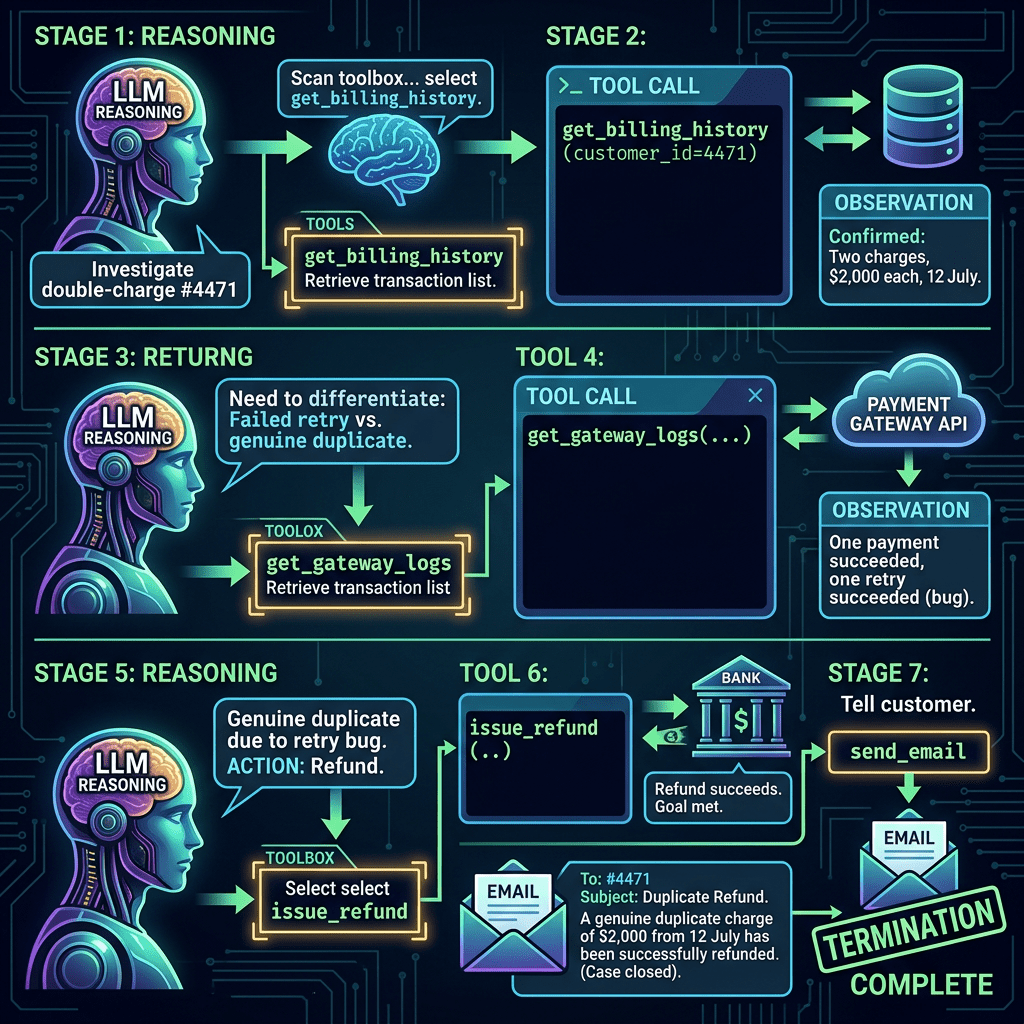
User goal received → “Investigate the double-charge for customer #4471.”
Reasoning (LLM call #1) → “I don’t know the cause yet. First I should see what this customer was actually charged.” It scans the toolbox, matches that need to the description of get_billing_history, and selects that tool.
Tool call → get_billing_history(customer_id=4471) , the underlying database query runs and returns two charges on the same date.
Observation & state update → the result is recorded: “Confirmed: two charges, $2,000 each, 12 July.”
Reasoning (LLM call #2) → “Two charges confirmed. Now I need to know whether one was a failed-then-retried payment or a genuine duplicate.” It scans the toolbox again, matches this to get_gateway_logs, and selects it.
Tool call → get_gateway_logs(...) → the API call returns: one payment succeeded, one was a retry that also succeeded (a bug).
Reasoning (LLM call #3) → “This is a genuine duplicate caused by a retry bug. The right action is to refund one charge.” It selects issue_refund.
Tool call → issue_refund(...) → the API call moves real money; refund succeeds.
Reasoning (LLM call #4) → “Refund done. Now I should tell the customer.” It selects send_email and generates the message.
Termination → the agent decides the goal is met and stops.
Four separate LLM “reasoning” calls, and each one did the same thing: read the current state, scan the toolbox, and decide which tool fits next. The intelligence isn’t in the tools. The intelligence is in the LLM matching its intent to the right tool, one step at a time. But how does it “read the current state” if the model forgets everything between calls? That’s the machinery we look at next.
4.5 What the agent actually “remembers” — context, memory, and state
It’s tempting to imagine the agent as a colleague who remembers what they just did. It isn’t. Here’s the fact that surprises almost everyone:
The underlying LLM is stateless between API calls. In plain English, this means the model has no memory of previous interactions. Every time it is asked to do something, it starts with a blank mind. Any apparent memory comes from external systems that retrieve and re-insert information into the model’s context.
So how does the billing agent “recall” that it already found two charges? Because the harness re-feeds it the entire history on every single call. The intelligence has no memory; the scaffolding around it does. Let’s name the pieces:
Context (the context window) — the LLM’s entire field of vision in every call: the system instructions, the descriptions of every tool in the toolbox, the original goal, and the running transcript of everything done so far. Because the model is stateless, anything you want it to “know” must be placed into the context on every call.
Working memory (short-term) — the running scratchpad for thistask: each thought, action, and observation, accumulated as the loop runs. In a simple agent, the working memory is the growing transcript that gets stuffed back into the context each loop. It exists only for the life of the task, then vanishes.
Long-term memory — information kept beyond this task, in an external store (a database, a vector store, a file) — e.g. “customer #4471 raised a similar issue in March.” It is not automatically in context; the agent must deliberately retrieve it (via a tool) and inject it, and write to it if it wants to remember something for next time.
State — the harness’s structured record of where we are: which steps are done, the latest tool outputs, and whether the goal is met. The state is what the loop checks to decide “reason again” or “stop.”
The key dynamic: after every reasoning step and every tool call, the harness updates the working memory and state by appending the newest thought, action, or observation and then the next reasoning call re-sends the whole enlarged context. Long-term memory only changes if the agent explicitly writes to it.
Watch it happen across our billing example. Notice how the context grows at every step — this is the engine of the token bill:
Writes: “Resolved double-charge for #4471; cause = retry bug”
Read the middle column top-to-bottom: the context the model must process grows on every loop. By Reason #4, the LLM is re-reading the goal, the full toolbox descriptions, and every thought, action and observation from the entire run, just to decide one final step.
This is the counter-intuitive cost engine of every agent. The model’s “memory” is really the harness re-reading the whole transcript aloud before each decision. In naive agent implementations, token costs compound because the full history is repeatedly reprocessed. More advanced systems reduce this through summarisation, pruning, retrieval, and memory compression. And it’s why context management (trimming, summarising, offloading to long-term memory) is one of the hardest parts of building a reliable agent, a cost that never appears in the demo, only in the bill.
4.6 From one agent to many — what a multi-agent system actually is
A multi-agent system is a team of AI agents, where each agent is responsible for a specific task. They communicate with one another, and a manager agent coordinates their work and combines their results to solve a larger problem.
It is not one brain with many skills. It is many separate reasoning loops each incurring its own LLM calls, each re-sending its own growing context (the exact engine we just saw in 4.5), and now also spending calls on talking to each other. Every metaphorical “meeting between colleagues” is, under the hood, more LLM calls and more tokens.
The typical parts:
Orchestrator / Manager agent — receives the overall goal, breaks it into sub-tasks, delegates each to a worker, and assembles the results. It coordinates; it doesn’t do the detailed work.
Worker / Specialist agents — each has a narrow job and its own toolbox.
Delegation — the manager deciding which worker gets which sub-task (itself an LLM reasoning step).
Inter-agent communication — workers reporting back, and sometimes talking to each other. Every conversation between agents comes at a cost. One agent creates the message, and another must read and interpret it, consuming tokens at both ends.
Shared vs. isolated memory — do the agents share one memory, or does each keep its own and pass summaries? This choice massively affects both cost and reliability.
Each “obvious” multi-agent example is defeated by a different disguise, until we reach one that genuinely qualifies.
4.6.1 First disguise: “It’s parallel, so it’s multi-agent”
Here’s the trap most “multi-agent” demos fall into. Suppose the task is: “Research our three rivals — Acme, Globex, and Initech.” The obvious design spins up three research agents, one per company. It looks impressive. But ask the sceptical question a literate leader should ask:
“Couldn’t a single agent just research all three, one after another, in a loop? The output would be identical.”
It absolutely could. So what does splitting into three agents actually buy? Only two things and, crucially, not the thing that justifies a true multi-agent system:
Parallelism → lower latency. Three workers run simultaneously, cutting wall-clock time to roughly a third. But the trap, it is not cheaper. You still pay for every call and token. Parallelism buys speed, never cost.
Context isolation → reliability. A single agent doing all three sequentially would pile all three companies’ research into one ballooning context (per 4.5), risking degraded attention and facts about Acme bleeding into the Globex summary. Three isolated workers each keep a clean, focused context.
Specialisation →none. The three tasks are identical: same skill, same toolbox, three times over.
Verdict: three-identical-companies is not a true multi-agent case it’s a “parallel fan-out” pattern, justified only by latency and context hygiene. A single looping agent is a perfectly respectable alternative. Showcasing it as “multi-agent” is quietly overselling the pattern.
The disguise it wore: parallelism. We saw through it. But there’s a second, subtler disguise.
4.6.2 Second disguise: “It’s specialised, so it’s multi-agent”
Let’s fix the flaw in 4.6.1 by choosing a task that is genuinelyspecialised. Take acquisition due-diligence: “Assess TargetCo as an acquisition.” This clearly splits into three experts, each with a different toolbox and different domain reasoning:
Worker
Its toolbox (genuinely different)
Its expertise
Financial analyst
financial-data API, calculator
valuation, ratios, cash-flow health
Legal & risk analyst
litigation database, contract search
lawsuits, liabilities, compliance flags
Market analyst
web search, news API
market position, competitive threats
This feels like the textbook multi-agent case real division of labour, three distinct specialties. Surely now we need agents?
No. And this is the most important lesson in the whole commandment 2. Watch what happens when we try to break the task with plain, fixed LLM calls:
Step
Action
Type
What produces it
1
Pull financial data for the target
Tool call
call_financial_api(target)
2
Summarise financial health
LLM call
fed the data from step 1
3
Pull litigation records
Tool call
query_litigation_db(target)
4
Summarise legal risk
LLM call
fed the cases from step 3
5
Search market & news
Tool call
web_search(target)
6
Summarise market position
LLM call
fed the news from step 5
7
Combine into a final assessment
LLM call
fed all three summaries above
Four LLM calls, three tool calls, in a fixed sequence I drew in advance. No agent decided anything. This is a specialised parallel workflow not an agentic system at all.
So where did the intuition go wrong? It made the single most common error in this entire field:
It confused specialisation with agency. They are not the same thing.
Specialisation (different toolboxes, prompts, expertise) justifies different branches ,which a workflow gives you for free. You do not need agents to have specialised steps.
Agency is justified only by a dynamic, discovery driven path where the next step genuinely cannot be known until the previous step reveals what it found.
Due-diligence is a checklist. You know in advance that you’ll pull financials, litigation, and market data so the path is pre-drawable, so it’s a workflow. Specialisation was a real property, but it was never the property that matters.
When would due-diligence actually become agentic? Only if it must branch on its findings: the financial analyst spots an odd related-party transaction → decides on its own to pull a subsidiary’s filings → forms a hypothesis of inflated revenue → chases three more documents to test it → follows the trail into an entity nobody put on the checklist. That path can’t be pre-drawn. But the ordinary “produce a due-diligence report” task never needs it. Most corporate due-diligence is checklist-driven i.e., a workflow.
Verdict: due-diligence is a specialised workflow, not a multi-agent system. It cleared the specialisation bar but failed the one that counts — agency.
The disguise it wore: specialisation. We saw through that too. So what does a genuine multi-agent system look like?
4.6.3 The real thing: parallel + specialised + discovery-driven
To genuinely need a team of agents, a task must clear all three hurdles at once: it must be parallel (not just fan-out), specialised (not repetition), and agentic (a discovery-driven path in each strand). Here is a task that finally does and it builds on an idea any leader will recognise: an analytics agent that builds answers on the fly.
The single-agent version first. Consider one exploratory question:
“Why did our Q3 margins drop in APAC?”
An analytics agent with tools (run_query, transform_data, make_chart) would:
Decide which data to pull → write a query → run it → see “margins fell 4pts,”
Based on that, drill into product mix → write a new query → see “one product line drove it,”
Based on that, drill into a specific SKU → discover a cost spike,
Decide a waterfall chart best communicates the finding → generate it.
Can you pre-draw this flowchart? No. Query 2 depends on the result of query 1; the chart type depends on the finding; the number of drill-downs isn’t known until the data reveals where the anomaly hides. The path is discovered, not designed. This is a genuine agent but for one question, it is a single agent (the steps are sequential and dependent; there’s nothing to parallelise).
Now scale it into a true multi-agent system. Change the request to an open-ended, multi-domain one:
“Give me a full quarterly business review, what’s happening across Sales, Operations, Finance, and Supply Chain?”
Here’s the important nuance, because it’s where magic-thinking creeps in: the analyst agents and their toolboxes are defined upfront. Someone engineered a Sales analyst wired to the sales DB and CRM, a Finance analyst wired to the GL, and so on. You decide your domains and build their tools in advance. What the lead agent does dynamically is decide, for this query, which of those analysts to invoke, write each a specific brief, and in more advanced setups decide howmany parallel investigations to spawn within a domain (say, three sales sub-investigations for three anomalous regions it wants explored at once).
So “spinning up agents on the fly” is real, but bounded: the lead agent varies the orchestration, who works on what, and how many within a fixed, pre-engineered envelope of tools and data access. It never invents a new capability. Ask it a question in a domain you never built tools for, and it is simply blind to it. The intelligence is dynamic; the capability envelope is not.
Analyst agent
Its tools
Why it’s genuinely agentic
Sales analyst
sales DB, CRM query, charting
explores revenue, follows leads into whichever regions/segments look anomalous
Operations analyst
ops-metrics DB, charting
investigates throughput/quality, drills wherever the data looks off
Finance analyst
ledger/GL API, charting
explores margins/cash, chases the drivers it discovers
Supply-chain analyst
logistics DB, supplier API
investigates delays/costs, digs where the trail leads
(These four analysts and their tools are defined by your engineering team upfront; the lead agent chooses which to deploy and how many parallel instances per query)
Now every box is genuinely ticked:
Parallel — the four domains are independent and don’t need to talk mid-flight.
Specialised — different data sources, different domain reasoning.
Agentic — each analyst runs a real, unbounded discovery loop; none of the four paths can be pre-drawn. (This is the exact property due-diligence lacked.)
Too large for one context — four deep explorations won’t fit cleanly in one agent’s memory without context rot.
Coordination worth it — parallelism gives a materially faster review; isolation keeps each investigation clean.
The decisive contrast with 4.6.2: in due-diligence, each worker ran a fixed two-step chain (pull → summarise) workflow. Here, each analyst runs a genuine, open–endeddiscoveryloop (agent).
Four parallel agents doing genuine discovery = a real multi-agent system.
The other classic clean example, if you prefer a non-analytics one: agentic deep research — a lead agent spawns parallel researcher sub-agents, each doing open-ended web investigation that revises its own search strategy based on what it finds. Same fingerprints: parallel + specialised + discovery-driven.
4.6.4 How the machinery runs : the blackboard flow
The critical structural difference from a single agent is that thereis no shared brain. Each analyst has its own isolated context and working memory, and can only learn about the others through messages passed via the lead agent. The lead agent holds the one global state / shared memory (often called a blackboard). Here’s the flow, tracking every piece of machinery, for our business review:
Lead reasons → plans the four investigations (1 LLM call)
plan written to blackboard
—
3
Delegation → lead generates 4 briefs, sends as messages
dispatched:4, returned:0
Each analyst’s context is created: only its own brief + its own tools
4
Sales analyst runs its own discovery loop(query→observe→drill→chart→…)
lead waits — no visibility inside the analyst
Sales memory: only sales queries/findings
5
Ops analyst runs its own discovery loop(parallel)
no visibility
Ops memory: only ops findings – never sees sales context
6
Finance & Supply analysts run their own loops (parallel)
no visibility
Each: only its own domain findings
7
Analysts report back → each generates a summary + charts message
lead appends all 4 reports → returned:4
analyst contexts now discarded
8
Lead reasons over the combined blackboard (now a large context)
synthesises the 4 strands into one review
—
9
Terminate → returns the assembled business review
final result on blackboard
—
Three dynamics you should take away:
Memory is isolated, not shared. The sales analyst literally cannotsee what the finance analyst found. This is a feature (clean, focused contexts) and a liability (the lead agent is the only place the full picture exists a single point of failure, and the place where one analyst’s hallucinated number gets baked into the final review as fact).
Every arrow between agents is tokens. Each brief (step 3) and each report (step 7) is text, one agent generates and another reads, pure coordination overhead producing no direct output. And it sits ontopof each analyst’s own discovery loop, which carries the very same growing-context cost engine from 4.5, now running four times in parallel, plus the lead’s.
The lead’s synthesis context is huge. Step 8 pulls all four full reports into one context often the single most expensive call in the entire run.
4.6.5 The three-strike summary
We defeated two disguises before finding the real thing:
Example
Looks like…
Actually is…
Fails on…
4.6.1 Three identical companies
multi-agent
parallel fan-out (a single looping agent works)
no specialisation
4.6.2 Due-diligence report
multi-agent
specialised workflow (fixed, pre-drawable path)
no agency
4.6.3 Multi-domain business review
multi-agent
genuinely multi-agent
nothing; it passes
The lesson compounds beautifully: to justify a multi–agent system, “it’s parallel” isn’t enough and “it’s specialised” isn’t enough. You need the one property that actually matters everywhere in this commandment — an unpredictable, discovery-driven path happening in parallel, specialisedstrands. That is a genuinely high bar, which is exactly why real multi-agent systems are far rarer than the word’s popularity suggests.
5.0 The experiment: what over-engineering actually costs
Now you might be thinking:
“Fine. You’ve shown me three architecture’s — a workflow, a single agent, a multi-agent system. Big deal. What if I just run multi-agent for everything? It sounds sophisticated. It’ll make us look cutting-edge. Where’s the harm?”
Wait a minute. It’s not about looking cool or cutting-edge. There is always a cost — and it is a perpetual one. This is the crucial word most people miss. Building the fancy system is a one-time cost you can rationalise away. But an agent doesn’t cost you once; it costs you on every single transaction, forever. Every email, every query, every invoice — for the entire life of the system.
That perpetual cost comes in two forms:
Token generation cost — the actual dollars you pay the model provider for every input and output token, on every run.
Time (latency) — how long each transaction takes, which becomes its own cost when a customer is waiting or a queue is backing up.
So rather than argue about it, we ran a real experiment. Here’s what we found.
5.1 The experiment: one simple task, three designs
We took a deliberately simple, deterministic, predictable task, the kind that occurs millions of times in real businesses:
Inbound customer-email triage:
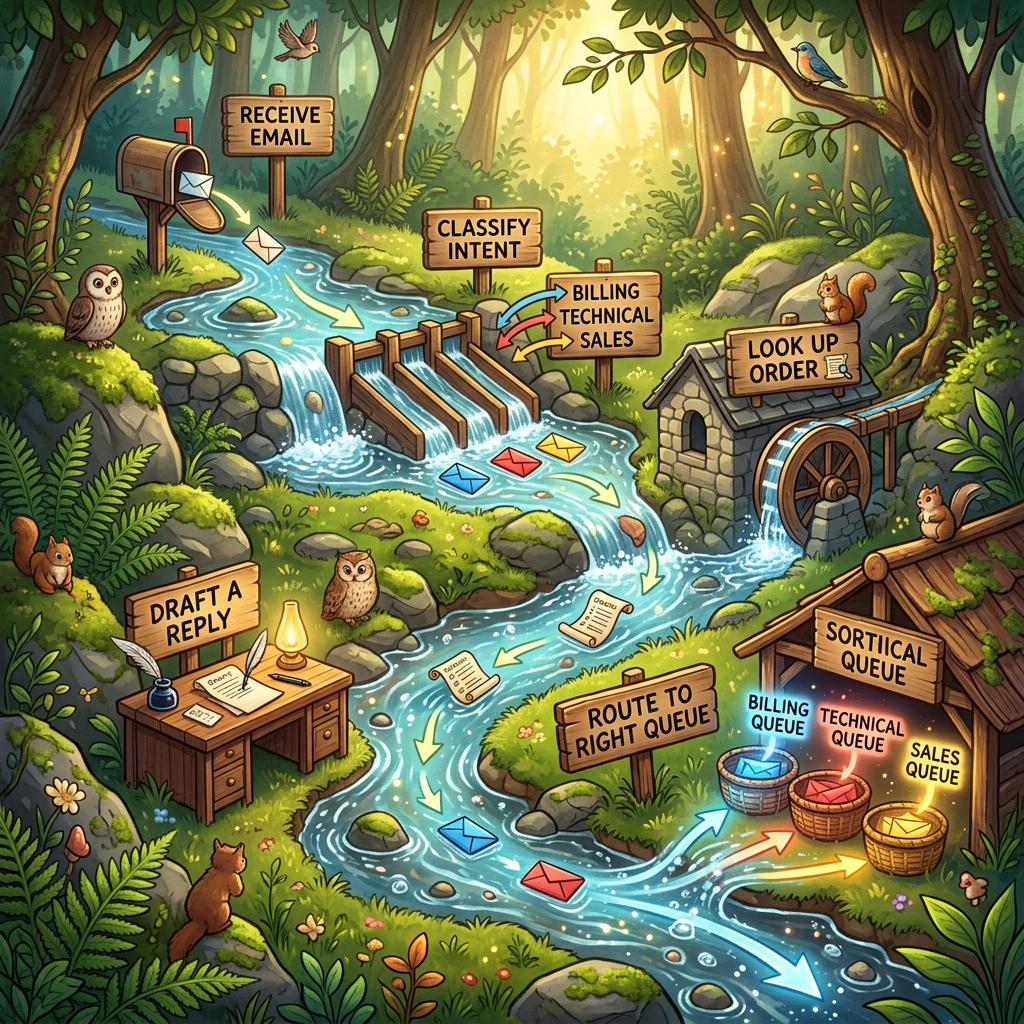
Receive email → Classify intent (billing/technical/sales) → Look up the order → Draft a reply → Route to the right queue
The path never changes. Every email follows the same steps in the same order. We know the roadwhich, per this whole commandment, means a fixed workflow is the correct design. But to measure the cost of over-engineering, we built it threeways and compared the results:
Design A — Workflow (correct): three fixed LLM calls : classify → extract → draft. I decide the sequence; the model just fills in each blank.
Design B — Single agent (over-engineered): one ReAct agent given the goal “triage this email” plus tools, left to discover the sequence itself on every email.
Design C — Multi-agent (absurdly over-engineered): a manager agent delegating to a classifier, an investigator (with its own tool-using loop), and a drafter all sharing one Gemini model, passing messages back and forth.
5.2 The results (real runs, Gemini 2.5 Flash, averaged with spread)
Before reading the numbers, here’s exactly what was measured — so you can trust the table rather than take it on faith.
One fixed task, three architectures. Every design was handed the identical input — a single customer support email (“I think I was charged twice for order #A-5592”) and asked to produce the same outcome: a classified, investigated, drafted, and routed reply. The only thing that changed between runs was the architecture (fixed workflow → single agent → multi-agent), never the task. This is what makes it a fair, apples-to-apples comparison: any difference in cost is caused purely by how we built it, not what we asked.
Real calls to a real model. These are not simulated numbers. Each design made live calls to Gemini 2.5 Flash via Vertex AI, using LangChain/LangGraph to orchestrate the single-agent and multi-agent versions. The workflow used direct, fixed model calls.
Measured directly from the model’s own metering. For every LLM call we captured the input tokens and output tokens straight from the model’s usage_metadata (not estimated), counted the number of LLM calls, and timed the wall-clock latency end-to-end. Cost is computed from those real token counts.
Repeated runs, with the spread reported. Crucially, we didn’t run each design once and quote a lucky number. Each architecture was run multiple times, and we report the mean ± standard deviation for every metric. That ± is deliberate: it lets us see not just how much each design costs, but how predictable that cost is run-to-run which, as you’ll see, turns out to be one of the most revealing findings of all.
With that established, here are the results.
Design
LLM calls
Input tokens
Output tokens
Time (s)
Cost ($)
× vs. workflow
A. Workflow (fixed)
3 ± 0
228 ± 0
95 ± 0
6.6 ± 0.3
0.0001 ± 0.0000
1.0×
B. Single agent
3 ± 0
929 ± 0
240 ± 0
5.1 ± 0.4
0.0003 ± 0.0000
3.1×
C. Multi-agent
6 ± 0
866 ± 21
802 ± 123
20.3 ± 0.7
0.0006 ± 0.0001
6.7×
(Cost $ above uses the script’s default illustrative pricing . We recompute with real Gemini 2.5 Flash rates later )
The ± values come from running each design multiple times. These values carry one of the most important findings in this whole post. Let us look at the insights hiding in the table
1. Same task. Same output. Wildly different cost. All three designs produced the same triaged email. Yet moving from workflow to multi-agent multiplied the token bill several times over. You paid more a lot more for identical business value.
2. The single agent made the same number of calls (3) but burned ~4× the input tokens. This is the subtle one. The agent didn’t take extrasteps here; the task was simple enough to solve in three reasoning turns. So why 929 input tokens versus the workflow’s 228? Because every one of the agent’s turns re-sends the growing context plus the full tool descriptions the “stateless model re-read the whole transcript” from Section 3.5. Even when an agent takes no extra steps, the harness itself is a drain. You pay 4× just for the scaffolding, before the agent does anything clever.
3. The multi-agent output tokens exploded — 802 vs. 95, more than 8×. This is the message-passing “tax” made visible. Each agent generates a verbose brief or report that another agent then reads. All that inter-agent chatter is output token’s pure coordination overhead that produced zero additional business value.
4. Predictability collapses as you move right — look at the ± column. The workflow is perfectly deterministic: ± 0 on everything. The single agent: still ± 0 on tokens (it happened to find the same path each run). But the multi-agent swung by ± 123 output tokens run-to-run. When you hand the LLM the steering wheel, you don’t just lose money and speed you lose predictabilityitself, the one thing a production process needs most. A cost you can’t forecast is a cost you can’t budget.
5. The latency story is honest and still damning. Notice the single agent (5.1s) was actually slightlyfaster than the workflow (6.6s). At this tiny scale, the difference between A and B is within network noise don’t over-read it. But the multi-agent at 20.3s is ~3–4× slower, unambiguously, and outside all noise. Every hand-off is another sequential round-trip. When a customer is waiting on a reply, that 20 seconds is a real, felt cost.
5.3 Now the real money: cost per email, at real Gemini prices
The table above used the script’s placeholder prices. Let’s use the real ones. Gemini 2.5 Flash charges $0.30 per million input tokens and $2.50 per million output tokens note that output is 8.3× more expensive than input, which matters enormously in a moment.
Recomputing each design’s cost for one single email:
Design
Input tokens
Output tokens
Input $
Output $
Cost / email
×
A. Workflow
228
95
$0.0000684
$0.0002375
$0.000306
1.0
B. Single agent
929
240
$0.0002787
$0.0006000
$0.000879
2.9
C. Multi-agent
866
802
$0.0002598
$0.0020050
$0.002265
7.4
Here’s a beautiful, sobering detail: under real Gemini pricing the multi-agent penalty gets worse 7.4×, not 6.7×. Why? Because output tokens cost 8.3× more than input, and the multi-agent design is output-heavy (all that inter-agent chatter). The cost multiplier isn’t fixed it depends on your model’s input/output price ratio, and the fashionable architecture is precisely the one that leans on the expensive side of that ratio. Choose a model with pricier output, and over-engineering punishes you even harder.
Fractions of a cent per email sound trivial. That’s the trap. Watch what “perpetual” does to a trivial number.
5.4 Scale it up: the perpetual token guzzler
These are not one-time costs. They fire on every message, every month, forever.
And here’s the key reframe before we scale: email triage is just our illustrative example. The classify → investigate → draft → route pattern is completely channel-agnostic the identical architecture runs on every inbound support contact, whether it arrives as an email, a live-chat message, a web ticket, or an in-app query. So when we scale up, we’re not imagining a company drowning in ten million emails; we’re counting the total inbound support messages a large consumer business genuinely handles across all its channels a number that comfortably reaches into the millions per month.
Scaling the real per-contact figures to realistic business volumes:
Monthly volume (all channels)
A. Workflow
B. Single agent
C. Multi-agent
100,000 contacts/mo
$31
$88
$226
1 million contacts/mo
$306
$879
$2,265
10 million contacts/mo
$3,059
$8,787
$22,648
And annually, at large-consumer scale (10M/month):
A. Workflow
B. Single agent
C. Multi-agent
Per year
$36,708
$105,444
$271,776
Look at that final row. For a task where the workflow was the correct design, choosing “multi-agent because it’s cool” costs you an extra ~$235,000 every single year, forever to produce the exact same triaged replies. That is not an investment. That is a perpetual token guzzler bolted onto your P&L, quietly draining margin on every transaction until someone finally asks why the inference bill is so high.
This is the difference between a build cost and a run cost. You can absorb a bad build once. A bad architecture bleeds you every day it runs.
And support triage is just one process. Most enterprises run dozens of these high-volume, repetitive, perfectly-predictable AI tasks — document classification, invoice extraction, content moderation, KYC checks, log triage, review summarisation. Each one is a candidate to be quietly over-engineered into an agent, and the 7.4× penalty compounds across every one you get wrong. The quarter-million-dollar line above isn’t a ceiling reserved for tech giants it’s the cost of a single mis-architected process. Multiply it by the dozen such processes a typical operation runs, and “let’s just use agents for everything” stops looking cool and starts looking like a structural margin leak. And yet, for the first two years of this wave, high token consumption wasn’t treated as a leak at all it was treated as a trophy. The industry had a name for it: token maxing.
5.5 The rise and fall of “token maxing”
Token maxing was the mindset that more tokens consumed was itself the mark of a sophisticated AI operation as if there were an industry leaderboard for who could burn the most. Longer reasoning traces, fatter contexts, more tool calls, more agents: consumption became a proxy for capability, and teams effectively competed on it. What the leaderboard conveniently ignored were the only two things that actually matter the cost of all those tokens, and whether they produced any better outcome.
Then the invoices arrived.
Companies that industrialised agentic systems without discipline discovered that token consumption doesn’t scale linearly with value it scales with architecture. A team could 10× its inference bill and see no improvement in business outcomes, because it had bought reasoning overhead, not results. The very “sophistication” they were proud of was the thing draining the budget.
In 2026, Uber reportedly burned through its entire annual AI budget within the first quarter exhausting a full year’s allocation by roughly March. Not a build overrun. Not a one-off migration. A run-rate so far above forecast that twelve months of budget evaporated in three because that’s what perpetual, per-transaction token consumption does when it’s left unconstrained. The invoice doesn’t arrive once; it arrives on every call, every day, and it compounds silently until the annual number is gone.
Uber isn’t alone, and it isn’t incompetent it’s an early, visible example of a pattern now playing out across the industry: teams that optimised for capability (“more agents, more reasoning, more tokens”) without a matching discipline on cost-per-outcome discovered that the two are not the same thing. The reasoning overhead they were proud of was the line item quietly draining the budget.
The lesson isn’t “don’t use AI.” It’s the one this entire experiment has been building toward: the flashy architecture and the frugal one often produce the identical result, but only one of them empties your budget by March
The correction is now well underway. Mature teams have swung hard toward token prudence: default to the simplest architecture that works, reserve agents for genuinely discovery-driven paths (Section 3), cache aggressively, trim context, use smaller models where they suffice (a preview of Commandment 9), and above all measure cost-per-successful-outcome, not cost-per-clever-demo. The status symbol is no longer “we run a multi-agent swarm.” It’s “we deliver the outcome at a fraction of the token cost.”
Our little experiment is that lesson in miniature: the cheapest design (A) and the flashiest design (C) produced the identical result. One of them cost 7.4× more, forever.
5.6 And the token bill isn’t even the whole bill
Everything above is just tokens and time. There’s a second, harder-to-price cost that compounds the first: reliability.
The cost compounds, it doesn’t add. With multi-agent you pay for every worker’s own reasoning loop (each re-sending its growing context and tool descriptions), plus the manager’s coordination calls, plus the tokens agents spend talking to each other. Three multiplying sources, not three additive ones.
And the failure modes multiply too. With a fixed workflow, if something breaks, you know exactlywhich of the three steps failed. With a single agent, a wrong tool choice is one bug in one loop. But with a team of agents:
a manager can mis-delegate — send the wrong sub-task to the wrong worker;
a worker can misunderstand its brief — it only has the summary the manager chose to pass, not the full context;
errors propagate — one worker’s hallucinated “fact” gets synthesised into the final output as truth;
and when the output is wrong, you must debug which agent, in which loop, on which call went astray dramatically harder than tracing a single agent, and worlds away from a fixed workflow where the path is nailed down.
That debugging difficulty, that unpredictability (remember the ± 123), and that wider blast radius are all real operational costs that never appear on the model provider’s invoice but land squarely on your engineering team, every week.
The rule that follows: every additional agent multiplies cost and fragility. A multi-agent system must therefore clear a higher bar than a single agent not a lower one. Splitting a task across four agents does not make it four times smarter. It makes it several times more expensive, several times slower, and several times harder to trust.
5.7 The takeaway
We ran the experiment so you don’t have to learn this from your own invoice. On a task that genuinely needed a workflow:
The workflow and the multi-agent system produced identical output.
The multi-agent version cost 7.4× more per transaction a gap that only widens with pricier output models.
It ran ~4× slower, was less predictable run-to-run, and was far harder to debug.
And every one of those penalties is perpetual, paid on every transaction, for the life of the system.
So when someone says “let’s just run multi-agent for everything, it’ll make us look cool” this is the number to put on the table. Cool is a one-time feeling. The token bill is forever.
Match the architecture to the road. Where the road is known, build the workflow. Reserve agents for the roads that genuinely have no map and reserve multi-agent for the rare roads that fork into parallel, specialised, genuinely-unmapped territory at once. Everywhere else, do not take the agent’s name in vain.
6.0 When you genuinely DO need an agent
The experiment might read like an anti-agent polemic. It isn’t. Agents are not the villain — misapplied agents are. The whole point of paying the agent tax is that, for the right problem, it buys you something a workflow simply cannot: the ability to navigate a road that has no map.
Reach for an agent only when the problem shows these fingerprints:
The path is unknown in advance. You genuinely cannot pre-draw the flowchart, because the next step depends on what the previous step discovers. (Our billing-dispute investigation in 4.4: yes. The email triage we just benchmarked: no.)
It’s genuinely multi-step and adaptive. The task requires forming a hypothesis, testing it, and changingcourse based on the result.
It requires dynamic tool use. Which tools, and in whatorder, depends on the situation as it unfolds.
Uncertainty is inherent, and exploration has value. The messy, branching nature of the problem is the whole point where an agent would add value
7. The decision lens: agent or not?
Put your process step usually the constraint you identified in Commandment 1 through these questions:
Ask this
If YES →
If NO →
Can I draw the exact steps in advance?
Workflow
Consider agent
Does every run follow the same path?
Workflow
Consider agent
Does the next step depend on what the last step discovered?
Consider agent
Workflow
Does it need to adapt, form hypotheses, and change course?
Consider agent
Workflow
Is unpredictability acceptable here?
Agent viable
Workflow / human
Would a wrong autonomous action be costly or irreversible?
Add human checkpoints
Agent viable
Rule of thumb: If you can draw the flowchart, build the flowchart. Only when you genuinely can’t draw it, does an agent earn its existence.
7.1 The second lens: single agent or multi-agent?
The first lens gets you to “yes, this genuinely needs an agent.” But that’s only half the decision. The fashionable and expensive mistake is to leap straight from “we need an agent” to “let’s build a multi-agent system.” As our experiment showed, that leap can multiply your perpetual cost several times over for no added value.
So once the first lens says “agent,” run the candidate through this second lens before allowing more than one:
Ask this
If YES
If NO
Do the sub-tasks run genuinely in parallel (independent, no need to talk mid-flight)?
Consider multi-agent
Single agent
Do they need genuinely different toolboxes or expertise (not the same skill repeated)?
Consider multi-agent
Single agent
Is each strand itself discovery-driven (an unmapped path, not a fixed pull-and-summarise)?
Consider multi-agent
Single agent (it’s a workflow of specialists)
Is the combined work too large for one agent’s context to hold cleanly?
Consider multi-agent
Single agent
Does the value of parallelism/isolation exceed the extra tokens, coordination, and debugging pain?
Multi-agent viable
Single agent
You need allfive to point toward multi-agent. Miss even one, and a single agent is the right and far cheaper answer. This is deliberately a high bar, because the default gravity of the industry pulls the other way.
8. The business leader’s checklist
The next time someone says “let’s put an agent on it,” ask these before nodding:
☐ “Can you draw me the flowchart of steps?” — If they can, you want a workflow, not an agent.
☐ “Does the path change based on what the process discovers along the way?” — If not, an agent is overkill.
☐ “How many tools does it need and who builds and maintains each one?” — Every tool is a real, recurring integration. Tool count is a proxy for true cost and fragility (Section 4.1).
☐ “What will this cost pertransaction, at our volume, versus a fixed workflow?” — Make them run the numbers. Remember these are perpetual costs (Section 5).
☐ “How much slower will each transaction be?” — Latency is a real cost when a customer or a line is waiting.
☐ “When it misbehaves, how will we know why and which step or agent failed?” — Probe their debugging and observability story.
☐ “What can this agent do in the real world, and what happens if it does the wrong thing?” — Establish the blast radius and the human checkpoints (previewing Commandment 8).
☐ “Why not a single prompt or a simple chain first?” — Put the burden of proof on the more complex option, not the simpler one.
☐ “If it’s multi-agent can you tick all four boxes (parallel, specialised, too-large-for-one-context, coordination-worth-it), or is this org-chart cosplay?” — Force a hard justification for every agent beyond the first.
If the honest answers point to a known, repeatable path, you don’t have an agent problem. You have a workflow which, conveniently, is the subject of the next commandment.
9.0 Conclusion
An agent is not a magic upgrade. It is the same LLM you already use, wrapped in a harness that lets it choose its own path and act on its own and you pay for that autonomy in tokens, time, unpredictability, and operational pain. We didn’t assert this; we measured it: on a task that genuinely needed a workflow, the multi-agent version produced identical output at 7.4× the perpetual cost, ran ~4× slower, and was far harder to trust.
That price is worthit when the road is genuinely unknown and the task must adapt as it goes. It is wasted as our experiment showed, up to ~7× over, forever when the road is known, which describes the majority of business processes.
The literate leader doesn’t ask “can we make this an agent?” They ask “can I draw the flowchart?” and reserve the steering wheel for the roads that genuinely have no map.
Invoke agents where they belong. Everywhere else, do not take their name in vain.
If most processes don’t need an agent, what do they need? We’ll make the case for the unglamorous, reliable, cheap workhorse of business AI — the single well-crafted prompt and the fixed chain — and show how far a “boring” workflow can actually take you.
Part 2 of the series The 10 Commandments of AI in Business: Choosing the Right Intelligence for the Right Problem
Recap
In the introduction to this series, we made a single argument: that roughly 95% of enterprise generative-AI pilots fail (MIT, 2025) not because the technology is weak, but because of a failure of judgement — force-fitting the fashionable tool onto the wrong problem. AI literacy, we said, is knowing which intelligence to reach for, and when.
We laid out ten commandments to build that judgement. In one line each:
The process is sovereign — start with the process, not the technology.
Don’t invoke agents in vain — most problems don’t need one.
Honour the humble LLM workflow — a single well-crafted call often wins.
Honour predictive AI and automation — the proven elders solve most problems.
Don’t slay your token budget — ground and retrieve before you build big.
Be faithful to causation — correlation misleads when you’re deciding to act.
Don’t steal the work that belongs to another tool — compose the right blend.
Don’t let your agent bear false witness — autonomy demands accountability.
Don’t covet only the frontier models — smaller, specialised models often fit better.
Don’t covet your competitor’s AI — prove the cost-benefit in your context first.
If those ten are the map, this post is where we take the very first step — and it is the step every other commandment stands on. Because before you can decide whichAI to use, you have to understand the thing you’re actually trying to improve: your business process.
1.0 Introduction
Let us first replay a scene probably you have lived through
A problem is raised in a meeting :-
Quotes are going out too slowly,
Defects are slipping through,
Campaigns are late.
Before anyone has looked at where the delay actually lives, someone says the sentence you now hear in every conference room:
“Why don’t we just put an AI agent on it?”
Heads nod. A pilot is funded. Six months later it joins the roughly 95% of enterprise generative-AI pilots that, per MIT’s 2025 study, delivered no measurable business impact.
The problem was never that the AI model was inadequate. It was never the prompt. It was never the framework. The mistake happened within the first few minutes of the meeting. The team asked, “Where can we apply AI?” when they should have asked, “Where does our business process actually need help?”
The rule is simple, you do not start with “Where can I use AI?” You start with “What is my process, where does it bleed, and what is the cheapest, most reliable thing – generative AI, predictive AI, automation, or a manual effort that stops the bleeding there?” That distinction is the foundation of this entire series. Everything else : the choice of LLM, predictive model, workflow, agent, or automation is secondary.
2.0 The business process is sovereign. Technology exists only to serve it.
Imagine three companies.
Company A has access to the world’s most advanced AI models.
Company B has average AI capability.
Company C barely uses AI.
Which company wins? Most people instinctively choose Company A. The correct answer is:
The company with the best business process.
Technology amplifies process quality. It rarely compensates for poor process design. An AI agent cannot rescue a process that contains unnecessary approvals. An LLM cannot eliminate a policy bottleneck. Automation cannot compensate for poorly designed governance. Predictive AI cannot improve decisions if the wrong data is collected. A badly designed process simply becomes an expensive badly designed process. The first lesson every business leader must learn is therefore remarkably simple.
Never optimise technology before understanding the process it serves.
3.0 The Forgotten Science of Throughput
Long before Generative AI existed, operations researchers had already solved a surprisingly large part of this problem. In 1984, Eliyahu Goldratt introduced the Theory of Constraints in his influential book The Goal. The idea is almost deceptively simple.
Every business process consists of a chain of activities. Like the strength of a chain being limited by its weakest link, the throughput of a process is determined by a single limiting step, the constraint. Improving anything other than that constraint rarely increases the output of the entire system.
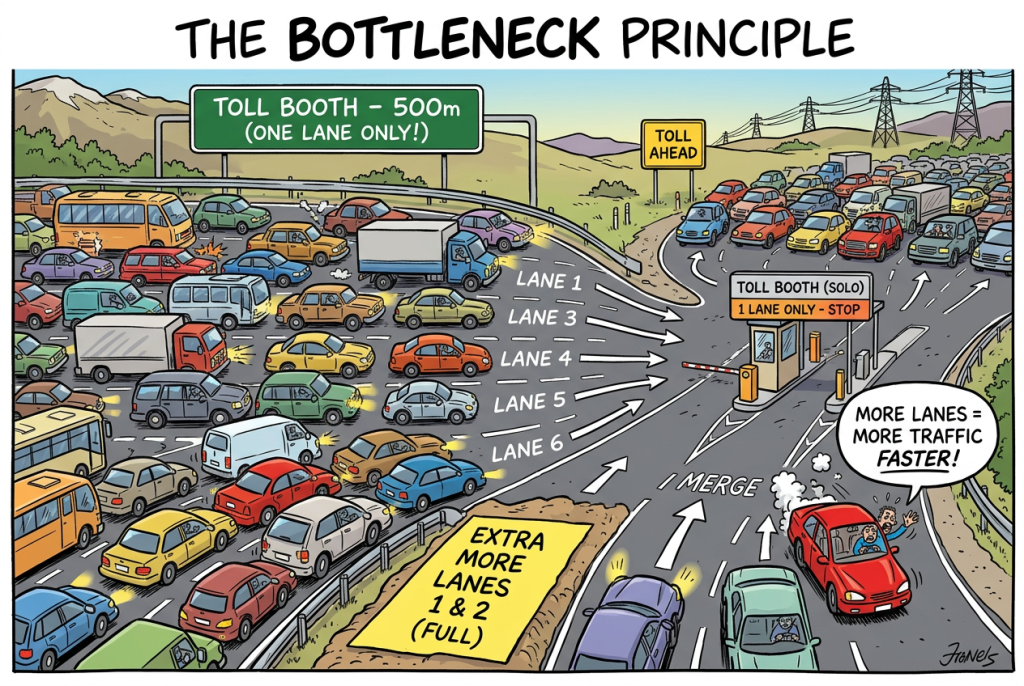
Imagine a six-lane highway that narrows into a single toll booth. Would building two more lanes before the toll booth reduce congestion? Of course not. It simply allows more cars to reach the bottleneck faster.
Exactly the same mistake happens in AI projects. Organisations automate whatever is easiest to automate rather than what actually limits business throughput. The result is impressive demonstrations but disappointing business outcomes.
Goldratt’s five focusing steps:
Identify the constraint.
Exploit it – get everything you can out of it as-is.
Subordinate everything else to it.
Elevate it – invest to break the constraint.
Repeat – the constraint will move; go find the new one.
Goldratt’s framework answers the where. The next challenge is answering the how.If the bottleneck has been identified, how should we remove it? Should we redesign the workflow? Introduce automation? Deploy predictive AI? Use Generative AI? Build an autonomous agent? Or simply hire another experienced employee?Before choosing any of these, we must first understand what the process is fundamentally trying to accomplish. Every process exists for one reason – to produce valuable business outcomes.
A sales process exists to convert qualified opportunities.
A manufacturing process exists to produce good units.
A recruitment process exists to hire capable employees.
A marketing process exists to launch campaigns.
Every AI investment should therefore answer one question.
How does this improve throughput?
If the answer is unclear, the AI project is probably solving the wrong problem. Of course, this immediately raises another question.
How do we systematically determine whether an AI intervention will improve throughput?
The following five-step discipline provides exactly that. It acts as a decision-making framework that helps identify where AI can genuinely create value, what type of intelligence is most appropriate, and just as importantly, where AI should not be applied at all.
4.0 The Five-Step Discipline Before You Think About AI
Before selecting any technology, every executive should perform five simple exercises.
Step 1 — Define the Business Outcome
Do not begin with technology. Define what valuable output the process exists to produce. Examples include:
Good units manufactured
Customer claims resolved
Campaigns launched
Orders fulfilled
Policies approved
The metric must describe business value, not activity.
Step 2 — Map the Process
Break the process into its constituent steps.
Where is time consumed?
Where are decisions made?
Where do errors occur?
Where does work accumulate?
Without visibility into the process, AI becomes little more than educated guesswork.
Step 3 : Find the Constraint
Now measure – Not opinions, Not assumptions – Actual data.
Where is work waiting?
Where are queues forming?
Where is the largest contributor to cycle time?
That is the only place worthy of serious attention.
Step 4 : Understand the Nature of the Constraint
This is where AI finally enters the discussion. Not all constraints require the same form of intelligence. Ask a simple question.
What kind of work is actually happening here?
Nature of Work
Appropriate Intelligence
Generating content, language or creative ideas
Generative AI
Predicting future outcomes or classifying patterns
Predictive AI
Performing repetitive deterministic actions
Automation
Optimising allocation, routing or scheduling
Optimisation algorithms
Coordinating multiple systems
AI Agents
Exercising judgement, empathy or accountability
Human expertise
Step 5 — Examine the Ripple Effects
Suppose AI removes today’s bottleneck.
What becomes tomorrow’s bottleneck?
Have you merely moved the queue downstream?
Every process redesign should consider second-order consequences. Business systems behave as systems, not isolated activities.
To illustrate how the framework supports technology investment decisions, we will evaluate three representative business processes. The metrics used throughout these examples are baseline assumptions designed to explain the core concepts. Because metrics are inherently organization-specific, enterprises must gather their own relevant data to execute this evaluation effectively.
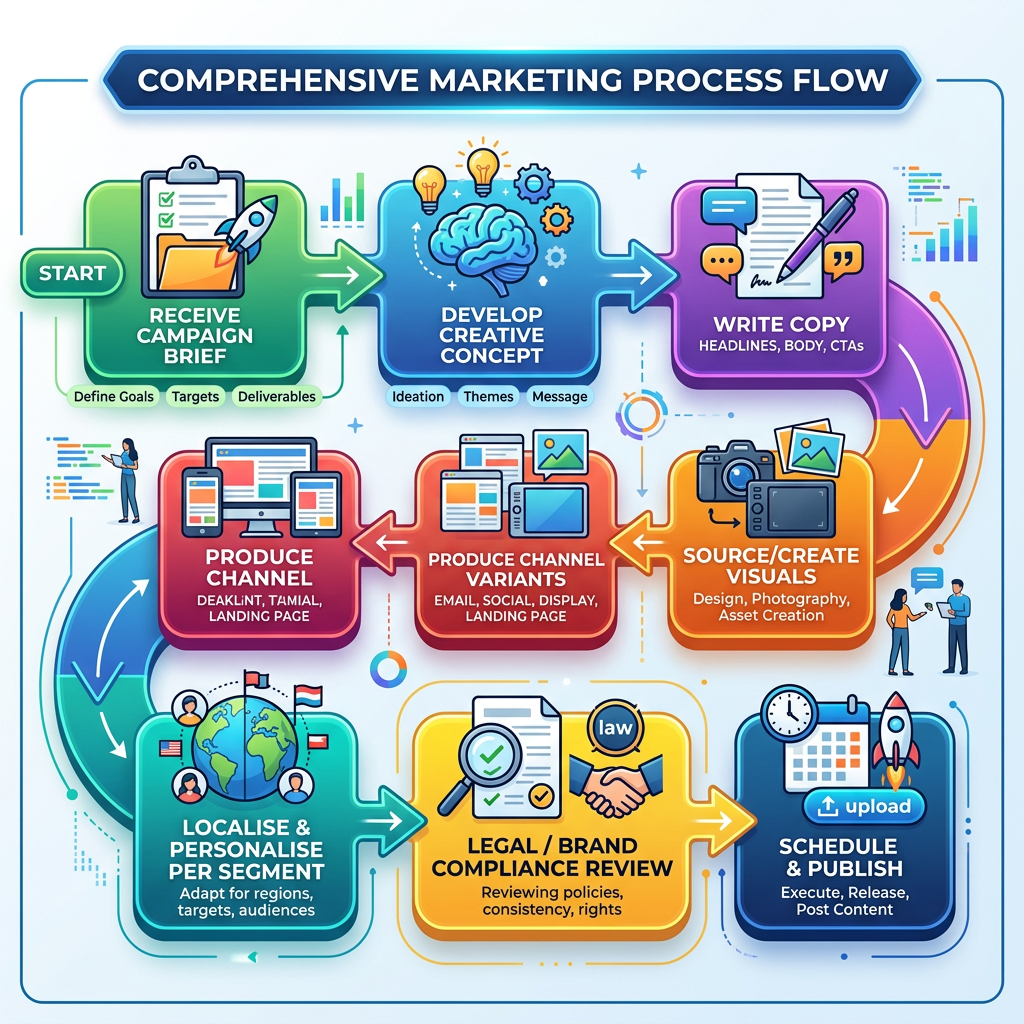
4.1 Process Analysis 1 – Marketing: multi-channel campaign content production
Let us first take a process from the marketing industry.
Now we will walk through each steps depicted in our analysis framework and apply it on the above marketing process.
Step 1 — Throughput metric.
This process exists to ship campaign-ready, on-brand assets. Throughput = number of approved campaign variants shipped per week(with a quality floor). Cost-per-asset is the secondary metric.
Step 2 — Decompose.
Average time per campaign across the steps:
Step
Avg. time
% of cycle
Brief -> concept
1 day
12%
Copywriting (all channels)
3 days
38%
Visual creation
1.5 days
19%
Channel variants + localisation
2 days
25%
Compliance review
0.5 day
6%
Publish
0
0
Step 3 — Find the constraint empirically.
Measure where work actually accumulates rather than relying on intuition. In this process, copywriting and content variant production together consume 63% of the total campaign cycle time. Because every campaign must pass through these stages before progressing further, requests begin to accumulate whenever the demand for new content exceeds the team’s capacity to produce it, leaving subsequent stages of the process waiting for content to be completed.
Step 4 — Apply the decision lens across the whole process (not just the constraint)
The instinct at this point is to say “copywriting is the constraint, so drop generative AI on it, done.” That’s half right. Breaking the constraint is priority one ,but a process is a chain, and once you elevate one link, the bottleneck moves. So we walk every step through a richer decision lens, and we do it with one eye permanently on overall throughput.
Let us now do the walk-through. For each step we ask two things:
What is the nature of the work? and
Does throughput justify investing here? (Theory of Constraints).
Receive campaign brief
Nature of task
Decision Lens
Throughput view
Capturing and routing an intake request. A structured intake form that logs the brief, tags it, and routes it to the right pod
Automation
This sits in the 12% “brief-to-concept” bucket and is not the constraint so keep it cheap and boring. No AI required.
Develop creative concept
Nature of task
Decision Lens
Throughput view
The strategic “big idea.” This is where two rows collide: it involves generating ideas (Generative AI) andaccountability for brand direction (Human expertise).
Human-led, GenAI-assisted. The strategist owns the concept; GenAI accelerates ideation, mood-boards,
Still inside the non-constraint 12% — use GenAI as a brainstorm partner, not a decision-maker. Don’t over-engineer it.
Write copy (headlines, body, CTAs)
Nature of task
Decision Lens
Throughput view
Generating language at volume across channels. brand direction (Human expertise).
Gen AI
This is the constraint (38%). This is where the primary investment goes and where the 3–5× uplift is earned. Human moves from author to editor.
Visual Creation
Nature of task
Decision Lens
Throughput view
Generating creative assets
Gen AI ( image generation) under human art direction
19% and adjacent to the constraint — worth investing, but the human art director stays accountable for brand fidelity.
Produce channel variants (email, social, display, landing page)
Nature of task
Decision Lens
Throughput view
This is genuinely two kinds of work
Adapting tone and message per channel is Generative AI; resizing, reformatting, and fitting each asset to rigid channel specs is a deterministic, repetitive action → Automation
Part of the 25% variant/localisation bucket- a hybrid of GenAI (message) + automation (format) is the right build.
Localise & personalise per segment
Nature of task
Decision Lens
Throughput view
There are three types of task involved in this step
Translating and adapting language > Generative AI. Deciding which segment should see which message > Predictive AI (propensity/segment models).
Deciding how to split budget/impressions across segments > Optimisation algorithms.
Completes the 25% bucket. This single step is the clearest proof that “put AI on it” is a meaningless instruction — three different interventions do three different jobs here.
Legal / brand compliance review
Nature of task
Decision Lens
Throughput view
Checking content against rules and claims (a classification task) and signing off (an accountability task).
Predictive AI for an automated first-pass compliance/claims classifier that flags risky content. Human expertise for final legal sign-off on the flagged exceptions.
This is the new constraint. Once GenAI multiplies draft volume 5×, all that copy piles up at a 0.5-day manual review. Per Goldratt, you must elevate this immediately. The classifier triages the safe 80% so humans review only the risky 20%.
Schedule & publish
Nature of task
Decision Lens
Throughput view
Three tasks within this step
Choosing the optimal send time / slot per channel > Optimisation algorithms. Pushing the assets out via platform APIs > Automation. Coordinating a synchronised launch across email, social, display and web systems > AI Agents (this is a legitimate agent use orchestrating multiple systems toward a goal).
Near-zero cycle time today, so don’t gold-plate it but the agent-coordinated publish is where a real agent earns its place (contrast this with the hype reflex of putting an agent on everything).
The throughput-first sequencing rule
We could build all of the above. But Theory of Constraints says, not all at once, and not in random order. Invest in strict order of throughput impact:
Wave 1 : Break the constraint: GenAI on copy, visuals, and variants (steps 3–5). This delivers the headline 3–5× gain.
Wave 2 : Elevate the new constraint: the compliance classifier (step 7), because that is exactly where the bottleneck jumps once Wave 1 lands.
Wave 3 : Smooth the flow: optimisation for scheduling and personalisation, agent-based publishing coordination (steps 6, 8).
Spending on Waves 3 before Wave 2 is the “widen the road before the toll booth” mistake you’d just deliver more copy to a jammed review desk.
The result: right tool, right step, right sequence
#
Process step
Nature of work
Appropriate intelligence
Constraint?
Throughput priority
1
Receive brief
Deterministic intake
Automation
No
Low — keep cheap
2
Develop concept
Idea generation + judgement
Human + GenAI assist
No
Low
3
Write copy
Generating language
Generative AI (human edits)
Yes *
Wave 1
4
Source visuals
Generating creative
Generative AI (human art dir.)
Adjacent
Wave 1
5
Produce variants
Message = generate; format = deterministic
GenAI + Automation
Adjacent
Wave 1
6
Localise & personalise
Language + targeting + allocation
GenAI + Predictive AI + Optimisation
No
Wave 3
7
Compliance review
Classify content + accountable sign-off
Predictive AI + Human
Yes (new) *
Wave 2
8
Schedule & publish
Timing + push + multi-system coordination
Optimisation + Automation + AI Agent
No
Wave 3
Look at the “Appropriate intelligence” column. Across a single marketing process we’ve deployed all six rows of the lens, generative AI, predictive AI, automation, each exactly where its nature of work belongs, and each sequenced by its effect on total throughput.
That is what “the process is sovereign” means in practice. Generative AI turned out to be the star of this process but even here it was one instrument in an orchestra, not the whole band. The leader who walked in saying “let’s put a GenAI agent on our marketing” would have automated the wrong 12%, ignored the compliance bottleneck that actually caps output, and wondered six months later why throughput never moved.
Step 5 — Second-order effects.
If GenAI raises draft output 5×, the queue moves downstream to compliance review. So the redesign isn’t “generate more copy” — it’s “generate drafts and elevate review”: add an automated brand/claims checker, and keep humans reviewing only the exceptions. Elevate the constraint, then immediately manage the new one.
Step 6 — Friction watch.
GenAI copy needs an editor. If a human rewrites every draft from scratch, you’ve added friction, not removed it. The design must be human-edits not human-writes, with brand-tuned prompts and templates so drafts land close to final.
Lesson 1:
When the constraint is language and creative volume, generative AI can genuinely 3–5× throughput. But you must move the human from author to editor, and immediately manage the constraint it pushes downstream.
The plant exists to do one thing: ship good units. So our throughput metric must capture not just how fast the line runs, but how much sellable, defect-free output it actually produces over the time it was supposed to be running.
The industry-standard measure for exactly this is OEE — Overall Equipment Effectiveness, expressed ultimately as good units per hour. OEE is built from three factors multiplied together:
OEE = Availability × Performance × Quality
Each factor answers a different question about where output is lost:
Availability — Of the time the line was scheduled to run, how much was it actually running? It captures losses from breakdowns, unplanned stops, and changeovers. (If the line was scheduled for 10 hours but ran for 7.8, Availability = 78%.)
Performance — When it was running, did it run at its rated speed? It captures losses from minor stops, slow cycles, and idling. (If it ran, but at 91% of design speed, Performance = 91%.)
Quality — Of the units produced, how many were good the first time? It captures losses from defects, rework, and scrap. (If 87% of units passed without rework, Quality = 87%.)
Step 2 —Decompose OEE.
This plant runs at 62% OEE. On its own, “62%” tells a leader nothing actionable — it’s a single number hiding three very different stories. Decomposing it is what turns a vague “we’re inefficient” into a precise “here is where we bleed.”
Now we can read each factor against a realistic world-class benchmark (roughly 90%+ on each) to see which one is dragging the whole product down:
OEE component
Actual
World-class benchmark
Gap
What’s actually causing the loss
Availability
78%
~90%
–12 pts
Unplanned downtime — the line stops when equipment fails without warning
Performance
91%
~95%
–4 pts
Minor speed losses — small, tolerable
Quality
87%
~99%
–12 pts
Defect escapes caught late at final inspection, forcing expensive rework
Each row is one of the three multiplied factors. The Actual column is where the plant is today; the benchmark and gap columns show how far each factor sits below what “good” looks like; the final column names the real-world event that causes that gap.
The table’s message is now unmistakable. Performance (91%) is broadly fine — the machines run at close to rated speed, so chasing speed improvements would be optimising a non-problem. The damage is concentrated in two factors: Availability and Quality, each roughly 12 points below benchmark. And because OEE multiplies, closing those two gaps has an outsized effect — lifting Availability and Quality to benchmark alone would move OEE from 62% to roughly 0.90 × 0.91 × 0.99 ≈ 81%, a near one-third jump in sellable output without a single new machine.
This decomposition is Theory of Constraints in action. The single “62%” number gave us nowhere to aim. Broken into its three drivers, it points a spotlight at exactly two constraints — unplanned downtime and late-caught defects — and tells us, before any investment, that any AI or automation investment in speed(Performance) would be money spent on a non-constraint. That is precisely the “widen the road before the toll booth” mistake this commandment warns against.
These two empirically identified constraints — Availability and Quality — are what we now carry into Step 3 and the decision lens.
Step 3 – Find the constraint empirically.
The OEE decomposition has already narrowed our attention to Availability and Quality. The next step is to verify these findings with operational data rather than assumptions.
The evidence confirms both constraints:
Availability: Production logs show repeated episodes of unplanned equipment downtime. Critical machines fail unexpectedly, bringing the production line to a halt and reducing the number of productive operating hours.
Quality: Inspection records reveal that a significant proportion of defects are detected only during final inspection. By this stage, defective products have already consumed materials, machine time, and labour, resulting in costly rework and scrap.
Notice what we are not seeing. There is little evidence that machine speed (Performance) is restricting throughput. The machines are generally capable of operating at their designed speed; the real losses come from machines that are not running at all and from defective products that must be reworked or discarded.
The data therefore validates what the OEE decomposition suggested: the primary process constraints are unplanned downtime and late defect detection. These are the constraints we now take into the decision lens to determine the most appropriate intervention.
Step 4 — Decision lens at the constraints.
Recall the empirically found constraints: Availability (78%) killed by unplanned downtime and Quality (87%) killed by defects caught too late. Now walk every step through the lens, watching throughput.
1 — Raw-material intake inspection
Nature of tasks
Decision lens
Throughput view
Classifying whether incoming material meets spec (vision / measurement pattern-matching)
Predictive AI (vision classification) + Automation (dimensional checks)
Not the headline constraint, but bad inputs cause downstream defects a Wave-3 quality feeder
2 — Machine setup
Nature of tasks
Decision lens
Throughput view
Configuring the line to a recipe (deterministic) and choosing optimal parameters (speed vs. wear vs. quality trade-off)
Automation + Optimisation (routing) + AI Agent(system coordination)
Downstream of the plant constraint; smooth later
So where is Generative AI? Look back, it hasn’t appeared once in the value core. The only honest place for it is at the administrative edges: auto-drafting maintenance work-order summaries, generating shift-handover reports from logs, or a RAG assistant that lets a technician query equipment manuals in plain language. Useful, but peripheral. A leader who walked in demanding “a GenAI agent for the shop floor” would have spent the budget on the 5% that doesn’t move OEE, and left the failing motor unmonitored.
Wave 4 : Smooth the tail: dispatch routing (11); leave GenAI reporting as a nice-to-have.
Result table:
#
Process step
Nature of work
Appropriate intelligence
Constraint?
Priority
1
Raw-material intake
Classify + measure
Predictive AI + Automation
No
Wave 3
2
Machine setup
Configure + optimise params
Automation + Optimisation
No
Wave 3
3
Production run
Deterministic control
Automation
No
Solved
4
In-line inspection
Classify defects (vision)
Predictive AI
Yes *
Wave 2
5
Defect classification
Classify pattern
Predictive AI
Yes *
Wave 2
6
Condition monitoring
Predict failure
Predictive AI
Yes *
Wave 1
7
Maintenance scheduling
Optimise + coordinate systems
Optimisation + AI Agent
Yes
Wave 1
8
Rework / scrap decision
Predict + optimise + judge edge cases
Predictive AI + Optimisation + Human
Yes (new) *
Wave 2
9
Final inspection
Classify + accountable sign-off
Predictive AI + Human
No
Wave 2
10
Packaging
Repetitive handling
Automation
No
Low
11
Dispatch
Execute + route + coordinate
Automation + Optimisation + AI Agent
No
Wave 4
The column is dominated by Predictive AI and Optimisation, with automation at the edges and a couple of legitimate coordination agents. Generative AI ,the technology everyone walked in asking for appears nowhere in the value-creating steps.
Step 5 — Second-order effects.
Predictive maintenance lifts Availability; vision inspection lifts Quality. But if you catch far more defects in-line, you may now overload the rework station. Plan rework capacity in parallel, or you’ve simply relocated the bottleneck.
Step 6 — Friction watch.
A vision model that raises false-positive scrap alarms will have operators overriding it within a week — trust dies, and the system is bypassed. Tune for the cost-weighted error the business actually cares about (a missed defect vs. a false alarm), not raw accuracy.
Lesson 2:
When the constraint is prediction or classification from structured/sensor/image data, predictive AI and automation are cheaper, faster, more accurate, and auditable. Generative AI here isn’t just suboptimal — it’s a category error.
4.3 Process Analysis 3 : HR: handling a formal employee grievance
The process, step by step:
Step 1 — Throughput metric.
Here’s the trap. The obvious metric is time-to-resolution. But this process does not exist to produce resolutions fast . It exists to produce fair, defensible, trusted outcomes. Speed at the cost of fairness is a catastrophic failure, not a win. The right throughput metric is “fair, legally sound resolutions” , with time as a constraint, not the goal.
This is a lesson in itself: not every process should be optimised for raw throughput. Recognising that is part of AI literacy.
Step 2 — Decompose.
Where does the cycle time actually go?
Step
Time
Nature of work
Acknowledge & log
1 day
Administrative
Initial assessment
2 days
Judgement + policy lookup
Scheduling interviews
5–7 days
Coordination / logistics
Interviews
4 days
Human judgement, empathy
Analysis & outcome
5 days
Human judgement, accountability
Documentation
2 days
Administrative
Step 3 — Find the constraint empirically.
The time constraint is mundane: interview scheduling (chasing calendars across parties). The value constraints — interviews and analysis — are slow because they should be; they demand human discernment.
Step 4 — Decision lens.
Apply it honestly, step by step:
Remember the two things that make this process different: the throughput metric is fair, legally sound, trusted resolutions (speed is a constraint, not the goal), and the only genuine time bottleneck is mundane – interview scheduling. Walk the lens honestly.
1 — Grievance received
Nature of tasks
Decision lens
Throughput view
Intake of a sensitive report, sometimes delivered verbally and emotionally
Automation (secure digital logging) + Human (empathetic reception when raised in person)
Administrative; keep it frictionless and confidential
2 — Acknowledge & log
Nature of tasks
Decision lens
Throughput view
Deterministic case creation and acknowledgement
Automation (auto-acknowledge, assign case ID) + narrow GenAI (draft the acknowledgement note, human-approved)
Pure admin automate it, don’t agonise over it
3 — Initial assessment (formal? which policy?)
Nature of tasks
Decision lens
Throughput view
Classifying the grievance and retrieving the governing policy, then an accountable decision on how to proceed
GenAI (RAG) to surface policy and precedent + Human to decide
AI informs; the human decides. Never let retrieval masquerade as judgement
4 — Assign investigator
Nature of tasks
Decision lens
Throughput view
Allocating a case to an available, appropriately skilled, conflict-free investigator
Human(conflict-of-interest judgement)
Improving efficiency while maintaining fairness.
5 — Gather documents & evidence
Nature of tasks
Decision lens
Throughput view
Retrieving and organising records; deciding what is relevant and admissible
Automation (pull from HRIS, email, access logs) + GenAI (organise / summarise) + Human (relevance & admissibility call)
Frees investigator time a safe assist
6 — Interview complainant, respondent, witnesses
Nature of tasks
Decision lens
Throughput view
Empathy, credibility assessment, reading the room — plus the calendar coordination around it
Human, full stop for the interviews; Automation / Optimisation for the scheduling
The real time constraint (*). Interviews should stay slow and human; the calendar coordination is where 5–7 days evaporate — the one place to elevate throughput aggressively
7 — Analyse findings
Nature of tasks
Decision lens
Throughput view
Weighing conflicting evidence and credibility
Human judgement, accountable
Slow because it must be. GenAI may help organise evidence, but must not weigh it
8 — Determine outcome
Nature of tasks
Decision lens
Throughput view
High-stakes, legally accountable adjudication
Human, full stop
Do not optimise. Speed here is not a virtue
9 — Communicate decision
Nature of tasks
Decision lens
Throughput view
Drafting a legally careful, humane communication, then delivering it with empathy
GenAI (first draft) + Human (owns every word and the delivery)
Assist the drafting; never automate the delivery
10 — Handle appeal
Nature of tasks
Decision lens
Throughput view
Re-adjudication of the case
Human
Same logic as the core judgement steps
11 — Close & document
Nature of tasks
Decision lens
Throughput view
Structured case documentation for the record and audit
GenAI (draft summary from verified records) + Human (verify) + Automation (archive / retention)
Admin tail — assist and file
The hype reflex here is not just wrong, it’s dangerous. “Let an agent triage grievances and recommend outcomes” delegates precisely the judgement, empathy and accountability row — the one row a machine must never own in this context. It imports bias, invents plausible-but-false reasoning, creates legal exposure, and — most destructively — collapses employee trust the instant staff learn a machine judged their complaint. That is a catastrophic second-order effect: fewer people report real issues, problems fester, and litigation risk rises. A faster process nobody trusts has negative net value.
Throughput-first sequencing (here “throughput” means freeing human time for judgement and cutting dead calendar time — never accelerating the judgement itself):
Wave 1 — Kill the dead time: automate interview scheduling (6), intake/logging (1–2), archiving (11).
Wave 2 — Assist at the edges: GenAI-RAG for policy lookup (3), document organisation (5), communication and case-summary drafts (9, 11) — every output human-verified.
Here the column is dominated by Human expertise, with automation and optimisation confined to the logistical edges and GenAI kept firmly on a leash as a drafting and retrieval assistant — never a decision-maker. And crucially, the biggest throughput win came from automating calendars, not from any AI touching the grievance itself.
Step 5 — Second-order effects.
This is where forcing AI is most destructive. A faster process that employees no longer trust has negative net value: fewer people raise legitimate grievances, issues fester, and litigation risk rises. The second-order damage dwarfs any first-order time saving.
Lesson 3:
Some processes are dominated by a human-judgement constraint that AI cannot and should not relieve. Here the right move is to automate the logistics around the humans (scheduling, documentation) so they spend more time on judgement , never to automate the judgement itself.
5.0 Conclusion
The three processes, side by side
Marketing content
Manufacturing QA/uptime
HR grievance
Throughput metric
Approved variants/week
Good units/hour (OEE)
Fair, trusted resolutions
Dominant intelligence
Generative AI
Predictive AI + Optimisation
Human expertise
Automation’s role
Format/publish edges
Control + packaging edges
Scheduling + logging edges
Where GenAI belongs
The value core
The reporting edges only
On a tight leash, edges only
Biggest throughput lever
Copy generation
Predictive maintenance
Interview scheduling
The hype-reflex mistake
Would’ve worked (rare)
Slower, costlier, un-auditable
Destroys trust, legal risk
One framework. Three honest walk-throughs. Three completely different answers. In every case, the six-row lens did the work — and in only one of the three did generative AI, the technology everyone walks in demanding, turn out to be the right lead instrument.
Now that we have seen three different processes let us now summarise our learning to generate your Commandment 1 checklist.
Before you approve any AI initiative, be able to answer these on one page:
☐ What is the single throughput metric this process exists to produce — and is throughput even the right goal, or is it fairness/quality/safety?
☐ Have I decomposed that metric across every step to see where time, cost, and errors accumulate?
☐ Have I found the constraint empirically — with data on where work queues — rather than guessing?
☐ At the constraint, what kind of work is it? (Generate / predict / automate / judge — apply the lens.)
☐ What is the second-order effect? Where does the bottleneck move next, and have I planned for it?
☐ Where is the friction — review, rework, latency, lost trust — and does it eat my gain?
☐ Am I elevating the constraint, or decorating a non-constraint with fashionable technology?
If you can’t answer these, you’re not ready to choose a model, a framework, or an agent. You’re ready to go back and look at your process.
That is Commandment 1 in a single sentence:
“Decompose the process, find the constraint and let the nature of the work at the constraint, not the fashion of the day, choose the tool.
Next in the series — Commandment 2: “Thou Shalt Not Invoke Agents in Vain.”We’ll take the constraints we’ve now learned to find, and confront the most over-prescribed answer of 2025-2026: the AI Agent. When does a problem genuinely need agentic autonomy — and when is a boring, reliable workflow the smarter, cheaper choice?
When ChatGPT was launched in late 2022, artificial intelligence suddenly became a household topic. Before that moment, AI certainly existed, but it largely remained invisible to the average person. Researchers built models. Businesses deployed recommendation engines, fraud detection systems, forecasting algorithms and optimization engines. Consumers unknowingly interacted with AI every day, but very few recognized it as AI.The arrival of conversational AI changed that forever. Today, ask almost anyone what AI is, and the answer is likely to include ChatGPT, Claude, Gemini, Grok or DeepSeek. For many people, AI has become synonymous with a chatbot.Ironically, chatbots represent only one branch of a much larger AI landscape.
Artificial intelligence has evolved through several generations over more than sixty years. Rule-based expert systems dominated the 1980s. Statistical machine learning transformed business decision making during the 1990s and early 2000s. Deep learning revolutionised perception problems such as computer vision and speech recognition during the 2010s. Generative AI has simply become the latest and most visible chapter in that journey.What makes this wave different is not merely the technology. It is accessibility.For the first time, AI became directly useful to almost everyone. A student can summarise research papers. A lawyer can draft contracts. A marketer can generate campaign ideas. A programmer can write code. A manager can analyse a spreadsheet. AI moved from being an invisible engine inside software to becoming a visible collaborator.
This transformation was amplified by intuitive conversational interfaces, relentless media attention, significant investment by technology companies, government initiatives, viral demonstrations, fears about job displacement, and endless discussions about AGI (artificial general intelligence), SSI ( Safe super intelligence) etc. Whether optimistic or skeptical, everyone suddenly had an opinion about AI. This democratization of AI is undoubtedly one of the greatest technological achievements of our time.
Yet it has also produced one of the biggest misconceptions. Many organizations have unconsciously started believing that every business problem deserves a Generative AI solution. Today it is not uncommon to hear questions such as:
“Which frontier model will we use for this use case?”
“Can we put an agent here?”
“Can we use autonomous agents ?”
Notice what is missing from these questions. Nobody first asks whether AI is even required. Nobody asks whether traditional automation would solve the problem more effectively. Nobody asks whether a predictive machine learning model would produce better business outcomes. The technology has become the starting point instead of the business problem.
The flip side of this democratization is an epidemic of corporate FOMO (Fear Of Missing Out). Suddenly, building a product or service without an “AI” sticker on it is deemed uncool or obsolete. Business leaders are feeling immense pressure from boards, investors, and competitors to infuse AI into every corner of their organizations, regardless of whether it actually adds value. Instead of analyzing business bottlenecks, leaders are chasing the latest technical fads. To understand how exhausting this has been, one only has to look at how rapidly the Generative AI landscape has evolved over the last few years, marked by overlapping phases of hype:
2.0 The Evolution of the Generative AI Era
Although Generative AI is only a few years old, its ecosystem has evolved remarkably quickly. Every six to twelve months, a new paradigm has emerged, each addressing shortcomings of the previous one.
Phase 1 — The Prompt Engineering Era (2022–2023)
The first challenge was simply learning how to communicate effectively with large language models.Prompt engineering, chain-of-thought prompting, few-shot prompting, role prompting and structured prompts became popular. The belief was that better prompts would solve almost every problem.The limitation soon became obvious. LLMs only knew what they had learned during training.
Phase 2 — The Grounding and RAG Era (2023–2024)
Businesses wanted models to answer questions using their own documents rather than public knowledge. This led to Retrieval-Augmented Generation (RAG), embeddings, vector databases and semantic search. The model became knowledgeable about enterprise data without retraining.Yet another limitation emerged. Knowing information was different from actually performing work.
Phase 3 — The Workflow Era (2024)
Organizations started embedding LLMs inside business workflows. Instead of one isolated prompt, AI became one step within a larger business process. Function calling, structured outputs, workflow orchestration frameworks such as LangChain and LlamaIndex became increasingly important. Soon businesses realized that workflows were becoming increasingly dynamic.
Phase 4 — The Agentic Era (2024–2025)
Instead of prescribing every step, businesses began assigning goals. AI agents could decide which tools to call, when to retrieve information, when to reason, and how to execute multi-step tasks. Frameworks such as LangGraph, AutoGen, CrewAI and similar agent frameworks gained popularity. However, agents needed standardized ways to communicate with external systems.
Phase 5 — The Protocol Era (2025)
The ecosystem began converging around standardised communication protocols. Rather than building custom integrations for every tool, protocols such as Model Context Protocol (MCP) enabled AI systems to interact with external applications through standardised interfaces. At the same time, agent-to-agent communication protocols (A2A and related efforts) emerged to allow multiple AI systems to collaborate. The challenge then shifted from coordination to autonomy
Phase 6 — The Autonomous Agentic Systems Era (Emerging)
The latest vision is not simply AI assisting people but AI managing significant portions of business processes independently.These systems monitor workflows, plan actions, invoke tools, collaborate with other agents, escalate exceptions to humans and continuously improve. This represents the beginning of AI-powered digital workforces rather than isolated assistants.
Notice that each phase did not replace the previous one. It simply added another layer.
Prompting still matters.
RAG still matters.
Workflows still matter.
Agents still matter.
Protocols still matter.
Many organisations incorrectly assume the newest technology replaces everything that came before it. One unfortunate consequence of the excitement surrounding Generative AI has been the neglect of other forms of intelligence. Many business problems are fundamentally prediction problems rather than generation problems. Others are optimisation problems. Many require deterministic automation rather than probabilistic reasoning. Some simply require better process design. Yet organisations frequently force Generative AI into problems where predictive machine learning, optimisation algorithms, business rules or conventional automation would produce better outcomes at lower cost and greater reliability.
The result is predictable.
Expensive proofs of concept.
Escalating infrastructure costs.
Disappointed business sponsors.
Little measurable business value.
A 2025 MIT study found that around 95% of enterprise generative‑AI pilots delivered no measurable business impact — is a symptom of exactly this: the indiscriminate pursuit of hype, combined with a lack of judgement about what to use where. That judgement, I would argue, is the very essence of AI literacy: knowing when to reach for generative AI, when for predictive AI, when for simple automation, and when for plain human expertise.
This series is an attempt to cut through the myth surrounding AI and lay down some ground rules for applying the right technology to the right problem. I therefore present my multi‑part guide, christened The 10 Commandments of AI in Business. These will be covered over the next 10 weeks. Let us now look at the commandments at a higher level and what will be covered each week under a commandment.
Essence: Start with the business process, not the technology. AI must serve throughput — never throttle it.
Topics covered:
How to take a process‑first view before you even name a solution.
Decomposing a process into its stages, decision points and handoffs — and finding the true bottleneck (Theory of Constraints applied to AI).
A decision lens for each stage: does it need generative AI, predictive AI, automation, or a human?
Local vs. global optimisation: does inserting AI at one stage actually improve end‑to‑end throughput, or just speed up a step that isn’t the bottleneck?
Spotting where AI adds friction (extra review, hallucination checks, latency) rather than value.
Essence: The older, proven techniques — machine learning, forecasting, rules, RPA — are frequently the correct and cheaper answer. Don’t disown them for being unfashionable.
Topics covered:
Recognising a “predictive” problem masquerading as a “generative” one (forecasting, churn, fraud, credit scoring, demand planning, recommendations).
When no AI at all is the right answer — simple rules, RPA, or a database query.
The advantages predictive AI still holds: accuracy, cost, speed, explainability, auditability.
A field guide to spotting generative‑AI “force‑fit” failures.
Case studies where switching from GenAI back to predictive AI (or plain automation) delivered the actual result.
Commandment 5 — “Thou Shalt Not Slay Thy Token Budget”
Essence: Use the least expensive mechanism that reliably delivers the business outcome. Don’t spend tokens, compute or engineering effort where simpler retrieval or grounding will do.
Topics covered:
The business question: Does the AI actually need to learn something, or simply retrieve it?
The three choices: Retrieval/RAG vs. fine-tuning vs. long-context and when each makes business sense.
The hidden cost: Tokens are not just an API cost; they affect latency, scalability and the economics of production AI.
Calculating the real cost: How to translate input and output token usage from an LLM response into actual cost, estimate the cost per interaction and project the cost at production scale.
Production discipline: Caching, chunking, retrieval quality, prompt efficiency and model tiering to control token and inference costs.
The business metric:Cost per successful outcome, not cost per token — evaluating whether the AI implementation delivers sufficient business value for what it costs.
Commandment 6 — “Be Faithful to Causation; Be Not Seduced by Correlation”
Essence: For decisions about interventions — “what happens if we change X?” — correlation‑based models mislead. You need causal reasoning.
Topics covered:
Where correlation‑based ML quietly produces bad business decisions.
The questions causal AI answers that predictive AI cannot (“If we cut price, what causes what?”).
High‑value business scenarios: pricing, marketing‑spend attribution, treatment/uplift modelling, policy and process changes.
How to know when a decision deserves the investment in causal methods.
Combining causal reasoning with predictive and generative AI in a single decision workflow.
Commandment 7 — “Thou Shalt Not Steal the Work That Rightly Belongs to Another Tool”
Essence: No single technology should “steal” the work another does better. Compose the right blend — generative, predictive, automation, causal, and human — across the process.
Topics covered:
How to architect a composite solution across a real end‑to‑end process (e.g., an insurance‑claim or loan‑origination flow using OCR + predictive risk model + RAG + a human approver + an LLM to draft the response).
A mapping method: for each process step, assign the tool with the best cost/accuracy/risk profile.
Where the human must stay in the loop, and where humans should be removed.
Orchestration patterns for combining tools reliably.
Anti‑patterns: the “one glamorous tool for everything” trap.
Commandment 8 — “Thou Shalt Not Let Thy Autonomous Agent Bear False Witness”
Essence: Autonomous agents can be powerful — but the more autonomy you grant, the more you must guard against them acting confidently on false information. Autonomy demands accountability.
Topics covered:
When full autonomy is genuinely appropriate — and when a human checkpoint is non‑negotiable.
Designing guardrails, verification, and “trust boundaries” for autonomous agents.
Hallucination and error containment: how a wrong output becomes a wrong action, and how to prevent it.
Human‑in‑the‑loop vs. human‑on‑the‑loop vs. fully autonomous — and how to choose.
Auditability, traceability and accountability: who is responsible when the agent gets it wrong?
Commandment 9 — “Thou Shalt Not Covet Only the Frontier Models”
Essence: You don’t always need the biggest, most expensive frontier model. A smaller, specialised, or locally hosted model may serve the use case better and cheaper.
Topics covered:
Determining whether a use case actually needs frontier‑model capability.
Small / specialised / fine‑tuned models: when they win on cost, speed, privacy and control.
Local and on‑premise models: when data sensitivity or regulation makes them the only right choice.
A practical framework for right‑sizing the model to the task (and mixing model tiers within one workflow).
Total‑cost‑of‑ownership: API vs. self‑hosted vs. fine‑tuned.
Commandment 10 — “Thou Shalt Not Covet Thy Competitor’s AI”
Essence: Don’t chase your rival’s AI announcements out of FOMO ( Fear of missing out). Prove the cost‑benefit in your context before joining the race.
Topics covered:
How to build a cost‑benefit case for an AI initiative before funding it.
Defining and measuring the actual business benefit (and avoiding vanity metrics).
A pragmatic ROI framework: cost per outcome, payback period, risk‑adjusted value.
Why a competitor’s implementation may be wrong for your process, data, or margins.
Build vs. buy vs. wait: how to time your investment.
Killing projects gracefully — how to run POCs that fail fast and cheap.
4.0 Where this leaves us
If you take away just one idea from this introduction, let it be this: AI literacy is not knowing the latest technology — it is knowing which technology to reach for, and when.
The generative-AI hype cycle — from prompting, to grounding, to workflows, to agents, to protocols, to today’s autonomous agents has trained us to believe that each new wave is a panacea for everything that came before. It isn’t. Every one of these advances is a genuine capability and a genuine trap, depending entirely on whether it fits the problem in front of you. Meanwhile, the unglamorous, battle-tested tools predictive AI, optimisation, plain automation, and irreplaceable human expertise quietly solve the majority of real business problems, and are being sidelined precisely because they aren’t fashionable.
The 10 Commandments we’ve just surveyed are not really about technology at all. They are about restraint, judgement, and matching the tool to the task:
Start with the process, not the technology (1).
Don’t reach for agents — or autonomous agents — when something simpler and more reliable will do (2, 8).
Respect the humble LLM workflow and the elders — predictive AI and automation (3, 4).
Guard your budget with grounding and retrieval before expensive builds (5).
Reason about causation, not just correlation, when decisions involve intervention (6).
Compose the right blend of tools across a process rather than forcing one everywhere (7).
Don’t covet the frontier model — or your competitor’s AI — until you’ve proven the fit and the cost-benefit in your context (9, 10).
Together, they form a single discipline: decide where AI belongs, on purpose, with evidence not out of hype or fear of missing out.
Over the coming posts, we’ll take each commandment in turn and make it practical with real processes, real decision frameworks, and the checklists you can carry into your next meeting. This series is written for the leader who is tired of being sold the next fad, and who wants instead a durable way of thinking that will outlast whatever the industry is excited about this quarter.
The commandments are the map. Now let’s start walking.
We’ll replay a meeting you’ve almost certainly lived through — the one where someone says “why don’t we just put an AI agent on it?” — and show why that single sentence is where most AI projects are quietly doomed. Then we’ll take one framework, run it across three real processes (in marketing, manufacturing, and HR), and watch it produce three completely different answers — proving that generative AI, the technology everyone walks in demanding, is only the right choice in one of them.